25 Virtual Farewell Party Ideas & Games for a Coworker's Send-Off
A planner's guide to virtual farewell parties: a 45-minute agenda that holds a video call together, 25 games and activities with instructions, lines to use when it is your turn to speak, and the ideas we would skip.
Published
·
Updated
Someone on your team is leaving, and the goodbye is a 30-minute calendar hold on a Thursday. No cake in the kitchen, no crowd by the elevator, no card going quietly around the floor. Just a video call, a grid of faces, and whoever speaks first.
That is a harder room than it looks. Silence on a video call is louder than silence in an office, and "does anyone want to say something?" is the fastest way to find it. A virtual farewell party works when someone decides in advance what happens in each block of the hour.
We run online celebrations for a living. As of September 2026, more than 40,000 teams have booked virtual events with us, totaling nearly 1 million participants, with 80,000+ reviews and an average rating of 4.96 out of 5. Our catalog includes 97 hosted virtual Originals, and we have hosted 6,000+ virtual holiday parties for clients like Apple, Amazon and Google. Farewells, retirements and milestone send-offs run on the same mechanics, and this guide is what we have learned about them.
Trusted by teams at
Below is a plan you can run this week: a timeline, a 45-minute agenda, 25 games and activities with instructions, what to say when it is your turn to talk, and the ideas we would skip.
A virtual farewell party is an online celebration held on a video call to say goodbye to a departing coworker. The format is usually a 45 to 60 minute gathering during work hours with a short program of toasts and memories, a group gift or digital card, and one or two games that give the room something to do besides take turns being sincere. These events are also called virtual going away parties, virtual goodbye parties, online farewell parties, remote send-offs and virtual send-off parties.
A virtual farewell party is a type of virtual team celebration and the online version of the office party a team would throw in the building. It is similar to a virtual retirement party, which marks the end of a career rather than a move to a new job, and to a virtual birthday party. Within the category, this guide covers farewell party games, farewell activities for a coworker, send-off gifts, and an agenda you can run. The version held in a room is a farewell party, covered in the in-person and hybrid section below, and the wider program a company runs all year is team celebration ideas.
It is worth being clear about why this matters more than the calendar invite suggests. In a landmark Psychological Bulletin review, psychologists Roy Baumeister and Mark Leary concluded that the need to belong — forming and maintaining lasting, positive relationships — is "a powerful, fundamental, and extremely pervasive motivation," and that people resist the dissolution of those bonds even when the relationship has run its course. A colleague leaving is exactly that kind of dissolution, and it lands on everyone who stays, not only the person packing up. A send-off is the ritual that gives the ending a shape.
How to plan a virtual farewell party
Most virtual farewell parties are planned in four or five days, because that is usually how much notice a team gets. That is enough time if you start with two decisions and then work backwards.
Ask the guest of honor two questions first. How public, and who has to be there. Some people want the whole department and a microphone. Plenty of others want eight colleagues, no speeches about them while they sit there on camera, and to be done in half an hour. Both are fine, and the answer changes everything below. This is also the moment to ask whether a surprise is welcome, rather than assuming.
Pick the platform the team already uses. About 85% of the hosted virtual events planned through our advisors run on Zoom, with the rest split across Microsoft Teams, Google Meet and Webex. Whichever you use, check three features before the day: breakout rooms, polls and screen sharing with audio. Those three carry most of the games on this page.
When
What to do
Who owns it
As soon as the date is set
Ask the guest of honor how public they want it and who must be invited. Book the hold on everyone's calendar during work hours.
Organizer
1 week out
Send the invite with a clear start and end time. In the same message, ask for photos, memories and 30-second video clips, with a deadline.
Organizer
4 days out
Open the digital card and the group gift collection. Ask three or four people to speak and tell them the time limit.
Gift lead
2 days out
Build the slideshow or montage. Prep the game materials, the poll questions and the bingo cards. Order anything that ships.
Game lead
1 day out
Send a reminder with the agenda and a cameras-on request. Confirm who is opening and who is closing.
Organizer
15 minutes before
Open the room early, test screen sharing and audio, and pin the agenda in the chat.
Organizer
Three planning decisions matter more than the rest.
Hold it on the clock. A send-off scheduled after hours quietly excludes parents, commuters and anyone in another time zone, and attendance is the entire point. Put it in the workday and treat it as work.
Give one person the run-of-show. Not a committee. On a video call, somebody has to say "next up is Priya" out loud, or the call stalls in the gaps.
Book early if you want a host. Teams book their events a median of 21 days in advance, and virtual events are booked closer to the date than in-person ones. A week of notice is usually workable for a hosted event, but a Friday-for-Monday request is not.
A virtual farewell party agenda that works
An agenda is what separates a farewell party from a meeting where everyone feels sad. It also protects the guest of honor, who otherwise spends the hour absorbing the same compliment 20 times in a row.
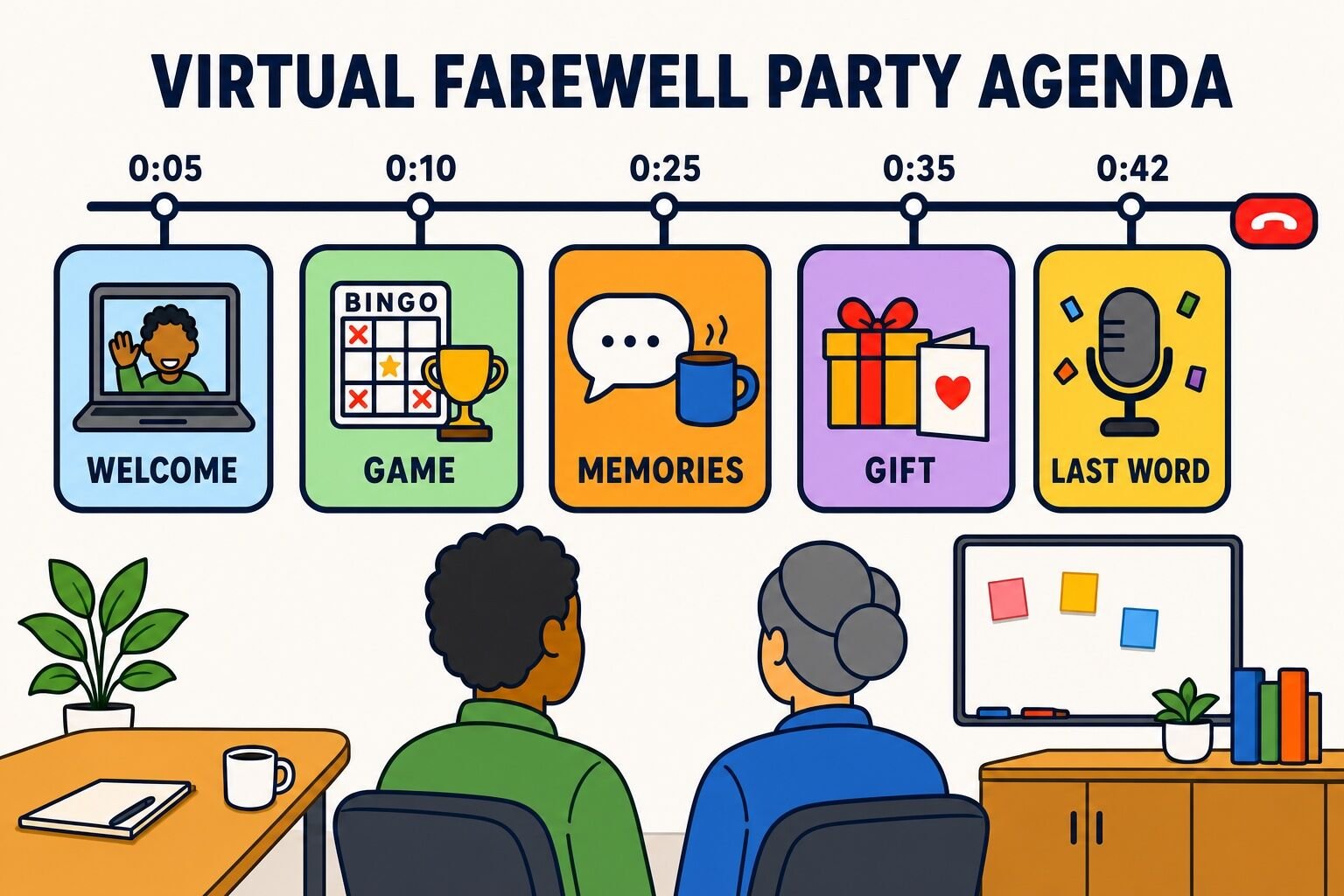
Here is the 45-minute structure we use for online celebrations, with notes for stretching it to an hour.
Time
Segment
Notes
0:00 to 0:05
Arrival
Music on, cameras on, an easy chat prompt on screen. Late joiners get a grace period.
0:05 to 0:10
Welcome
The organizer opens, names how long the guest of honor has been on the team, and lays out the plan for the hour.
0:10 to 0:25
A game about the guest of honor
Personalized trivia or bingo. This is the warm-up, and it does more for the mood than any speech.
0:25 to 0:35
Memories and toasts
Three or four named speakers, 90 seconds each, in an order you set in advance. Never an open mic.
0:35 to 0:42
Gift, card and group screenshot
Reveal the digital card or gift, then take the screenshot while everyone is still in the room.
0:42 to 0:45
The guest of honor speaks
Give them the last word, then end the call cleanly rather than letting it trail off.
For a 60-minute party, add a second game after the toasts and stretch the arrival window to 10 minutes. For a 30-minute version, cut to one game, two speakers and the gift.
That length is not arbitrary. Across roughly 18,000 post-event surveys, 88% of the virtual events we run are 60 to 90 minutes long, and participants consistently rate events in that window highest. A farewell sits at the shorter end because the emotional register is harder to hold than a game show.
The best virtual farewell party events you can book
Most teams run the farewell themselves, and the free ideas further down are enough to do it well. Booking a host makes sense in three situations: the group is large enough that unstructured talking will not work, nobody has time to prepare, or the organizer is close enough to the person leaving that they should be a guest rather than a stage manager.
We ranked our virtual events using our Team Building Score, which combines overall satisfaction, participant recommendation scores, organizer reviews, engagement ratings and other post-event feedback. Only events with at least 20 survey responses are included.
Cheers and virtual farewells abound as we send your remote colleague off into the next chapter of their life! Customize the event based on the guest of honor.
Participate in engaging games and activities
Share personal anecdotes and well wishes
Customize the event to honor the retiree
Perfect for: Teams with retiring colleagues, Celebrating career milestones, Remote teams wanting a special send-off
Ranked by our Team Building Score — a running points total earned through confirmed bookings, verified reviews, ratings, and listing quality, recalculated nightly. Every event shown also has at least 30 post-event survey responses per question; the happier, connected, and NPS columns are computed from the 4,426+ survey responses collected for the 10 events listed here — a subset of all post-event surveys across our catalog. Updated November 2026.
For a send-off specifically, the one we would book is tiny campfire. It is a storytelling event built around a virtual campfire and shipped s'mores kits, which gives a group a reason to go around the circle and tell stories about someone rather than compliment them in a line. It runs 60 to 90 minutes for 10 to 1,000 guests at $79 per person, and it is rated 4.97 out of 5 across 1,095 reviews.
If the departure is a retirement rather than a job change, the Virtual Retirement Party is purpose-built for the occasion, with a personalized trivia round and a guided tribute segment. For a bigger, louder send-off with a competitive spine, Ultimate Game Show is our highest-rated virtual event by volume.
Size is the other factor. The median virtual event we run is a team of 16, but we have hosted 448 virtual events with 100 or more participants, and the largest had over 1,000 attendees. A 12-person farewell and a 200-person farewell are different problems.
You can browse the full catalog of virtual team events to compare formats and price points.
Where to book a virtual farewell party
We are a virtual team building company, so weigh our opinion accordingly. That said, there are only a few kinds of vendor worth considering for a send-off, and the differences between them are real.
Most virtual events run $30 to $45 per person, median $40
Hosted send-offs for distributed teams, from 10 guests to 1,000
Our pick when the party needs a facilitator. 97 virtual Originals, including a purpose-built Virtual Retirement Party, all refined through post-event surveys.
A digital group card where everyone adds a message, photo or short video. It is the single highest-value tool on this list, because it collects from people who cannot make the call.
Recording 30-second video messages from teammates in other time zones, for a montage or an async send-off.
Free tier, paid plans from around $12 per user
Virtual farewell party games
Games do a specific job at a send-off. They fill the awkward stretch between hello and the toasts, they surface stories the speeches miss, and they give the quiet people a way to participate that is not a monologue. Pick one, maybe two. Eight is a party planner's fantasy, not an agenda. These also work as general virtual party games if you want to swap one in.
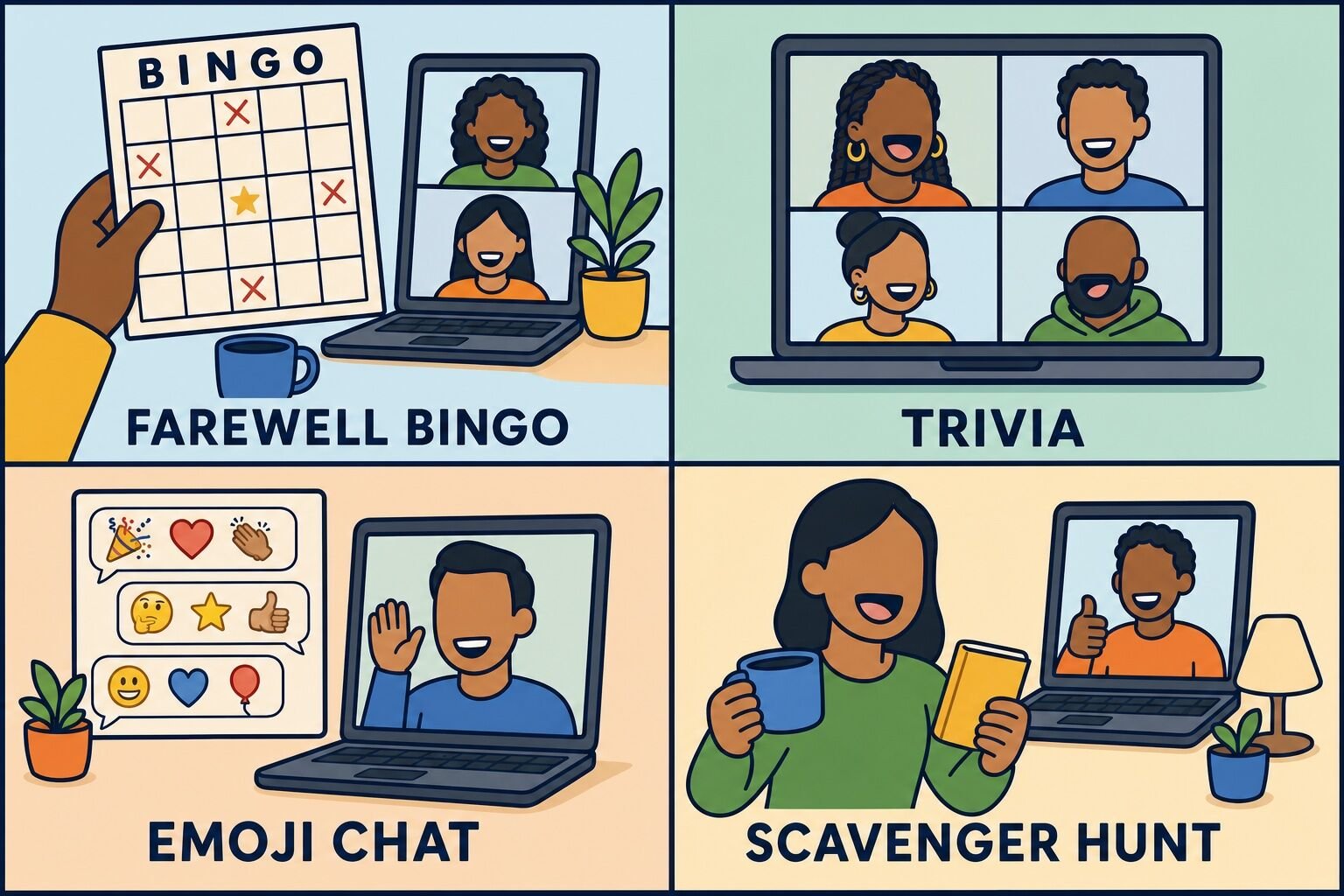
Here are all 25 ideas at a glance, with full instructions below.
Farewell Bingo is a listening game that runs in the background of the whole party, which is why we put it first. Each player gets a card filled with the phrases and moments that are guaranteed to happen at a send-off, and marks a square every time one lands.
Send everyone a link to the randomized card generator before the call and ask them to open it in a second tab. As the party runs, players mark squares for things like "someone says we'll miss you," "a pet appears on camera," "an inside joke nobody explains," or "the guest of honor says they'll keep in touch." First to five in a row unmutes and calls bingo.
Because it plays underneath the rest of the agenda, bingo costs you no program time at all. It also gives people something to do in the first five minutes while stragglers join, which is the single most awkward stretch of any virtual party.
Best for: 5 to 100+ people Time: 10 to 15 minutes, or the whole party in the background Materials (cost): The card generator above (free)
What we've learned: Cards work best when about a third of the squares are specific to your team and the person leaving. Generic squares fill too fast and the game ends before the toasts. For more square ideas, see our icebreaker bingo templates.
2. Guess the Coworker Trivia
A short quiz about the guest of honor is the most reliable opener at a farewell party, because it turns "tell us how you feel about Sam" into "how well do you actually know Sam?"
Ask the person leaving for answers to 10 questions a few days ahead, and tell them they can veto anything they would rather not share. Good questions mix work history with harmless personal detail, so a new hire has a chance against someone who has known them for six years:
What year did they join, and what was their first project here?
What is their coffee or tea order?
Which meeting do they secretly find pointless?
What is the strangest thing on their desk right now?
What are they most looking forward to in the new role?
Read the questions out loud and collect answers in the chat, or run them as poll questions so results appear on screen. After each one, let the guest of honor confirm the real answer and tell the 20-second story behind it. The stories are the point. The scoring just keeps people honest.
Best for: 5 to 50 people Time: 15 minutes Materials (cost): Slides or the meeting poll feature (free)
What we've learned: Ask for the answers in writing rather than improvising live. When a host asks the guest of honor to answer on the spot, they downplay everything, and the room loses the detail that makes the game fun. Our guide to virtual trivia has more formats you can borrow.
3. Survey Says
This is the game-show format, adapted to one person. Before the party, send the team a three-question survey about the guest of honor: the phrase they say most, the app they live in, the thing they will be remembered for. Collect the answers and rank the top five for each question.
On the call, split the group into two teams using breakout rooms or simply by first letter of last name. Read a question, give each team 30 seconds to guess the top answers, and reveal them one at a time on a slide. Points for every answer they land.
It scales further than any other game here because guessing happens in teams rather than one person at a time, so a room of 200 plays at the same speed as a room of 20.
Best for: 15 to 200+ people Time: 15 minutes Materials (cost): A survey form and a slide deck (free)
What we've learned: Close results are the fun part. If one answer takes 90% of the vote the reveal falls flat, so write questions that genuinely split the team rather than ones with an obvious answer.
4. Emoji Memory Lane
Emoji Memory Lane is a chat game, which makes it the most inclusive option on this list. Nobody has to unmute, nobody has to be funny out loud, and people who never speak on calls take part immediately.
The host names a chapter of the guest of honor's time at the company: the project that would not die, the offsite, the reorg, the launch. Everyone has 30 seconds to tell that story in the chat using emoji only. Then the host reads the best three out loud and asks the person who posted it to explain in one sentence.
Run three or four rounds. It takes ten minutes and it reliably produces two stories nobody had thought about in years.
Best for: 5 to 100+ people Time: 10 minutes Materials (cost): The meeting chat (free)
What we've learned: Ask everyone to hold their entry until you say go, then post at once. The wall of emoji arriving together gets a genuine laugh. Staggered posts get scrolled past.
5. Send-Off Scavenger Hunt
A scavenger hunt is our house cure for a room that has been sitting still too long. Everyone stands up, everyone comes back with something, and the energy in the grid changes completely.
Call out one clue at a time and give the group 30 to 60 seconds to find the item and hold it up to the camera. Points to the first three people back. For a farewell, write the clues about the person leaving:
Something in the color of the team they are joining
The most useless thing on your desk, which they would have made a joke about
Something you own because they recommended it
Your oldest piece of company swag
Something that represents where they are headed next
The fourth and fifth clues are the ones that produce stories, so save them for last and ask two people to explain what they grabbed.
Best for: 5 to 100+ people Time: 10 to 15 minutes Materials (cost): Free, using items people already have
What we've learned: Five clues is the ceiling. Past that, the returning-to-camera rhythm gets repetitive and the laughs thin out. Our list of virtual scavenger hunt ideas has more clue sets.
6. Guess Who Wrote It
A week before the party, ask everyone to send the organizer one anonymous sentence about the guest of honor: a memory, a thank-you, or the thing they will miss. The organizer strips the names.
On the call, read the lines out one at a time and let the guest of honor guess who wrote each one. They will get about half right, and the misses are funnier than the hits. After each guess, the author unmutes and adds the two sentences of context that did not fit.
This is the quiet version of a toast, and it works for teams where public speaking is a real barrier or where English is a second language for part of the group.
Best for: 6 to 40 people Time: 10 to 15 minutes Materials (cost): A form or direct messages (free)
What we've learned: Collect the lines with a form rather than a group thread. In a thread, people read each other's entries first and start writing variations of the same sentence.
7. Their Jeopardy Board
For someone who has been at the company a long time, a quiz board beats a single round of trivia because it lets the room choose what to dig into.
Build a five-by-five board with categories drawn from their tenure: Projects, Inside Jokes, Their Hometown, Things They Have Said in Standup, and Where They Are Going Next. Share your screen, let teams pick a square, and keep score in the chat. Twenty minutes is enough for one full board if you cap the deliberation at 20 seconds per answer.
Best for: 6 to 60 people Time: 20 minutes Materials (cost): A free slide template (free)
What we've learned: Put the emotional category last. Teams naturally pick the funny squares first, and ending on Where They Are Going Next hands the room a clean transition into the toasts. See our online Jeopardy games guide for templates.
8. Predict Their Next Chapter
A five-minute closer that points forward instead of back. Run three or four polls about the guest of honor's future and show the results live: how many months until they post about loving the new job, whether they will finally take the trip they keep mentioning, what their new team will figure out about them first.
Then let the guest of honor answer each one. It ends the party on a note about what is next rather than what is ending, which is usually where the person leaving would rather be.
Best for: 5 to 200+ people Time: 5 to 10 minutes Materials (cost): The meeting poll feature (free)
What we've learned: Keep the predictions warm. A poll about how long they will last at the new company reads as a joke in the planning doc and as something else entirely when it is on screen in front of 40 people.
Farewell activities for a coworker
Games handle the energy. These activities handle the actual goodbye. Pick two, and make sure at least one of them produces something the person can keep.
9. Structured Toasts
An open mic is how a farewell party dies. Three or four named speakers with a time limit is how it works.
Ask people in advance, tell them the order, and give them 90 seconds each. Speakers who know the format in advance say something specific. Speakers ambushed live say "you're great, we'll miss you." Hand out this structure and let people pick two lines:
The first time I worked with you was...
The thing you do that I am going to steal is...
You helped me with... and I never told you that it mattered.
The team will be different without you because...
What I think you will do next is...
Have the organizer introduce each speaker by name so nobody has to guess whose turn it is.
Best for: Any group size Time: 10 minutes for four speakers Materials (cost): Free
What we've learned: Specific beats sentimental every time. A story about one afternoon in 2024 lands harder than a paragraph about what a great person someone is, and it is also much easier to deliver without getting choked up.
10. Memory Slideshow
Ask the team for photos a week ahead: team offsites, screenshots of old calls, the whiteboard from the project that went sideways, the group photo where half the faces are blurry. Drop them into a slide deck in rough chronological order, one photo per slide, with a one-line caption.
Play it for four or five minutes with music underneath, then share the file with the guest of honor afterward. Four minutes is the ceiling. Every slideshow we have seen run past six minutes lost the room.
Best for: Any group size Time: 4 to 5 minutes Materials (cost): Free slide software
What we've learned: Check that screen sharing includes computer audio before the call starts, and run the deck in presenter mode. A slideshow with silent video clips is the most common technical failure at a virtual party.
11. Video Tribute Montage
A montage covers the people who cannot be on the call: former teammates, colleagues in other time zones, the manager who left last year.
Ask for 30-second clips recorded on a phone or a screen recorder, with a firm deadline three days out. Give people a prompt so the clips are not all "congratulations": ask each person to finish the sentence "the thing I'll always remember is...". Stitch them into four minutes with free editing software and play it during the gift segment.
Best for: Any group size Time: Collected async, 4 minutes on the call Materials (cost): Free with a screen recorder and basic editing software
What we've learned: Set the deadline three days before the party, not the night before. People submit on the deadline day regardless of when you set it, and you need a buffer to edit.
12. Compliment Round
For a small team, the simplest activity is the best one. Go around the call in a set order, and each person says one specific thing they appreciate about the guest of honor. A set order matters: "anyone who wants to" produces three volunteers and a long pause.
If the team struggles to get past "you're so helpful," give them a starting point. This generator produces a compliment you can adapt rather than copy, which is usually enough to unstick someone.
Best for: 5 to 20 people Time: 10 minutes Materials (cost): Free
What we've learned: This one has a hard ceiling of about 20 people. Past that, the round takes 25 minutes and the last five speakers are repeating earlier ones. For bigger groups, collect the compliments in writing instead and read a selection out loud.
13. Time Capsule
Instead of giving every well-wish on the call, hold some back. Build a package the person opens a month after they start the new job, which is exactly when the novelty has worn off and a reminder of the old team is worth the most.
Collect notes, photos and small mementos from the team, and either mail a box or build a digital version with a scheduled email. Tell the recipient the open-on date and ask them to wait. Most people do.
Best for: Any group size Time: Assembled async Materials (cost): Free to $50 depending on shipping
What we've learned: A month is the right delay. A week is too soon to feel like anything, and a year is long enough that the team has moved on and the package lands as a curiosity rather than a message.
14. The Handoff
Give the guest of honor ten minutes to answer the question nobody else can: what do you know that the rest of us don't?
Ask them in advance to prepare three things: the thing that always breaks and how to fix it, the person outside the team who actually gets things done, and the piece of advice they wish someone had given them on day one. Let people ask follow-up questions.
This one is not sentimental, and that is the point. It treats the person as an expert on their way out rather than a subject being celebrated, and quieter teams often find it much easier to sit through than a round of compliments.
Best for: 5 to 40 people Time: 10 to 15 minutes Materials (cost): Free
What we've learned: Record this segment with permission. Teams reference the answers for months, and it turns a party into the only offboarding documentation that anyone actually watches.
15. Digital Kudos Board
A digital group card is the closest equivalent to the card that used to go around the office, and it is better in one respect: it holds photos, GIFs and video, and people in other offices can sign it.
Open the board a week ahead, seed it with three or four entries so nobody has to go first, and send one reminder the day before the party. Reveal it on screen during the gift segment by scrolling slowly through the entries, then transfer ownership so the guest of honor keeps it.
Best for: Any group size Time: Collected async, 3 minutes on the call Materials (cost): Free tier, paid boards start around $6
What we've learned: Seeding the board is the whole trick. An empty board sits empty, and a board with four entries on it fills up, because people copy the format they see rather than deciding what to write from scratch.
Send-off party ideas and gifts
A send-off is not only the hour on the calendar. These are the pieces that surround it, and most of them cost nothing.
16. Group Gift and Care Package
A group gift is easier to organize remotely than it looks. Poll the team for two or three options, set a per-person contribution rather than an open ask, collect it through a group-gifting tool, and ship to the home address the person is happy to share.
The gifts that land are the specific ones: the thing they mentioned wanting in a call three months ago, the good version of something they use daily, or a contribution to whatever the next chapter is. Include a printed note from the team, because everything else about a remote farewell is digital.
Best for: Any group size Time: Organized async over a week Materials (cost): $20 to $100 depending on contribution
What we've learned: Set the amount rather than leaving it open. An open collection makes people guess what everyone else is giving, and the average contribution drops. Our list of gifts for employees has options at every budget.
17. Goodbye Playlist
A collaborative playlist is the best free gift on this list, because it keeps working after the party. Open a shared playlist, ask each person to add one song and a one-line reason, and play it in the background during the arrival window.
Turn it into a game if you have the time: play 20 seconds of each track and let the guest of honor guess who added it. Share the finished playlist afterward.
Best for: Any group size Time: Built async, 5 minutes on the call Materials (cost): Free
What we've learned: Cap it at one song per person. Uncapped playlists become four hours long and nobody listens to them. Our list of team building songs is a decent starting point if the team needs seeding.
18. Personalized Video Backgrounds
Ask everyone to set the same custom background before they join: a photo of the guest of honor, an inside joke, the team logo with their name on it, or a picture of the city they are moving to. The reveal happens in the first ten seconds of the call, when the grid loads and the person realizes every tile is about them.
Send the image file the day before with instructions for your platform, and ask one person to check it works on mobile.
Best for: 5 to 50 people Time: 5 minutes of setup Materials (cost): Free
What we've learned: Send one image, not a choice of five. Options mean half the team forgets to do it. For more ways to use the platform features, see our Zoom meeting ideas.
19. Alumni Channel
Most goodbyes end with "keep in touch" and no mechanism for it. An alumni channel is the mechanism. Create a shared channel with an external-connection tool or a group chat outside company systems, and invite the guest of honor using a personal email address before their work account is deactivated.
Announce it during the party so people join while they are thinking about it. Keep the conversation social rather than work, and treat alumni as guests rather than former employees.
Best for: Any group size Time: 10 minutes of setup Materials (cost): Free
What we've learned: Set it up before the last day, not after. Once the company account is off, the invitation has nowhere to land and the channel quietly never happens.
20. Contact Swap
Remote teams lose touch faster than office teams because there is no building to bump into anyone in. Five minutes of logistics prevents it.
Circulate a simple document where teammates add whatever contact details they are comfortable sharing: personal email, a professional network profile, a phone number. Share it with the guest of honor, and make it clear that nobody has to fill in every column.
Best for: Any group size Time: Collected async Materials (cost): Free
What we've learned: Make participation optional and say so in writing. A blank row in a shared contact list is uncomfortable if nobody has said out loud that opting out is fine.
Farewell party ideas for remote teams
Some teams cannot get everyone into one hour. A team spread across three continents, a support rota that never goes quiet, a departure announced two days before the last day. These are the formats we would use when the live party is not possible.
21. Async Memory Thread
Open a thread a week before the last day and post one prompt a day: a favorite project, a photo, the funniest thing they said in a meeting, a thank-you. One prompt daily beats a single "share your memories" post, which gets six replies on day one and nothing after.
The guest of honor watches it fill up all week, which spreads the send-off over seven days instead of compressing it into an hour they have to be brave through.
Best for: Any group size Time: Async over a week Materials (cost): Free
What we've learned: Assign the first reply each day to a different person in advance. A thread that already has one answer in it gets far more replies than one that starts empty. Our virtual thank you ideas work well as daily prompts.
22. Shipped Send-Off Kit
Mail a small box to everyone so the whole team toasts with the same thing at the same time. A good kit is three items: something to drink, something to eat, and something small that connects to the guest of honor, like the snack they kept in their desk or a card printed with a team photo.
Order at least two weeks ahead, and ask for addresses in a way that does not require people to post them in a public channel. Our own shipped-kit events run on the same logic: a shared physical object gives a video call something to do with its hands.
Best for: 5 to 100+ people Time: Ships in advance, used during the party Materials (cost): $15 to $40 per person
What we've learned: Ship to arrive two days early, and tell people not to open the box until the call. Kits that arrive the morning of are a coin flip, and kits opened in advance lose the moment.
23. Time-Zone Relay
When there is no hour that works for everyone, run the send-off as a relay across one day. Each region takes a 15-minute slot with the guest of honor: Asia-Pacific in their morning, Europe midday, the Americas in the afternoon. Every slot runs the same short agenda, so nobody sits through the same thing twice.
Record a two-minute clip at the end of each slot and send all three to the guest of honor that evening, so they get a single artifact out of a day that was otherwise three separate conversations.
Best for: Any group size Time: Three 15-minute slots across one day Materials (cost): Free
What we've learned: Give the guest of honor a break between slots and tell each region what the previous one covered. Without that, they repeat the same stories three times and arrive at the last call with nothing left.
What to say at a virtual farewell party
The hardest part of a remote goodbye is that nobody can read the room, so people default to the safest sentence they can think of. Here are lines that sound like a person rather than a greeting card. Adapt them, do not copy them.
For a teammate you worked with closely:
Working with you made me better at my job, and I am not sure I ever said that out loud.
I am going to miss the little green dot next to your name.
Half of what I know about this job, I learned from watching how you handled things.
You made a hard year funnier than it had any right to be.
Whoever replaces you is inheriting an unreasonable standard.
For someone you knew mostly through a screen:
We never met in person and I am still going to miss you, which says something.
Your camera-on energy set the tone for every meeting you were in.
You are the reason I stopped dreading Monday standup.
Thanks for always answering the question I was too embarrassed to ask in the channel.
For a manager or a mentor:
Thank you for giving me more than I asked for, more than once.
You backed me before I had earned it, and it changed how this year went.
I still ask myself what you would do before I make a call.
To close out a toast:
Congratulations on the new role. They have no idea how lucky they are yet.
Do not be a stranger. The alumni channel is already open.
Good luck, although I am fairly sure you will not need it.
These work in a spoken toast, a digital card, a chat message on the last day, or a written note in a care package. For longer wording, browse our list of employee appreciation quotes, and if the departure is a retirement, our retirement wishes are a better fit.
One rule covers all of them: name a specific thing. "Thanks for everything" is a sentence about you. "Thanks for rewriting my deck at 9pm before the board meeting" is a sentence about them, and it is the one they remember.
In-person and hybrid farewell party ideas
Plenty of teams are part remote and part in the building, and a send-off that ignores either half goes badly. Two formats cover most cases. For a fully in-person send-off, our guide to in-person farewell party ideas goes deeper.
24. Hybrid Farewell Lunch
Book a room with a screen, bring in lunch for the people in the building, and send a meal credit to everyone remote so both halves are eating at the same time. The failure mode of hybrid parties is the room talking to itself while the remote tiles watch, so assign one person in the room to be the remote group's advocate: they run the laptop, repeat questions into the microphone, and call on remote people by name.
Run one game that works in both places, like Guess the Coworker Trivia, where answers go in the chat and nobody in the room shouts over the audio delay.
Best for: 8 to 60 people Time: 45 to 60 minutes Materials (cost): Cost of lunch plus remote meal credits
What we've learned: Put the laptop at the table rather than at the front of the room. A camera pointed at a podium turns remote guests into an audience, and a camera in the middle of the table keeps them in the conversation.
25. Last-Day Walkthrough
On the final day, someone walks the office with a phone on a video call: the desk, the kitchen, the whiteboard nobody has erased since 2023, the team waving from wherever they are sitting. It takes fifteen minutes and gives a remote leaver the closure that a scheduled meeting cannot.
End it with a group photo, or a screenshot of the call, with everyone in it. It is the most commonly forgotten part of a send-off, and it is the artifact people actually keep.
Best for: Any group size Time: 15 minutes Materials (cost): Free
What we've learned: Ask permission before broadcasting a walk through an open-plan office. Colleagues who are not part of the send-off did not agree to be on camera.
What we've learned from hosting virtual celebrations
A few patterns hold across the online celebrations we run, whether it is a farewell, a retirement or an end-of-year party.
Structure carries the room, not sentiment. A call with no program produces a silence that somebody fills with "well, this is sad." The same call with a game, three named speakers and a gift reveal produces the event people describe afterward as genuinely good. This is the single biggest difference between the parties that work and the ones that do not.
The celebration is often a team's first event with us, and it is rarely their last. A milestone is what finally gets a budget approved, and the experience decides whether the team does anything together again.
Group size changes the format completely. The mistake we see most often is running a small-group format in a large room. Below roughly 15 people, everyone can speak and the conversation holds itself together. Above it, you need teams, breakout rooms, polls and chat.
Going around the call one by one. At 30 people that takes 25 minutes and the last ten repeat each other.
40 and up
A host or MC, polls on screen, Survey Says, Farewell Bingo running underneath, and a tight program with clear segments.
Open mics, quiet-answer activities, and anything that needs everyone to unmute.
Somebody has to own the silence. On video there is no hum of a room to cover a gap, so the organizer has to say the next name out loud. When we run events, that is the host's main job, and the games are mostly the vehicle for it. The same principle runs through our wider guide to virtual team building activities.
Cameras on, and say so in the invite. A send-off with six black tiles is a conference call. Asking in advance, with a reason attached, gets far better compliance than asking in the moment.
Virtual farewell party ideas we don't recommend
Search for virtual farewell ideas and the same handful of suggestions come back, several of which reliably land badly. Here is what we would skip, and what to do instead.
The Lame List
Activity
Why skip it
Verdict
Surprising the guest of honor
A fake meeting invite and a shouted "surprise" takes away the one thing a departing person still controls: how public their exit is. Plenty of people want a small goodbye, and the surprise format decides for them.
Ask first
Open-mic toasts
Without named speakers and a time limit, two people talk for eight minutes and everyone else waits for the silence to end. Use Structured Toasts instead.
Add structure
Virtual karaoke send-off
Call latency makes singing together impossible, and solo karaoke puts enormous pressure on one person at an event that is already emotionally loaded.
Skip it
Roasting the person leaving
A roast needs a room that has agreed to the format and speakers who can land a joke. On video, without laughter to cushion it, one misjudged line is what the goodbye is remembered for.
Skip it
An unstructured farewell happy hour
Without a host or a game, it becomes another video call where everyone happens to have a drink, and the guest of honor repeats the same conversation nine times.
Add structure
A 15-minute slideshow
Photos are the emotional centerpiece, but attention on video drops hard after about five minutes. Cut it to four and share the full file afterward.
Trim it
"Say one word to describe them"
It sounds efficient and produces 30 variations of "amazing," which tells the guest of honor nothing and takes longer than four real toasts.
Usually skip
Virtual charades or Pictionary as the farewell game
Both are fine games, but they are about the players rather than the person leaving. Save them for a regular team social and pick something personalized here. Our list of online team building games covers the general-purpose versions.
Wrong occasion
Making the departing person plan it
It happens more than it should, usually because they are the organized one. Someone else runs this call, even if they run it worse.
Skip it
A farewell email instead of a call
An all-staff email announcing the departure is an announcement, not a send-off. It costs the team 30 minutes to do the actual thing.
Not a send-off
Final thoughts
A virtual farewell party is not hard. It is just easy to do badly, because the default version is an open call with no plan and a lot of goodwill. Decide what happens in each block, ask three people to speak, run one game, and make sure something arrives that the person can keep.
Pick three ideas from this page, not fifteen. One game to open, one activity that produces an artifact, and a gift or card with specific words in it. Then take the screenshot before anyone leaves.
Answers to the questions organizers ask us most often about virtual send-offs.
How long should a virtual farewell party be?
Forty-five minutes is the sweet spot, and an hour is the ceiling. Across roughly 18,000 post-event surveys, 88% of the virtual events we run are 60 to 90 minutes long, and participants rate events in that window highest, but a farewell sits at the shorter end because the emotional register is harder to hold than a game show. A workable 45-minute split is five minutes of arrival, five minutes of welcome, fifteen minutes on a game about the guest of honor, ten minutes of timed toasts, seven minutes for the gift and group screenshot, and three minutes for the guest of honor to have the last word.
What games should you play at a virtual farewell party?
Pick one or two, not six. Farewell Bingo is the easiest to run because it plays in the background of the whole party and costs no program time, and personalized trivia about the guest of honor is the most reliable opener, since it turns sincerity into a game the room can play. For groups over 40, a survey-based game show format scales best because guessing happens in teams rather than one person at a time. Chat-based games like an emoji memory round are the most inclusive option, as nobody has to unmute to take part.
What is the difference between a virtual farewell party and a virtual retirement party?
A virtual retirement party marks the end of a career, while a virtual farewell party marks a move: a new job, a promotion, a relocation, a sabbatical or a leave. The mechanics are nearly identical, but the tone differs. A retirement party looks back across decades and often includes family, whereas a farewell party works better when it points forward to what is next, because the guest of honor will be doing a version of this job somewhere else on Monday. Retirement send-offs also tend to run longer and include more formal recognition.
What should you say at a virtual farewell party?
Name a specific thing. "Thanks for everything" is a sentence about you, while "thanks for rewriting my deck the night before the board meeting" is a sentence about them, and it is the one they remember. If you are speaking, prepare two lines rather than improvising: the first time you worked together, and the thing you are going to steal from how they work. Keep it to 90 seconds. For teams where public speaking is a barrier, collect anonymous written lines in advance and read them out instead, letting the guest of honor guess who wrote each one.
How do you throw a virtual farewell party for a team across time zones?
Run it async or as a relay. An async memory thread opened a week ahead, with one prompt posted each day, spreads the send-off across seven days and gets far more participation than a single "share your memories" post. For a relay, give each region a 15-minute slot with the guest of honor on the same day, run the same short agenda in each, and send them the recordings that evening so they end up with one artifact instead of three separate conversations. Either way, a digital kudos board collects from everyone who could not make any of it.
How much does a virtual farewell party cost?
Most of the ideas on this page are free, since the games use the video platform you already pay for and the card, playlist and memory thread cost nothing. The costs that do come up are a group gift, commonly $20 to $100 collected across the team, a shipped send-off kit at roughly $15 to $40 per person, and a paid digital card at around $6. If you want a host to run the hour, most of our virtual events run $30 to $45 per person with a median of $40, which usually makes sense when the group is large, the organizer is too close to the person leaving to also be stage-managing, or nobody has time to prepare.
Comments (2)
Janie
Where is the link to the randomized bingo card generator?


















Where is the link to the randomized bingo card generator?
tools.teambuilding.com