30 Virtual Party Games for Work & Friends (Zoom-Ready)
Thirty virtual party games that hold up on a real video call, sorted for work teams, adults, offices, large groups, birthdays, and holidays, with step-by-step rules and the 60-minute agenda we use to host them.
Published
·
Updated
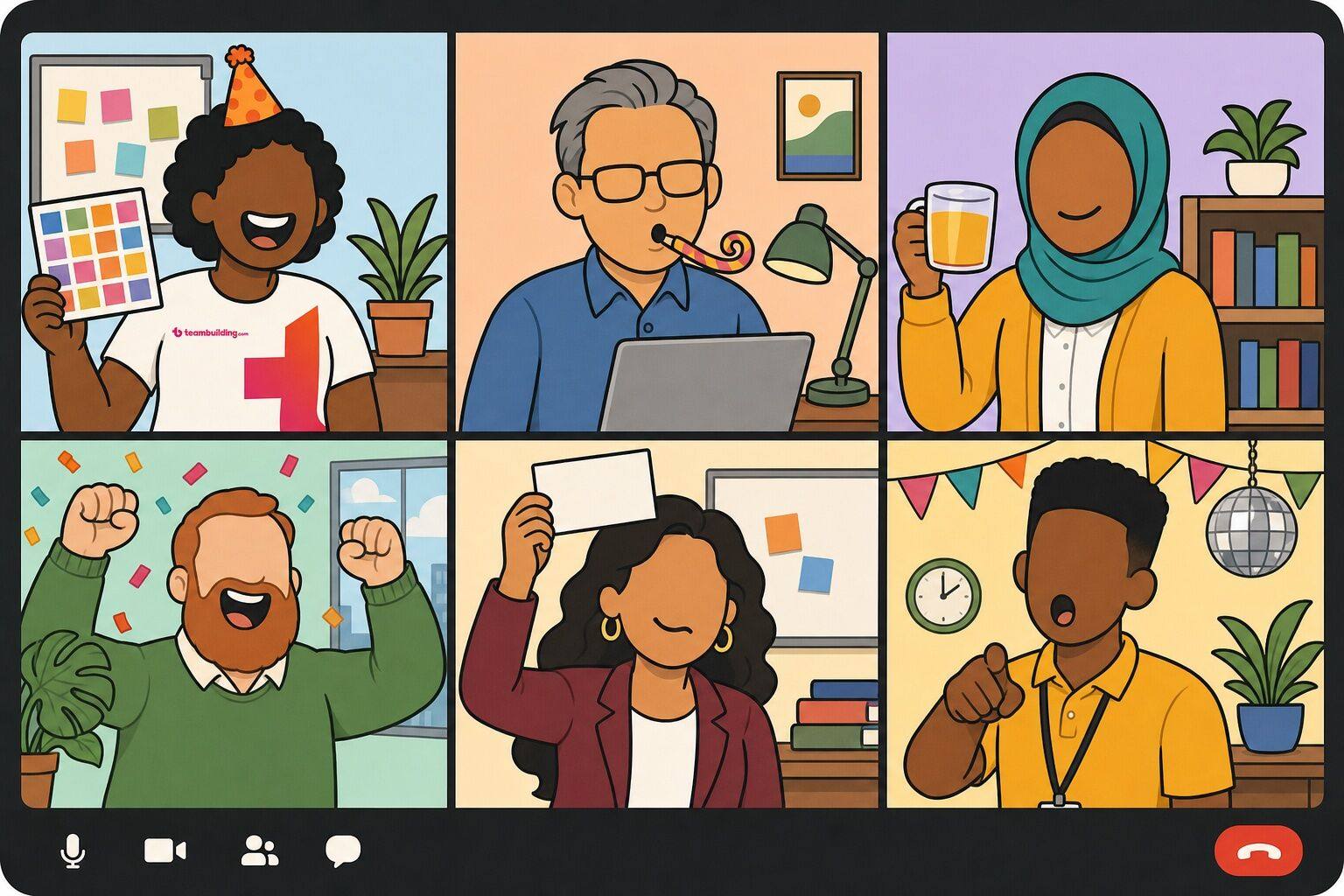
A virtual party has one job: make a group of people on a video call feel like they are in the same room. Games are how you do it. Put twenty coworkers on Zoom with no plan and you get a meeting with cake emojis; give the same group a bingo card, a scoreboard, and a host who keeps things moving, and they will still be talking about it next week. We have been hosting virtual parties for work teams since 2020, and this guide collects the 30 virtual party games that hold up on a real call, sorted by who you are playing with, plus the agenda we use to run them.
What are virtual party games?
Virtual party games are group games played over a video call, usually on Zoom, Microsoft Teams, or Google Meet, to entertain guests at an online celebration. Examples include virtual bingo, guess-the-coworker rounds, lightning scavenger hunts, and chat-based trivia. Most need nothing more than the meeting software, a shared screen, and a host with a list of prompts. These games are also called "online party games," "Zoom party games," "digital party games," "virtual party ideas," and "virtual games for parties."
Virtual party games are a subcategory of virtual team celebration ideas and the entertainment half of most virtual team events. They are similar to Zoom games, virtual game show formats, online office games, and the games played at a virtual happy hour. Within the category, this guide includes virtual party games for work, online party games for adults, virtual office party games, games for large groups, free games that need no apps, and games for virtual birthday and holiday parties.
The games below are the ones we would actually run. Some come straight from our hosted events, others are classics we have adapted for the video-call format, and each entry includes step-by-step instructions, the group size and time it suits, and what we have learned from running it. This list includes:
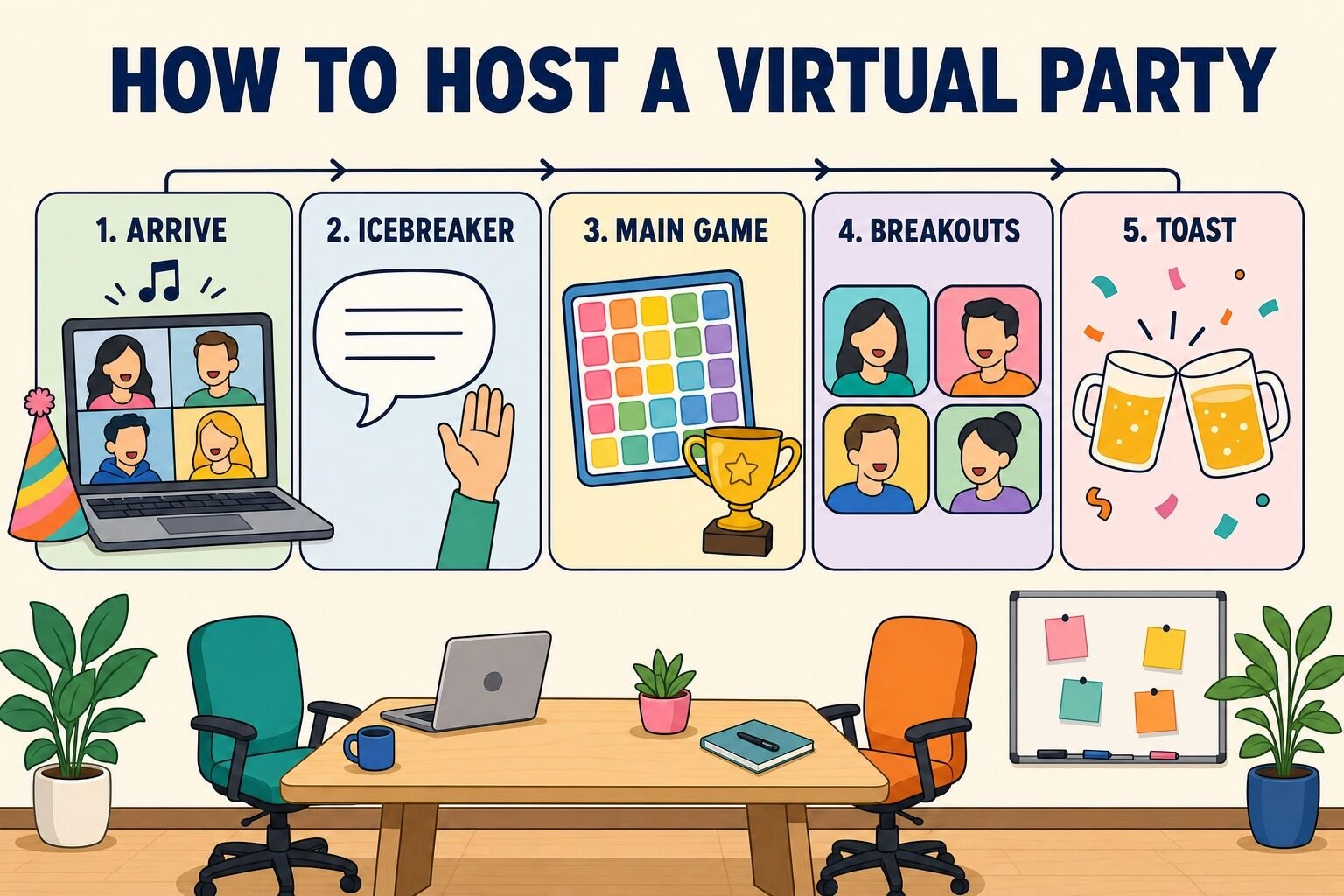
Before the games, the plan. Almost every good virtual party we have run follows the same shape: a soft landing so early arrivals are not sitting in silence, one icebreaker that gets every voice on the call, one main game with a scoreboard, breakout rooms for real conversation, and a deliberate ending. Sixty minutes is the sweet spot for a social call; ninety works if a hosted event or a murder mystery is the centerpiece. Anything past that and you are competing with screen fatigue.
Time
Block
What happens
0:00–0:05
Arrive
Music playing over screen share, a themed background suggestion in the invite, host greets each guest by name. Nobody joins to silence.
0:05–0:12
Icebreaker
One quick everyone-at-once game such as Don't Say It (announce the banned word) or a This or That round.
Rooms of four or five with one prompt on screen. Groups under eight can stay together.
0:50–1:00
Toast and close
Announce the winners, one round of shout-outs, a toast, and a hard stop on time.
Three hosting decisions matter more than which games you pick:
Name a host. Someone owns the clock, reads the prompts, and calls the next round. A party where "we'll just see how it goes" produces two talkers and eighteen spectators.
Hold it on work time. A 3 p.m. Thursday party gets far better attendance than a 6 p.m. one, and it tells the team that celebrating together is part of the job.
Send a real invitation. Include the theme, the games, anything guests need at their desk (a pen, a mug, a photo), and whether cameras are expected. Surprises make people nervous; previews make them show up.
Virtual party games for work
These are the games we reach for first at a team party: fast to explain, everyone plays at the same time, and no one has to perform alone on camera. Most run in ten to twenty minutes and need only the chat box and a host with a list.
1. Virtual Party Bingo
Bingo is the most reliable virtual party game we know, because it runs underneath everything else. Each guest gets a card of party-appropriate squares ("someone's pet appears on camera," "a guest toasts with coffee," "the host says 'can everyone hear me'"), and the game plays itself while you run the rest of the agenda.
How to play:
Send each guest a card link before the party, or paste it in the chat as people arrive.
Explain the rules in one sentence: mark a square when you see it happen, first full line wins.
Run your normal party. Guests mark squares as the call unfolds.
When someone types "BINGO," pause, have them read their line aloud, and award a small prize.
For longer parties, play blackout (full card) as a second round.
Here is a Virtual Party Bingo card generator you can use:
For a get-to-know-you version where squares describe people ("has run a marathon," "speaks three languages"), try icebreaker bingo.
Best for: Any group, especially mixed teams who do not know each other well Time: Runs in the background for the whole party Materials (cost): Bingo card link (free)
What we've learned: Bingo works best when at least a third of the squares are things the host can trigger on purpose. If the party is slow, the host says "can everyone hear me" and four people mark a square. It is a cheap way to keep the energy up without a single awkward moment.
2. Don't Say It
Don't Say It is the simplest game on this list and one of the funniest. The host bans a common word for the whole party, and anyone who says it loses a point (or a life). "Yes" is the classic starter, and it is remarkable how quickly a room full of adults starts saying "affirmative."
How to play:
Pick a word everyone says constantly: "yes," "like," "um," "actually," or the company name.
Announce it at the start of the party and give everyone three lives.
Whenever someone slips, anyone can call it in the chat with the person's name.
The host keeps a tally on screen. Lose all three lives and you are out of the running (but still at the party).
The last guest standing wins. For longer parties, change the banned word at the halfway point.
Best for: Teams that already talk a lot; groups of 5 to 30 Time: Runs in the background; 1 minute to explain Materials (cost): None (free)
What we've learned: Ban "yes" and pair it with a question round. The host asks each guest a question that begs a yes ("Did you have coffee today?") and watches the verbal gymnastics. That one trick turns a background game into a five-minute centerpiece.
3. Likes and Dislikes
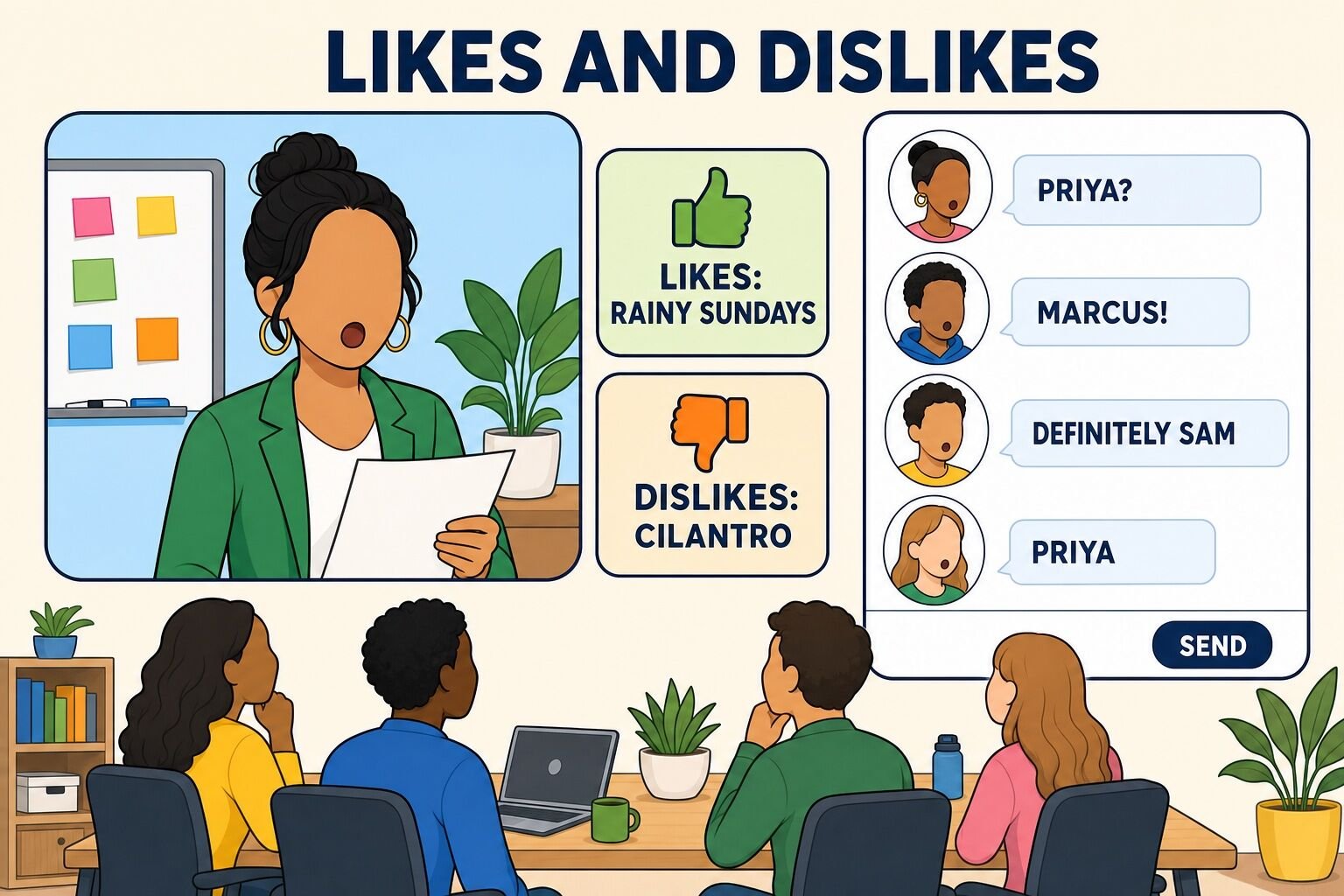
Likes and Dislikes is a guess-who game that works with any group size, because guesses go in the chat rather than around the room. Before the party, each guest privately sends the host one thing they love and one thing they cannot stand. The host reads the pairs aloud and the group guesses the author.
How to play:
A day before the party, message each guest: "Send me one like and one dislike. Be specific." ("Likes rainy Sundays, dislikes cilantro" is a good pair; "likes food" is not.)
At the party, read one pair aloud without naming the author.
Everyone types a guess in the chat within 15 seconds.
Reveal the author, who gets 30 seconds to defend their dislike.
Score one point per correct guess. The most-guessed person and the best guesser both win something.
Best for: Teams of 8 to 100+; great for onboarding parties Time: 15 to 25 minutes Materials (cost): A list collected in advance (free)
What we've learned: The dislikes carry the game. Likes are pleasant; dislikes are funny and specific, and the 30-second defense is where the laughs happen. If time is short, read only the dislikes.
4. Great Minds Think Alike
Great Minds Think Alike rewards guessing what everyone else will say. The host reads a prompt, every guest writes the first answer that comes to mind, and points go to the most common answer. It is fast, needs zero preparation, and quietly reveals how alike (or not) the team thinks.
How to play:
Everyone grabs a pen and paper, or opens a note on their phone.
The host reads a prompt: "a pizza topping," "a movie with 'love' in the title," "something you would see in the sky," "a hot drink," "a sport with no ball."
Guests write one answer and hold it up to the camera on the count of three (or paste it in the chat at the same moment).
Every guest whose answer matches the most common one scores a point.
Play ten prompts. Highest score wins; the person with the most unique answers gets the "free thinker" award.
Best for: Groups of 5 to 40 Time: 10 to 15 minutes Materials (cost): Pen and paper (free)
What we've learned: Use the chat, not the camera, for groups over about a dozen. Ask everyone to type but not send, then say "go" so all answers land at once. Cameras-held-up works for small groups and is more fun to watch.
5. Guess the Playlist
Guess the Playlist is a music game that doubles as the party soundtrack. Each guest secretly submits a song; the host plays 20 seconds of each and the group guesses whose pick it is. The reveals are where people learn that the quiet accountant is a death-metal fan.
How to play:
A few days out, ask each guest to send the host one song "that says something about you."
Build a playlist in the order the host chooses, and test screen share with computer audio before the call.
Play 20 seconds of each track. Guests type their guess in the chat.
Reveal the owner, who explains the choice in one sentence.
Points for correct guesses; leave the playlist running during breakouts and the close.
Best for: Groups of 6 to 25 Time: 15 to 25 minutes Materials (cost): A streaming account and screen share with audio (free)
What we've learned: Enable "share computer sound" and mute your own mic while the clip plays, or everyone hears a tinny echo. Twenty seconds is enough; a full chorus kills the pace.
6. Psychiatrist
Psychiatrist is an improv game in which one guest, the psychiatrist, leaves the room while everyone else agrees on a secret condition: each person imitates the guest to their left, or answers as their manager would, or lies whenever the question contains a number. The psychiatrist returns and asks questions until the pattern is diagnosed.
How to play:
Pick a psychiatrist and send them to a breakout room for 60 seconds.
The group agrees on the "condition." Keep the first one simple: everyone answers as the person above them in the participant list.
Bring the psychiatrist back. They ask any guest any question.
The psychiatrist gets three guesses at the condition, with a three-minute time cap.
Rotate so two or three people get to be the psychiatrist, escalating the difficulty each round.
Best for: Groups of 6 to 15 who know each other a little Time: 15 to 20 minutes Materials (cost): None (free)
What we've learned: The "imitate the person above you on the participant list" condition is the crowd favorite, because it forces everyone to do an impression of a coworker. Save it for round two, after the group has warmed up on an easier pattern.
Online party games for adults
These online party games for adults suit friends as well as coworkers: a little more competitive, a little longer, and better with a group that is happy to commit an hour. All of them are workplace-safe as written.
7. Who Am I?
Who Am I? is the sticky-note-on-the-forehead game rebuilt for video. One guest steps out, the group picks a famous person for them, and the guest returns to ask yes-or-no questions until they crack it.
How to play:
Send the guesser to a breakout room (or ask them to close their eyes and cover their ears; the honor system works fine).
The group agrees on a well-known person, character, or, for a work twist, a coworker on the call.
The host renames the guesser's tile to the secret identity so everyone else can see it on screen.
The guesser asks yes-or-no questions: "Am I alive?" "Am I an athlete?" "Have I won an Oscar?"
Score by how few questions it takes. Cap each turn at 20 questions or three minutes.
Best for: Groups of 5 to 10 Time: 15 to 20 minutes Materials (cost): None (free)
What we've learned: Renaming the tile is the trick that makes this work online. Everyone sees the answer at a glance, nobody has to keep a secret in the chat, and the guesser's own tile becomes the punchline.
8. Virtual Murder Mystery
A murder mystery is the centerpiece game for a longer virtual party: guests get characters, secrets, and a crime to solve over 60 to 90 minutes. You can run a DIY version from a purchased script, or book a hosted one. Our hosted version is Murder in the Speakeasy, a 1920s whodunit run by a professional host, and it is one of our most-booked events for celebrations.
How to play (DIY version):
Buy or download a party-size murder mystery script and assign characters a week ahead so guests can plan a costume.
Email each guest their character sheet with a public bio and a private secret.
Open the call with the host reading the setup and "discovering" the crime.
Run three rounds of interrogation: an open-room round, a breakout-room round for private questioning, and a final round to present accusations.
Take a vote in the chat, then reveal the killer and award prizes for best detective and best performance.
For scripts, formats, and more hosted options, see our guide to virtual murder mystery games.
Best for: Groups of 8 to 20 for DIY; hosted versions scale well beyond that Time: 60 to 90 minutes Materials (cost): A script ($20 to $60) or a hosted event (per-person pricing)
What we've learned: The DIY versions fail when guests have not read their character sheet. Send it twice, and ask each person to reply with one line "in character" the day before. That confirms they have read it and gets everyone into the bit early.
9. Online Talent Show
A talent show gives every guest three minutes on a stage they can set up however they like. Singers and guitarists show up, but so do the sourdough bakers, the card-trick people, and the coworker who can name every U.S. state capital in under a minute.
How to play:
Announce the show two weeks out with a three-minute limit and a sign-up sheet. Give examples beyond music so nobody thinks they need a "real" talent.
Collect the running order and any backing tracks or slides the host needs to share.
Host introduces each act with one fun fact. Everyone else stays muted with cameras on for applause.
After each act, the host reads two or three reactions from the chat aloud.
Award category prizes so more than one person wins: most surprising, most technical, best showmanship, and crowd favorite by chat vote.
Best for: Groups of 8 to 40 with 6 to 10 acts Time: 30 to 45 minutes Materials (cost): Sign-up sheet (free); small prizes optional
What we've learned: Recruit the first three acts privately before you announce the show. An empty sign-up sheet scares people off; a sheet with three names on it fills up.
10. Virtual Pictionary
Virtual Pictionary uses the whiteboard built into Zoom, Teams, or Meet, so nobody needs to install anything. One guest draws, their team guesses in the chat, and the timer keeps the pressure on.
How to play:
Split into two or three teams and give each team a name.
The host privately messages the drawer a word ("giraffe," "quarterly report," "karaoke"). Party-themed lists work best.
The drawer shares the whiteboard and has 60 seconds. No letters, no numbers.
Only the drawer's teammates may guess, in the chat. First correct guess scores.
Rotate drawers every round so everyone draws at least once. Play to ten points.
Best for: Groups of 6 to 24 Time: 20 to 30 minutes Materials (cost): Built-in whiteboard (free)
What we've learned: Ask people to draw with a mouse or trackpad on purpose. The worse the drawings, the better the game; a guest with a tablet and a stylus makes the round too easy and less funny.
11. Virtual Board Game Night
Plenty of classic party board games have free browser versions that support a video call alongside them. Codenames, Skribbl, Jackbox-style prompt games, and online Scattergories all run in a shared link with no accounts required for guests.
How to play:
Pick one game for the whole group, or two if you have more than 12 guests, and test the link a day early.
Keep the video call open for faces and voices; the game lives in a browser tab.
Host creates the room and pastes the join link in the chat.
Play two or three short games rather than one long one, so late arrivals can jump in.
Track wins on a shared scoreboard and crown a champion at the end of the night.
Our list of online board games covers the best options and how each one handles group size.
Best for: Groups of 4 to 16 per game room Time: 30 to 60 minutes Materials (cost): Browser games (free to $10)
What we've learned: Codenames is the safest pick for a mixed group of coworkers and friends: two teams, one word at a time, and the spymaster role gives quieter guests a way to shine without talking much.
12. Trivia Showdown
Trivia is the most requested party game for adults, and the version that works online is short rounds, multiple choice, and one round about the people on the call. Read the questions aloud, share them on screen, and collect answers by team in the chat or through a poll.
How to play:
Write four rounds of five questions: general knowledge, pop culture, a themed round tied to the party, and a "how well do you know us" round about the group.
Split into teams of three to five and send each team to a breakout room for 60 seconds per question, or play individually for small groups.
Show each question on screen with four options. Teams submit their letter in the chat before the timer runs out.
Reveal the answer and update a scoreboard everyone can see.
Make the last round double points so the standings can flip.
For question banks and formats, see our virtual trivia guide.
Best for: Groups of 6 to 100+ Time: 20 to 40 minutes Materials (cost): Question list and a slide deck (free)
What we've learned: The "about us" round is the one people remember. Questions like "Which of us has been skydiving?" or "How many dogs are on this call right now?" turn trivia from a knowledge test into a get-to-know-you game.
Virtual office party games
Virtual office party games lean on the thing coworkers have in common: the job. These formats turn shared context, inside jokes, and the office itself into the game, which is why they land harder at a team party than generic trivia.
13. Costume Contest
A costume contest gives the party a theme and a reason to turn cameras on. Announce the theme in the invite, run a quick "runway" where each guest gets 15 seconds on spotlight, and vote in the chat.
How to play:
Pick a theme a week ahead: decades, movie characters, "dress as your job title," or wildcard.
Open the party with a runway: the host spotlights each guest for 15 seconds while they strike a pose.
Run a poll or chat vote with three categories: best overall, most creative, and lowest effort, highest impact.
Announce winners at the close so the costumes stay on all party.
Option: a five-minute "build a costume from your desk" round for anyone who forgot.
Best for: Any size; runway works up to about 30, then use a photo grid Time: 10 to 15 minutes Materials (cost): Whatever is in the closet (free)
What we've learned: The "build it from your desk in five minutes" round is often better than the planned costumes. It puts everyone on the same footing and a stapler crown gets more laughs than a rented outfit.
14. Virtual Awards Show
An awards show is a party-length way to recognize the whole team. The categories are the joke ("Most Likely to Reply-All," "Best Mute Button Recovery," "Unofficial Office DJ"), but the recognition underneath is real.
How to play:
A week out, collect nominations through a short form: five or six silly categories plus two sincere ones.
Tally the votes and make one slide per award with the nominees' names.
At the party, the host announces each category, opens the envelope (an actual envelope helps), and reveals the winner.
Winners get 30 seconds for an acceptance speech. Encourage thanking "the academy."
Send winners a certificate or a small prize afterward.
Best for: Teams of 8 to 60 Time: 15 to 25 minutes Materials (cost): Nomination form and slides (free); prizes optional
What we've learned: Make sure every guest wins or is nominated for something. We build the categories after the nominations come in, adding a category if someone was left out, so nobody ends the party as the one person with nothing.
15. Guess the Coworker
Guess the Coworker is a photo game built from things guests send in ahead of time: a baby photo, a picture of their desk, their most-used emoji, or the view from their window. The host shows each one and the group guesses who it belongs to.
How to play:
Pick one category for the party (baby photos are the classic; desk photos are the work-safe alternative) and ask everyone to send one to the host.
Build a slide deck with one photo per slide and the answer on the following slide.
Show each photo for 20 seconds while guests type their guess in the chat.
Reveal the answer and let the owner add a one-line story.
One point per correct guess; the most-recognizable and least-recognizable coworkers both get an award.
Best for: Teams of 8 to 50 Time: 15 to 20 minutes Materials (cost): Photos and a slide deck (free)
What we've learned: Desk photos are the underrated category. They are easy to take on the day, they reveal more personality than people expect (the plant collection, the action figure, the fourth monitor), and nobody has to dig through a parent's attic.
16. Office Scattergories
Office Scattergories is the classic category game with work-flavored prompts. The host announces a letter and five categories, everyone writes one answer per category starting with that letter, and unique answers score.
How to play:
Prepare three rounds of five categories. Mix party and office: "a snack in the break room," "an excuse for being late to a meeting," "a Slack channel we should have," "a boy band," "something in a junk drawer."
Pick a letter with a random generator or by asking a guest for a number 1 to 26.
Give 90 seconds. Guests write on paper, then paste all five answers into the chat at "pens down."
Read through each category. An answer scores one point only if nobody else wrote it. The group votes on borderline entries.
Three rounds, highest total wins.
Best for: Groups of 5 to 30 Time: 15 to 20 minutes Materials (cost): Pen and paper (free)
What we've learned: The "excuse for being late to a meeting" category is the winner every time. Any category that invites a tiny bit of confession beats a factual one.
17. Zoom Background Contest
A background contest turns a Zoom feature into a game. Give guests a theme and ten minutes' notice, and let the group vote on whose virtual background wins. It works as an opener or as a running gag with a new theme every 15 minutes.
How to play:
Announce the theme: "where you would rather be right now," "your childhood bedroom," "a movie you could live in," or the party's own theme.
Give five to ten minutes for everyone to find or make a background. Many guests will use an image search; a few will draw one.
Switch the call to gallery view and take a screenshot for the record.
Each guest gives a ten-second tour of their background.
Vote in the chat. Rotate themes if the party is long.
Best for: Any group size Time: 10 minutes per round Materials (cost): Video-call backgrounds (free)
What we've learned: Ask the team to keep their new background on for the rest of the party. The call looks like a party instead of a meeting, and the gallery-view screenshot becomes the photo you share afterward.
Virtual party games for large groups
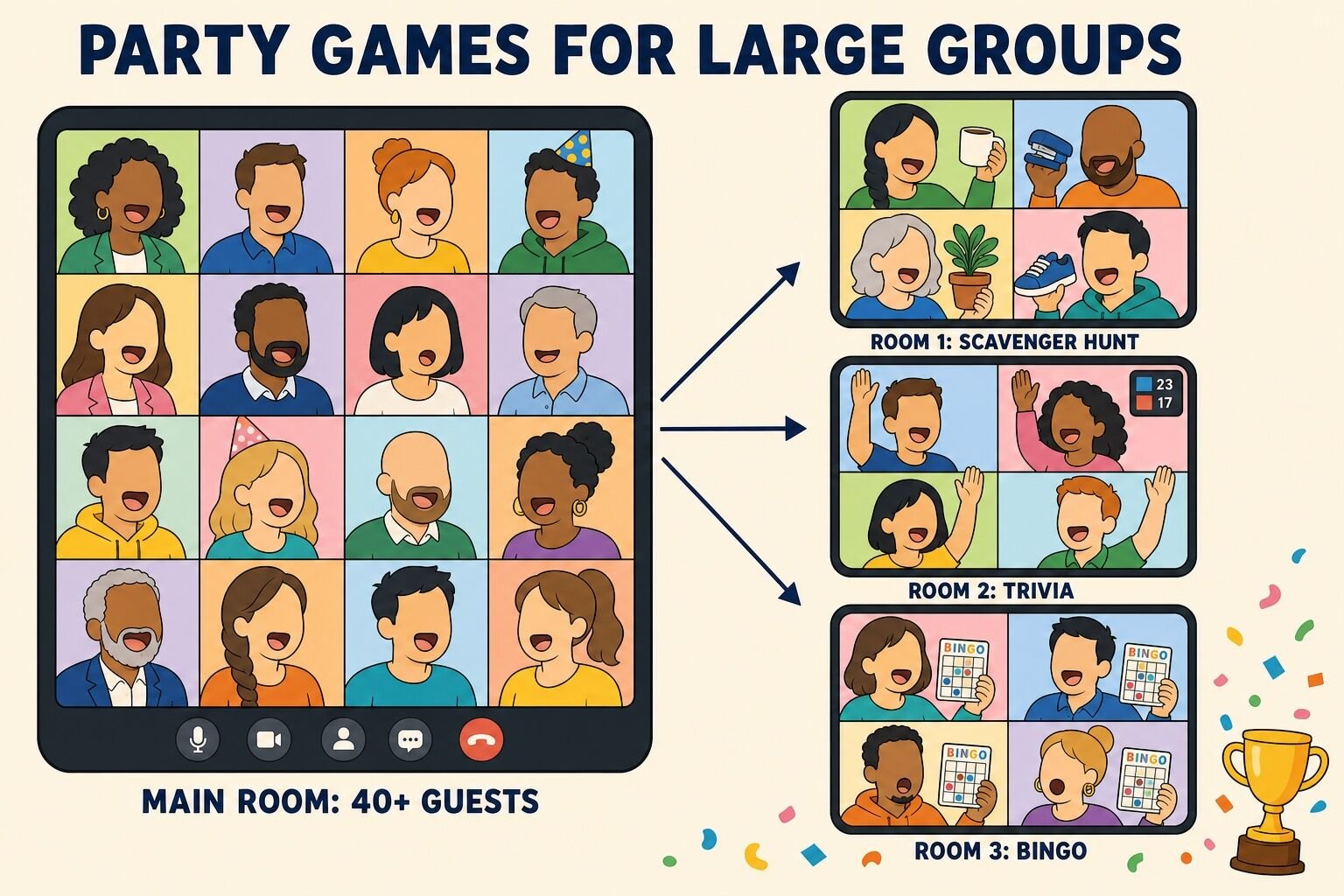
Virtual party games for large groups follow one rule: everyone acts at the same time, or the game happens in breakout rooms. Anything with a turn order dies at 40 guests. The games below scale from a department party to a whole-company celebration because scoring happens in the chat, in polls, or room by room.
18. Lightning Scavenger Hunt
A lightning scavenger hunt is our go-to opener for big virtual parties. The host calls out an item, everyone races to grab it and hold it up to the camera, and the first few faces back on screen score. It takes 30 seconds to explain and gets a hundred people out of their chairs.
How to play:
Prepare a list of 10 to 15 items, from easy ("a mug") to specific ("something you have owned for more than ten years") to silly ("the ugliest thing within reach").
Ask everyone to switch to gallery view and unmute.
Call an item. Guests have 30 seconds to find it and hold it up.
The host names the first three people they saw with the item; each scores a point. For big calls, a co-host watches the second page of tiles.
End with a "show and tell" item where the host picks two or three guests to explain what they grabbed.
Best for: Groups of 5 to 200+ Time: 10 to 15 minutes Materials (cost): An item list (free)
What we've learned: The open-ended items ("something that makes you happy," "something you should have thrown away") beat the literal ones, because the reveal becomes a story. We run the literal items first to build speed, then switch to the open-ended ones once the group is warmed up.
19. Virtual Amazing Race
A virtual amazing race turns a party into a team competition across a series of short challenges: a photo scavenger hunt, a rapid trivia round, a build-something task, and a final puzzle. Teams work in breakout rooms and report back to the main room for scoring.
How to play:
Design five "legs," each five minutes long, with one challenge and a clear proof of completion (a photo in the chat, a correct answer, a screenshot).
Split guests into teams of four to six and assign breakout rooms and team names.
Broadcast the first challenge to all rooms. Teams submit proof to the host in the main room chat.
Award points by finishing order: five for first, four for second, and so on.
Bring everyone back for the final leg, played live in the main room, with double points.
Best for: Groups of 12 to 100 in teams of 4 to 6 Time: 30 to 45 minutes Materials (cost): Challenge list and a scoreboard (free)
What we've learned: Use the broadcast-to-breakout-rooms feature rather than visiting each room. It keeps every team on the same clock, and the host stays in the main room to receive submissions instead of bouncing between rooms.
20. Poll Party
Poll Party uses the polling tool built into the meeting software to run a majority-rules game with a hundred people at once. The host asks a question, everyone votes, and points go to the guests who picked the majority answer. It is Great Minds Think Alike for a crowd.
How to play:
Pre-load 10 to 12 polls before the party: "Pancakes or waffles?" "Which coworker would survive longest in a zombie movie?" "Best decade for music?"
Launch each poll for 30 seconds while the host reads the options aloud.
Share the results. Everyone who voted with the majority marks a point on their own honor-system scorecard.
After each poll, the host picks one person from the minority to defend their vote in 20 seconds.
Highest self-reported score at the end wins; the biggest contrarian gets a prize too.
Best for: Groups of 20 to 500 Time: 10 to 20 minutes Materials (cost): Built-in polls (free)
What we've learned: The 20-second minority defense is the whole game. The poll results are the setup, and the person explaining why waffles are objectively superior is the payoff.
21. Breakout Speed Mixer
A speed mixer solves the biggest problem with large virtual parties: nobody actually talks to anyone. Guests rotate through random breakout rooms of three, with a prompt on screen and four minutes per round. By the end, everyone has had real conversations with nine people.
How to play:
Set breakout rooms to auto-assign groups of three with a four-minute timer.
Broadcast a prompt to all rooms: "the best thing you ate this month," "a skill you learned during lockdown," "the job you wanted at age ten."
When rooms close, everyone lands in the main room for 30 seconds while the host reshuffles and sends the next prompt.
Run three rounds. Each round gets a slightly more personal prompt.
Close with a quick chat storm: "Type the most surprising thing you learned about someone."
Best for: Groups of 15 to 300 Time: 15 to 20 minutes Materials (cost): Breakout rooms (free)
What we've learned: Groups of three, not four or five. Three people cannot hide, and four minutes is long enough to say something real but short enough that a quiet room does not become painful.
22. Chat Storm
A chat storm is a burst of rapid prompts that everyone answers in the chat at the same moment. It fills the gaps between bigger games, works with any number of guests, and gives the host a stream of material to read aloud.
How to play:
Write 10 prompts with one-word or one-line answers: "your go-to karaoke song," "the last thing you Googled," "your first concert," "the emoji that describes your week."
Ask everyone to type but not send until the host says "go," so answers land together.
Read five or six of the best answers aloud and tag their authors.
Award a point per prompt to the answer that gets the most reactions.
Keep it to 90 seconds per prompt so the energy stays high.
Best for: Groups of 10 to 1,000 Time: 5 to 10 minutes Materials (cost): Chat box (free)
What we've learned: Chat storms are the best tool for the first five minutes of a big party. People are arriving, nobody wants to be first to speak, and a chat prompt on screen gives everyone something to do the second they join.
Free virtual party games (no apps needed)
Nearly everything on this list is free, but these three need nothing at all: no links, no accounts, no screen share. They run on cameras, mics, and the chat box, which makes them the games to keep in your back pocket when the tech fails or the schedule runs short.
23. Reactions
Reactions is a 30-second acting game. The host privately sends a guest a scenario, the guest reacts to it on camera without saying what it is, and the group guesses. It rewards drama, and the quietest coworker is often the best at it.
How to play:
Prepare 15 scenarios: "you just won the lottery," "your Wi-Fi died during a presentation," "a bear is in your kitchen," "you just saw your favorite celebrity," "you found out the meeting was optional."
Private-message a scenario to one guest.
They get 30 seconds to react using gestures, expressions, and words, but they cannot name the scenario.
Everyone types a guess in the chat. First correct guess and the actor both score.
Rotate through as many actors as time allows; nobody is required to take a turn.
Best for: Groups of 5 to 25 Time: 10 to 20 minutes Materials (cost): None (free)
What we've learned: Let the group nominate actors instead of going in order. The volunteers set the tone, the shy guests see it is safe, and by round four the person who said "no way" is asking for a scenario.
24. Emoji Story
Emoji Story is a chat-only guessing game. One guest describes a movie, a song, or a moment from the team's history using only emojis, and everyone races to decode it. It is quiet, quick, and works even when half the cameras are off.
How to play:
Pick a category: movies, songs, or "things that happened to this team this year."
The first player types an emoji sequence into the chat, three to eight emojis long.
Everyone else guesses in the chat. First correct guess scores and becomes the next storyteller.
If nobody has it after 60 seconds, the storyteller adds one more emoji as a clue.
Play for 10 minutes or until everyone has told a story.
Best for: Groups of 5 to 50 Time: 10 minutes Materials (cost): Chat box (free)
What we've learned: The "this team's year" category is the version worth playing at a party. A sequence like "plane, rain cloud, pizza, trophy" that only the team can decode is an inside joke generator.
25. This or That, Camera Edition
This or That, Camera Edition, is the fastest whole-group game we know. The host reads two options, and guests answer with their cameras: camera on for the first choice, camera off for the second. The gallery view becomes a live bar chart.
How to play:
Prepare 20 pairs: "beach or mountains," "early bird or night owl," "text or call," "cake or pie," "reply-all or ignore."
Read a pair. Give guests five seconds to turn cameras on or off.
Call out the split ("looks like 70% beach") and pick one person from each side to defend their choice in one sentence.
Speed up as you go. The last five pairs should come every ten seconds with no defenses.
Finish with a pair about the party itself: "one more game or breakout rooms?" and do what the majority says.
Best for: Any group size Time: 5 to 10 minutes Materials (cost): None (free)
What we've learned: Reverse the rule for the last few pairs (camera off for the first option) to catch people on autopilot. The confusion is the best laugh of the round.
Virtual birthday party games
Virtual birthday party games put one person at the center, which changes the design: the guest of honor should be the subject of the game, not just a player. Two formats do this well, and the rest of the list fills out the hour. For agendas and gift ideas, see our guide to hosting a virtual birthday party.
26. Guest of Honor Trivia
Guest of Honor Trivia is a quiz about the birthday person, written with a little help from the people who know them best. The guests compete to prove who knows them best, and the birthday person gets to be the answer key.
How to play:
A week ahead, message the birthday person's partner, best friend, or closest teammate for ten facts: first job, first concert, a childhood nickname, a fear, a hidden talent.
Write ten multiple-choice questions and put them in a slide deck.
At the party, the birthday person is the judge. Guests answer in the chat.
After each reveal, the birthday person tells the real story behind the answer.
The top scorer wins the title of official biographer for the year.
Best for: Groups of 5 to 30 Time: 15 to 20 minutes Materials (cost): Ten questions and a slide deck (free)
What we've learned: The stories after each reveal are the real gift. Keep the question count to ten so there is time for them, and let the birthday person pick one "bonus" question to ask the group about themselves.
27. Surprise Unboxing
Surprise Unboxing gives a virtual birthday its moment of ceremony. Guests coordinate a small delivery to the birthday person ahead of time, and the party opens with the unboxing on camera, with the senders guessing who chose what.
How to play:
Two weeks out, the host collects a small budget from guests (or picks a team budget) and orders a few items to arrive by party day, with instructions not to open the box.
Each guest secretly picks or nominates one item, so every item has a sender.
Open the party with the birthday person unboxing on camera, one item at a time.
After each item, the birthday person guesses who chose it. Correct guesses earn the sender a point, wrong guesses earn the birthday person a point.
Close the round with a group toast and a photo of the haul.
Best for: Groups of 4 to 20 Time: 10 to 15 minutes Materials (cost): Gift box ($25 to $75 pooled)
What we've learned: Ask the sender of each item to explain the choice after the reveal. A $6 novelty mug with a story behind it beats an expensive gift with no story every time.
Virtual holiday party games
December is the busiest month of the year for virtual celebrations, and holiday parties need games that work for a mixed crowd, from the person in a full elf costume to the person who would rather not. These three are the formats we see requested most, and our guide to planning a virtual holiday party covers themes, food, and agendas in detail. As of September 2026, we have hosted 6,000+ virtual holiday parties for clients including Apple, Amazon, and Google, and the games below are the ones that keep coming back.
28. Ugly Sweater Runway
The ugly sweater contest is the holiday party classic, and the runway format makes it a game rather than a dress code. Each guest gets ten seconds on spotlight, the group scores in the chat, and the categories reward effort as much as ugliness.
How to play:
Put "ugly sweater (or ugly anything)" in the invitation with a week's notice.
Play walk-out music over screen share while the host spotlights each guest for ten seconds.
Guests score each sweater 1 to 10 in the chat.
Award three prizes: ugliest, most creative, and best homemade.
Keep sweaters on for the rest of the party and take a gallery-view screenshot.
Best for: Any size; use a photo grid above 40 guests Time: 10 minutes Materials (cost): A sweater (free); small prizes optional
What we've learned: Add a "decorate your sweater in three minutes" round with whatever is on the desk (sticky notes, tinsel, a lanyard) so guests without a sweater still play. The homemade category usually produces the best photo.
29. Virtual White Elephant
White Elephant works online with one change: the gifts are links instead of boxes. Each guest submits a gift under a set budget, the host reveals them one at a time, and stealing rules keep the drama intact.
How to play:
Set a budget ($20 to $25 is typical) and have each guest send the host a product link or a photo of a wrapped gift, plus a decoy name for it ("mystery item #4").
Shuffle the turn order and post it in the chat.
On each turn, a guest either opens a new gift (the host reveals the link on screen) or steals an opened one. Each gift can be stolen twice, then it is locked.
The host tracks who holds what on a shared slide.
After the last turn, the first player gets one final swap. Gifts ship to their final owners afterward.
Best for: Groups of 6 to 20 Time: 30 to 45 minutes Materials (cost): One gift per guest ($20 to $25)
What we've learned: The two-steal cap is not optional. Without it, a good gift bounces between the same three people for ten minutes while everyone else checks email.
30. Name That Holiday Tune
Name That Holiday Tune is a five-second music quiz. The host plays the opening of a holiday song, teams race to name it in the chat, and bonus points go for the artist. It works for any holiday playlist, and a "songs of the year" round keeps it inclusive.
How to play:
Build a 15-song playlist mixing classics, covers, and a few of the year's biggest hits.
Share computer audio and play the first five seconds of each track.
Teams type the title in the chat. First correct answer scores; naming the artist too is a bonus point.
If nobody has it, play five more seconds.
Finish with a "sing the next line" bonus round for anyone brave enough to unmute.
Best for: Groups of 6 to 100 in teams Time: 15 minutes Materials (cost): A playlist and screen share with audio (free)
What we've learned: Include a round of instrumental and international holiday songs. It levels the field for a global team, and the guesses at an unfamiliar tune are funnier than the correct answers.
Summary table: all 30 virtual party games at a glance
We have been running hosted virtual celebrations for work teams since 2020, from ten-person birthday calls to company-wide holiday parties with hundreds of guests, and a few patterns hold every time.
The games are the party. An unstructured "hang out on Zoom" call peaks at minute eight. A party with three games on a clock stays lively for an hour, because every guest always knows what to do next. The best hosts treat the agenda like a setlist: open with something everyone does at once, put the biggest game in the middle, and end with a moment (an award, a toast, a reveal) rather than a fade-out.
Everyone-at-once beats one-at-a-time. The games on this list that scale (bingo, chat storms, polls, lightning hunts) all share a mechanic: the whole group acts in the same moment. Turn-based games are wonderful for eight people and exhausting for 30. If a game needs a turn order, split into breakout rooms so several turns happen in parallel.
Small groups (under 15)
Large groups (15+)
Best formats
Who Am I?, Psychiatrist, Reactions, Guess the Playlist, Virtual Board Game Night
Bingo, Poll Party, Lightning Scavenger Hunt, Chat Storm, Breakout Speed Mixer, Trivia in teams
Scoring
Host keeps a tally out loud
Chat submissions, polls, or a co-host on a shared scoreboard
Conversation
Stay in the main room
Breakout rooms of 3 to 5 with a prompt on screen
Hosting
One host is plenty
Host plus one co-host to watch the chat and second page of tiles
Length
45 to 60 minutes
60 minutes, 90 with a centerpiece event
The stakes should be low and the recognition real. Prizes at our best parties are bragging rights, a renamed tile, or a $10 gift card. What people actually take away is the moment the room laughed at their dislike of cilantro or voted them "Most Likely to Reply-All." Gallup reports that only two in 10 U.S. employees strongly agree they have a best friend at work, and estimates that moving that ratio to six in 10 could mean 36% fewer safety incidents, 7% more engaged customers, and 12% higher profit (Gallup, "Why We Need Best Friends at Work"). A party where coworkers learn each other's first concerts and worst habits is one of the few structured ways a remote team builds those friendships.
Teams come back. As of September 2026, 928 companies have come back to book virtual events with us in three or more separate years, and 160 have booked across five or more, which tells us a good virtual party becomes a tradition rather than a one-off.
If you would rather have a professional host run the party, our hosted virtual events include game shows, murder mysteries, trivia, and holiday formats built for exactly this.
Virtual party games we don't recommend
Some party ideas that circulate online read well and play badly on a video call. Latency, one-mic-at-a-time audio, and the fact that everyone is alone in a room all change what works. Here is our Lame List for virtual parties.
The Lame List
Activity
Why skip it
Verdict
Virtual dance party
Most adults will not dance alone on camera at work. Participation is low and the people who do join feel watched.
Skip it
Virtual karaoke
Latency makes singing together impossible, and solo karaoke puts one person on the spot. Name That Tune gets the music without the pressure.
Skip it
Never Have I Ever
Built around personal disclosure and drinking-game roots; the work-safe version is not much of a game.
Skip it
Drinking games of any kind
Excludes anyone who does not drink and creates HR exposure. Every game on this list works with a coffee.
Skip it
Virtual charades
Body language is cropped by the camera frame and only one person acts at a time. Reactions is the version that works.
Better in person
Two Truths and a Lie
Fine for six people, but overused, and with 25 guests it takes half an hour of turn-taking.
Usually skip
Unstructured "hang out" calls
Without a host and games, two people talk and everyone else watches the clock. Add any three games from this list.
Add structure
Virtual movie night
Two hours together without interacting. It can bookend a party, but it is not the party.
Not a party game
Mandatory talent show
A talent show works when people volunteer. Requiring an act from every guest produces dread, not fun.
Make it optional
Long-form escape rooms with 40 people in one room
One shared puzzle and 40 voices means five people solve it while 35 mute themselves. Split into rooms or pick a hosted format.
Split the group
Final thoughts
The difference between a virtual party people dread and one they ask to repeat is almost never the budget or the platform. It is whether someone is hosting, whether the games let everyone play at once, and whether the hour ends with a moment instead of a shrug. Pick three games from this list, put them on a 60-minute agenda, and name a host. That is the whole recipe.
Quick answers about choosing and running party games on a video call.
What are virtual party games?
Virtual party games are group games played over a video call, usually on Zoom, Microsoft Teams, or Google Meet, to entertain guests at an online celebration. Examples include virtual bingo, Likes and Dislikes, lightning scavenger hunts, and chat-based trivia. Most need nothing more than the meeting software, a shared screen, and a host with a list of prompts. They are also called online party games, Zoom party games, and digital party games.
What are the best virtual party games for work?
The best virtual party games for work let everyone play at the same time and avoid putting one person on the spot: Virtual Party Bingo, Don't Say It, Likes and Dislikes, Great Minds Think Alike, and Guess the Playlist. For a centerpiece, a virtual murder mystery or a team trivia showdown fills 30 to 90 minutes. All of these are workplace-safe and free apart from a murder mystery script.
How do you host a virtual party on Zoom?
Name a host, send an invitation that lists the theme and any items guests need at their desk, and follow a 60-minute agenda: five minutes to arrive with music playing, a quick icebreaker such as Don't Say It, one main scored game such as bingo or trivia, 15 minutes of breakout rooms with a prompt on screen, and a toast with awards to close. Test screen share with audio and breakout rooms before the call.
What virtual party games work for large groups?
Games scored in the chat or through polls scale to hundreds of guests: Poll Party, Lightning Scavenger Hunt, Chat Storm, This or That (camera on or off), and Virtual Party Bingo. For conversation, use a Breakout Speed Mixer with rooms of three and a prompt on screen. Avoid anything with a turn order once the group passes about 15 people, or split the turns across breakout rooms.
What are free virtual party games that need no apps?
Reactions, Emoji Story, This or That (Camera Edition), Don't Say It, Great Minds Think Alike, and Chat Storm all run on cameras, mics, and the chat box alone. Virtual Pictionary uses the whiteboard built into Zoom, Teams, and Meet, and Poll Party uses built-in polls, so none require guests to install anything or create an account.
How long should a virtual party be?
Sixty minutes is the sweet spot for a social call, and 90 minutes works when a hosted event or murder mystery is the centerpiece. Beyond that, screen fatigue sets in no matter how good the games are, so end on time with a toast or an awards moment. If the group is under eight, 45 minutes is often enough.

Comments (0)
Leave a Comment