
Virtual Team Building Activities Ranked by 50,000+ Surveys (2026)
The best virtual team building activities, ranked by 50,000+ post-event surveys — plus 15 free DIY games, honest provider comparisons, and lessons from 40,000+ events.
The best virtual team building activities, ranked by 50,000+ post-event surveys — plus 15 free DIY games, honest provider comparisons, and lessons from 40,000+ events.
In October 2017, we published our first guide to virtual team building on our sister site, Museum Hack – more than two years before remote work went mainstream.
Then in March 2020 the world changed – the World Health Organization officially declared COVID as a pandemic, and teams around the world rushed to go remote, meeting on Zoom and for the first time people managers started thinking about virtual team engagement at scale.
We saw this shift early and quickly launched three new team building events for remote teams: Online Office Games, tiny campfire, and Tea vs Coffee. Since then, we've expanded our collection of Originals to include 90+ unique hosted virtual events — competitions, game shows, creative events, workshops, cultural celebrations and more.
One of our earliest clients was the U.S. Centers for Disease Control and Prevention (CDC), whose team trusted us to help keep employees connected during one of the most demanding periods in the agency's history. We also did events for teams at the US Air Force, Apple, Amazon, Google, Capital One, plus international companies in the United Kingdom, Sweden, Singapore, Hong Kong, India, Mexico, Canada and more.
Trusted by teams at






As of August 2026, over 40,000 teams have booked virtual events with us, totaling nearly 1 million participants, with 80,000+ reviews and an average rating of 4.96 / 5.0. Our written guides on virtual team building and engagement have been read by millions of people, and our work has been featured in The Washington Post, discussed on The Economist's World Ahead podcast, and more. All told, we've run 45,000+ events across virtual and in-person formats since 2013 — and the lessons from each side make the other better.
We've also built our own remote team, working with hundreds of remote employees over the last few years and so know how turning a Zoom meeting into a 90 minute social experience can transform a team and culture over time.
There is no PhD yet in Virtual Team Building, but it's fair to say we have the equivalent in earned experience.
Anyway, you are here to learn about virtual team building in 2026. This list includes:
Virtual team building activities are group games, challenges and exercises via platforms like Zoom, Microsoft Teams and Google Meet. Example activities include icebreaker questions, virtual campfires, and virtual escape rooms for teams. The purpose of these virtual activities is to build relationships, improve communication, and boost employee morale. These activities can be free or paid, and are also called “virtual team building games,” “virtual team building ideas,” “virtual team building exercises,” “online team building activities,” “remote team building activities” and “virtual team activities.”
Virtual team building activities are the online branch of team building activities and a subcategory of virtual employee engagement. They are similar to online team building games, virtual group activities, virtual training games, and hybrid team building, and the platform-specific versions are Zoom team building, Zoom games, and Microsoft Teams games. Within the category, this guide includes hosted virtual team building events, free virtual team building activities and games, and virtual team building ideas and exercises for small and large groups, and for celebration formats see virtual party games and virtual team events.
Deliberate connection matters more on remote teams, not less. A Nature Human Behaviour study of 61,182 Microsoft employees found that company-wide remote work made collaboration networks more static and siloed, with fewer bridges between groups. The U.S. Surgeon General's 2023 advisory on loneliness goes further, recommending employers make social connection "a strategic priority in the workplace" — and structured virtual activities are one of the few levers that reach a distributed team.
Saying any particular team building, virtual or otherwise, is the best is pretty subjective – kind of like saying a movie is the best, or a flavor of ice cream. In reality, people like different flavors for different reasons, and even an experience that 150,000 people love might be loathed by a small handful of cynics.
So, let's ground this in numbers. First, I'll share the most popular teambuilding.com Originals based on ratings and over 50,000 post event surveys, then a few popular choices from our major competitors based on publicly available information.
We ranked our virtual events using more than 50,000 post-event surveys. Our Team Building Score combines overall satisfaction, participant recommendation scores, reviews from event organizers, engagement ratings, and other post-event feedback — and we publish exactly how it works.
| # | Event | Score | Rating | Happier | Connected | NPS | Price |
|---|---|---|---|---|---|---|---|
| 1 | 
tiny campfire
Best for: Remote teams seeking connection
More about this eventVirtual campfire games, ghost stories and real s'mores.
Perfect for: Remote teams seeking connection, Teams celebrating achievements, Groups wanting a fun evening |
248 | ★ | 97% | 95% | 85 | $79 pp |
| 2 | 
Ultimate Game Show
Best for: Teams seeking fun competition
More about this eventCompete in fan favorites like Coworker Feud & Price Hike.
Perfect for: Teams seeking fun competition, Fans of classic game shows, Groups wanting team bonding |
248 | ★ | 98% | 93% | 86 | $45 pp |
| 3 | 
Virtual Trivia: Team vs Team
Best for: Virtual happy hours
More about this eventChoose your trivia theme and let the friendly competition begin!
Perfect for: Virtual happy hours, Conference entertainment, Teams seeking fun competition |
245 | ★ | 97% | 90% | 82 | $30 pp |
| 4 | 
Murder in the Speakeasy
Best for: History buffs and mystery lovers
More about this eventA prohibition-themed murder mystery where teams collect clues and crack the case.
Perfect for: History buffs and mystery lovers, Teams seeking immersive experiences, Corporate retreats with a twist |
245 | ★ | 97% | 91% | 80 | $40 pp |
| 5 | 
War of the Wizards
Best for: Creative storytelling enthusiasts
More about this eventTeams use imagination to thwart great evil in this cooperative roleplaying game.
Perfect for: Creative storytelling enthusiasts, Teams seeking strategic challenges, Fantasy role-playing fans |
245 | ★ | 99% | 92% | 78 | $40 pp |
| 6 | 
Online Office Games
Best for: Remote teams seeking fun
More about this eventA triathlon of virtual activities with 150,000+ participants to date.
Perfect for: Remote teams seeking fun, Boosting team morale, Virtual team celebrations |
245 | ★ | 98% | 93% | 81 | $40 pp |
| 7 | 
Murder in Ancient Egypt
Best for: Teams seeking a thrilling challenge
More about this eventWork together on puzzles & solve a real (ancient) murder mystery.
Perfect for: Teams seeking a thrilling challenge, Improving problem-solving skills, Virtual team building events |
245 | ★ | 96% | 90% | 73 | $45 pp |
| 8 | 
Espionage!
Best for: Teams seeking adrenaline-pumping fun
More about this eventA social deduction game with puzzles, challenges, and sabotage.
Perfect for: Teams seeking adrenaline-pumping fun, Groups wanting a strategic challenge, Virtual team-building events |
245 | ★ | 97% | 92% | 80 | $40 pp |
| 9 | 
Ghost Hunt in the Haunted Mansion
Best for: Teams seeking thrilling experiences
More about this eventAn online escape-room-esque game in the famously haunted Winchester Mansion.
Perfect for: Teams seeking thrilling experiences, Halloween-themed team events, Groups wanting a spooky challenge |
240 | ★ | 99% | 93% | 82 | $45 pp |
| 10 | 
Art Heist: The Vanishing Van Gogh
Best for: Teams who love a challenge
More about this eventA whodunit where teams must follow clues to retrieve a famous painting.
Perfect for: Teams who love a challenge, Art enthusiasts and mystery lovers, Building problem-solving skills |
238 | ★ | 97% | 91% | 80 | $40 pp |
| 11 | 
Superhero Academy
Best for: Teams seeking thrilling challenges
More about this eventComic-themed puzzles & minute-to-win-it challenges in an epic heroes vs. villains showdown.
Perfect for: Teams seeking thrilling challenges, Building stronger team bonds, Unveiling hidden team talents |
238 | ★ | 97% | 93% | 79 | $40 pp |
| 12 | 
Virtual Mix n' Mingle
Best for: Remote teams seeking deeper bonds
More about this eventA guided virtual networking event with fun activities that spark real connection.
Perfect for: Remote teams seeking deeper bonds, Teams looking to enhance collaboration, Groups wanting a fun networking event |
228 | ★ | 97% | 95% | 83 | $40 pp |
| 13 | 
Virtual Art of Storytelling Workshop
Best for: Remote teams seeking engagement
More about this eventLearn to tell stories in a fun and interactive way.
Perfect for: Remote teams seeking engagement, Teams aiming to improve communication, Workshops focused on leadership skills |
226 | ★ | 95% | 92% | 81 | $60 pp |
| 14 | 
Margarita Making Class
Best for: Virtual happy hours
More about this eventAn online margarita making class with real cocktails.
Perfect for: Virtual happy hours, Teams wanting a fun night, Cocktail enthusiasts |
224 | ★ | 97% | 92% | 79 | $109 pp |
| 15 | 
Office Feud
Best for: Virtual team bonding
More about this eventSpark friendly office rivalry inspired by a classic game show.
Perfect for: Virtual team bonding, Boosting team morale, Game show enthusiasts |
220 | ★ | 97% | 88% | 82 | $30 pp |
| 16 | 
Virtual Holiday Party
Best for: Teams seeking light competition
More about this eventThe world's #1 virtual holiday party since 2020.
Perfect for: Teams seeking light competition, Remote holiday celebrations, Fast-paced team bonding |
218 | ★ | 98% | 91% | 80 | $40 pp |
| 17 | 
Virtual Trivia: Individual vs Individual (45 min)
Best for: Virtual happy hours
More about this eventA general knowledge trivia melee where your group members compete individually to win points.
Perfect for: Virtual happy hours, Conference entertainment, Small or large teams |
217 | ★ | 100% | 91% | 84 | $20 pp |
| 18 | 
Pride Ultimate Game Show
Best for: Teams celebrating Pride Month
More about this eventA game show competition that celebrates the LGBTQ+ community. teambuilding.com donates $5 per guest to an LGBTQ+ non-profit.
Perfect for: Teams celebrating Pride Month, Diversity and inclusion initiatives, Remote teams seeking engagement |
217 | ★ | 100% | 95% | 95 | $40 pp |
| 19 | 
True or False: Unusual Beasts
Best for: Teams seeking a fun challenge
More about this eventA rapid-fire quiz game with a wildly unexpected twist on True or False & This or That trivia.
Perfect for: Teams seeking a fun challenge, Trivia enthusiasts, Boosting team morale |
217 | ★ | 100% | 82% | 73 | $30 pp |
| 20 | 
Holiday Feud
Best for: Virtual holiday parties
More about this eventPut your team's festive spirit to the test with this event based on the nostalgic game show favorite. Available now!
Perfect for: Virtual holiday parties, Teams seeking festive fun, Boosting team morale |
214 | ★ | 99% | 92% | 85 | $30 pp |
Ranked by our Team Building Score — a running points total earned through confirmed bookings, verified reviews, ratings, and listing quality, recalculated nightly. Every event shown also has at least 30 post-event survey responses per question; the happier, connected, and NPS columns are computed from the 8,732+ survey responses collected for the 20 events listed here — a subset of all post-event surveys across our catalog. Updated October 2026.
Want to see the full catalog? Browse all 90+ virtual Originals →
Want to see what a hosted virtual event looks like? Here's Murder in Ancient Egypt — ranked in our Top 20 above — in action:
Next, let's look at a few other virtual team building companies.
There are dozens of companies offering virtual team building, but frankly, I wouldn't recommend most of them. The industry is full of impressive-sounding marketing language for experiences that are ultimately pretty mediocre — basic trivia, generic games, or activities that weren't really designed for a virtual room.
I'm obviously biased: I'm the CEO of a virtual team building company. But I've been working on virtual team building since 2017, before it was really an industry, and I'm happy to recommend competitors when I think they offer something worthwhile.
Here are the options I'd actually consider.
| Company | Type | Typical price | Best for | Our take |
|---|---|---|---|---|
| teambuilding.com | Team building company | $20–$45 per person | Hosted games and experiences designed specifically for remote teams | Our pick for highly structured virtual team building. We've refined our Originals through tens of thousands of bookings and post-event surveys. |
| Confetti | Experiences marketplace | ~$20–$50 per person, priced live on their site | Teams that want a large selection of activities and price points | Probably the strongest alternative to teambuilding.com. Confetti offers a broad range of virtual games, classes, workshops, and other experiences. Think "quick energizer" more than "deep connection." |
| TeamBonding | Team building company | Custom quotes; virtual events from ~$1,000 per event | Organizations that want an established provider with both virtual and in-person options | TeamBonding has been in the industry for decades and offers a broad catalog of corporate team building programs. |
| The Go Game (Weve) | Team building company | Custom quotes | Teams that want highly produced, game-show-style hosted events | An established company in the team building space. Limited public reviews, but highly rated. |
Working with a company like ours is a great way to do team building virtually, but it's not your only option – you can also host your own experiences and get great results.
The following ideas are based on games and activities we do in our events. We've created thousands of games, and run each one with thousands of participants, refining what works and retiring what doesn't – so these are crowd favorites that have stood the test of time.
Prefer to watch? This video walks through some of our favorite free virtual team building ideas:
| Activity | Best for | Group size | Time | Cost |
|---|---|---|---|---|
| Can You Hear Me Now? | Communication | 5–30 | 15–30 min | Free |
| Bet on the Crowd | Getting to know your team | 10–100+ | 15–30 min | Free |
| Lightning Scavenger Hunts | Energy and movement | 5–100+ | 10–20 min | Free |
| Blackout Truth or Dare | Icebreakers and bonding | 5–30 | 15–30 min | Free |
| Something in Common | Building relationships | 6–100+ | 15–30 min | Free |
| Pancakes vs Waffles | Discussion and decision-making | 5–30 | 10–30 min | Free |
| Tree or Bob Ross | Creative thinking | 4–20 | 10–20 min | Free |
| Out-of-Order Challenge | Communication and coordination | 5–20 per team | 15–30 min | Free |
| Who da Baby? | Getting to know coworkers | 8–50+ | 15–30 min | Free |
| Best Thing on My Desk | Storytelling and connection | 4–20 | 10–30 min | Free |
| What Would You Do? | Problem-solving and discussion | 5–50 | 15–30 min | Free |
| Virtual Debate Club | Communication and persuasion | 6–30 | 20–45 min | Free |
| Virtual Werewolf | Social deduction and strategy | 8–20 | 30–60 min | Free |
| Virtual Team Building Bingo | Icebreakers and large groups | 10–100+ | 15–30 min | Free |
| Virtual Mini Games Tournament | Full team building events | 10–100+ | 60–90 min | Free |
Need a quick warmup before any of these? Try our random icebreaker generator:
Can You Hear Me Now? is a communication game we developed for Online Office Games. One person becomes the Reader and receives a simple visual clue, such as a bird, sailboat, or other recognizable object. Everyone else needs a blank piece of paper.
The Reader describes how to draw the image using only general visual instructions, without saying what the object is. For example, instead of saying "draw a bird," the Reader might say, "Draw a medium oval in the center of the page, then add a smaller circle touching the upper-right side."
After a few minutes, everyone holds their drawings up to the camera and guesses the original object. A participant earns a point if they both draw and identify the object correctly. The Reader also earns a point for every participant who succeeds.
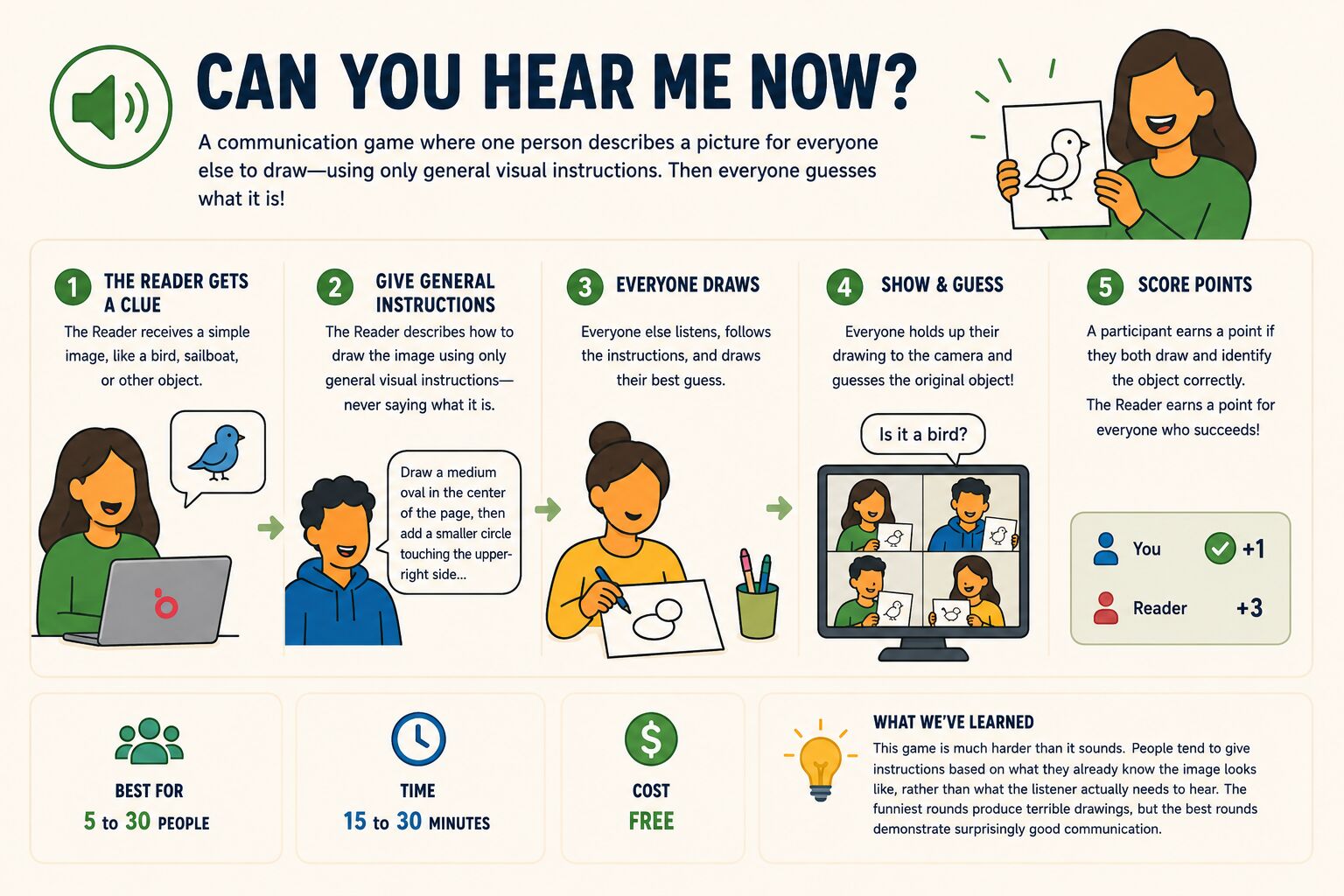
Best for: 5 to 30 people
Time: 15 to 30 minutes
Cost: Free
What we've learned: This game is much harder than it sounds. People tend to give instructions based on what they already know the image looks like, rather than what the listener actually needs to hear. The funniest rounds produce terrible drawings, but the best rounds demonstrate surprisingly good communication.
Bet on the Crowd is part trivia game and part social experiment. Instead of testing who knows the most obscure facts, players try to predict the opinions and preferences of their coworkers.
Before the event, survey participants with questions such as "Dogs or cats?", "Coffee or tea?", "Early bird or night owl?", or "Would you rather work four long days or five short days?" Keep the results secret.
During the event, ask a question like, "Are more people on this team dog people or cat people?" Everyone votes for whichever answer they think received the majority of responses. Reveal the results, award a point for every correct prediction, and move to the next question.
Best for: 10 to 100+ people
Time: 15 to 30 minutes
Cost: Free
What we've learned: Close votes are the most fun. A 52/48 split creates suspense; a 95/5 split does not. Use a mix of universal questions and questions that reveal something about your particular team. People usually enjoy discovering the actual results almost as much as scoring points.
Lightning Scavenger Hunts are one of the simplest ways to inject energy into a virtual meeting. The host announces a clue and everyone races away from their computer to retrieve or complete it.
For example:
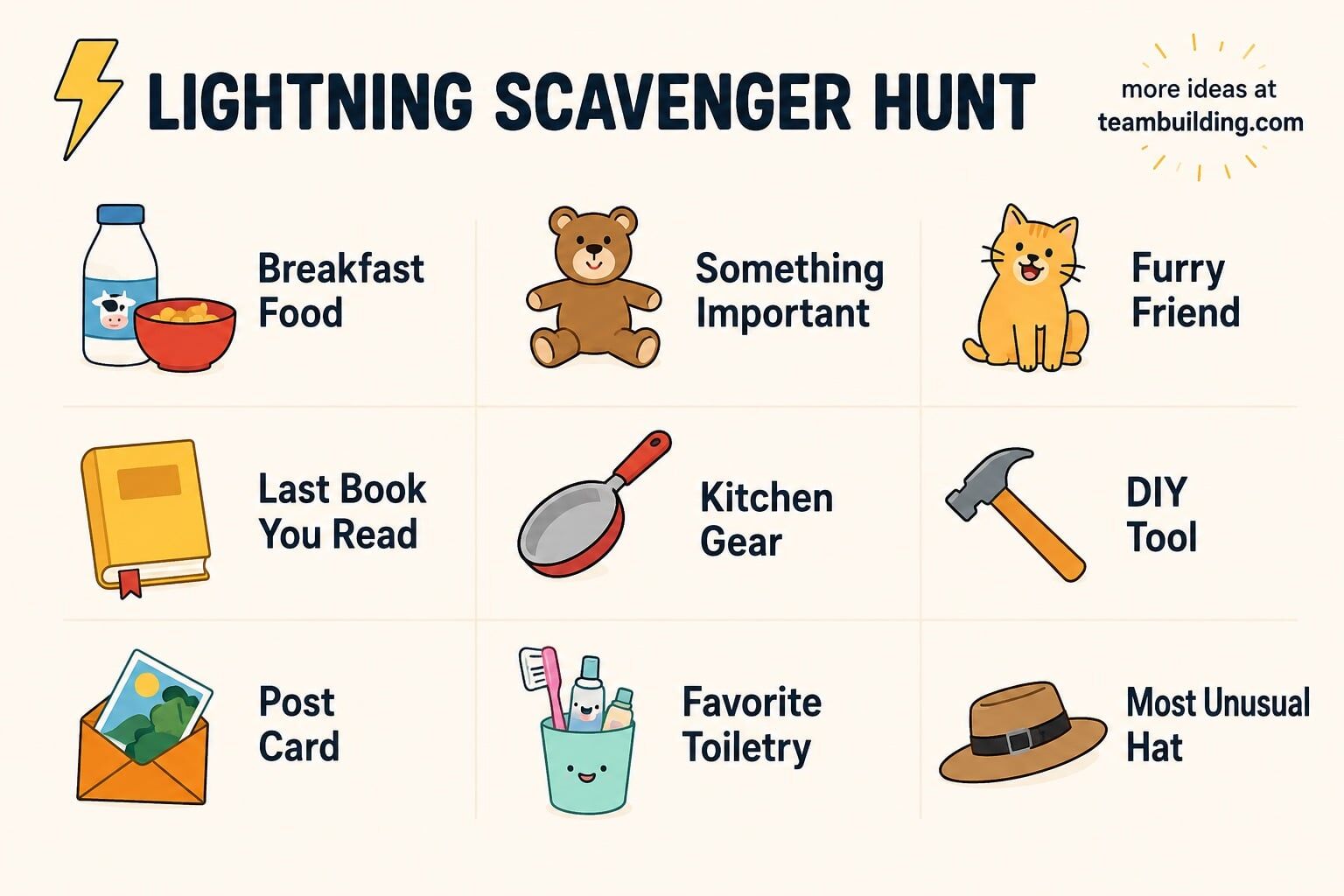
The first person back with a qualifying item gets a point. For subjective clues, you can instead let the host or group award a point for the funniest or most creative answer.
Best for: 5 to 100+ people
Time: 10 to 20 minutes
Cost: Free
What we've learned: Don't just rush into the next clue. If somebody comes back holding a 100-year-old spoon or a bizarre souvenir, ask about it. The race creates the energy, but the stories are what actually help people get to know each other.
Traditional Truth or Dare is a terrible corporate team building activity. Blackout Truth or Dare changes the mechanic so that participation is voluntary without putting anyone on the spot.
Everyone starts with their camera on. The host announces a workplace-appropriate truth or dare, such as "Show us the floor around your desk," "Tell us about your strangest job," or "Bring back the oldest piece of technology you own."
Anyone who does not want to participate simply turns off their camera. The host chooses one or more people from those who remain visible to complete the challenge. Then everyone turns their cameras back on for the next round.
You can generate prompts for your game here:
Best for: 5 to 30 people
Time: 15 to 30 minutes
Cost: Free
What we've learned: When we train hosts, we emphasize "green-light" prompts that are unlikely to make anyone uncomfortable. The blackout mechanic adds another layer of consent because nobody has to publicly decline. Keep the prompts playful even with that safeguard in place.
Something in Common is one of our favorite activities when the goal is actual relationship building rather than simply entertaining a group.
Split participants into breakout rooms of about three to six people. Give each group five minutes to discover the three most unusual things everyone in the room has in common.
"We all like pizza" does not count for much. "We all played violin as children," "we've all been to Iceland," or "we all hate raisins" is better.
Bring everyone back and have each group share its most surprising discovery. For additional rounds, remix the breakout rooms and ban easy categories like food, movies, or work.
Best for: 6 to 100+ people
Time: 15 to 30 minutes
Cost: Free
What we've learned: Small groups matter. Six people can discover something unusual they share; sixty people usually cannot. We also like removing obvious categories in later rounds because the constraint forces participants into better conversations.
Pancakes vs Waffles is a debate game built around an unnecessarily serious question: if either pancakes or waffles had to disappear from existence forever, which would your team save?
The group debates until everyone reaches a decision. The surviving option then faces a new challenger nominated by a participant. If waffles survive, the next matchup might be waffles versus pizza. Then pizza versus dogs. Eventually you may find your team passionately debating something like dogs versus human civilization.
You can require consensus or settle each round by majority vote. Here is an example game of Pancakes vs Waffles.
Best for: 5 to 30 people
Time: 10 to 30 minutes
Cost: Free
What we've learned: The game gets better as the comparisons become more ridiculous. It also works well for quieter groups because participants can advocate for their choices verbally, in chat, or through polls. Don't spend too long on the opening pancakes-versus-waffles debate; the strange later rounds are where the fun is.
Tree or Bob Ross is a strange guessing game that works a little like 20 Questions, except every question is a comparison.
One participant secretly chooses anything: a person, object, animal, place, or concept. The other players begin with the mandatory opening question:
"Is it more like a tree or more like Bob Ross?"
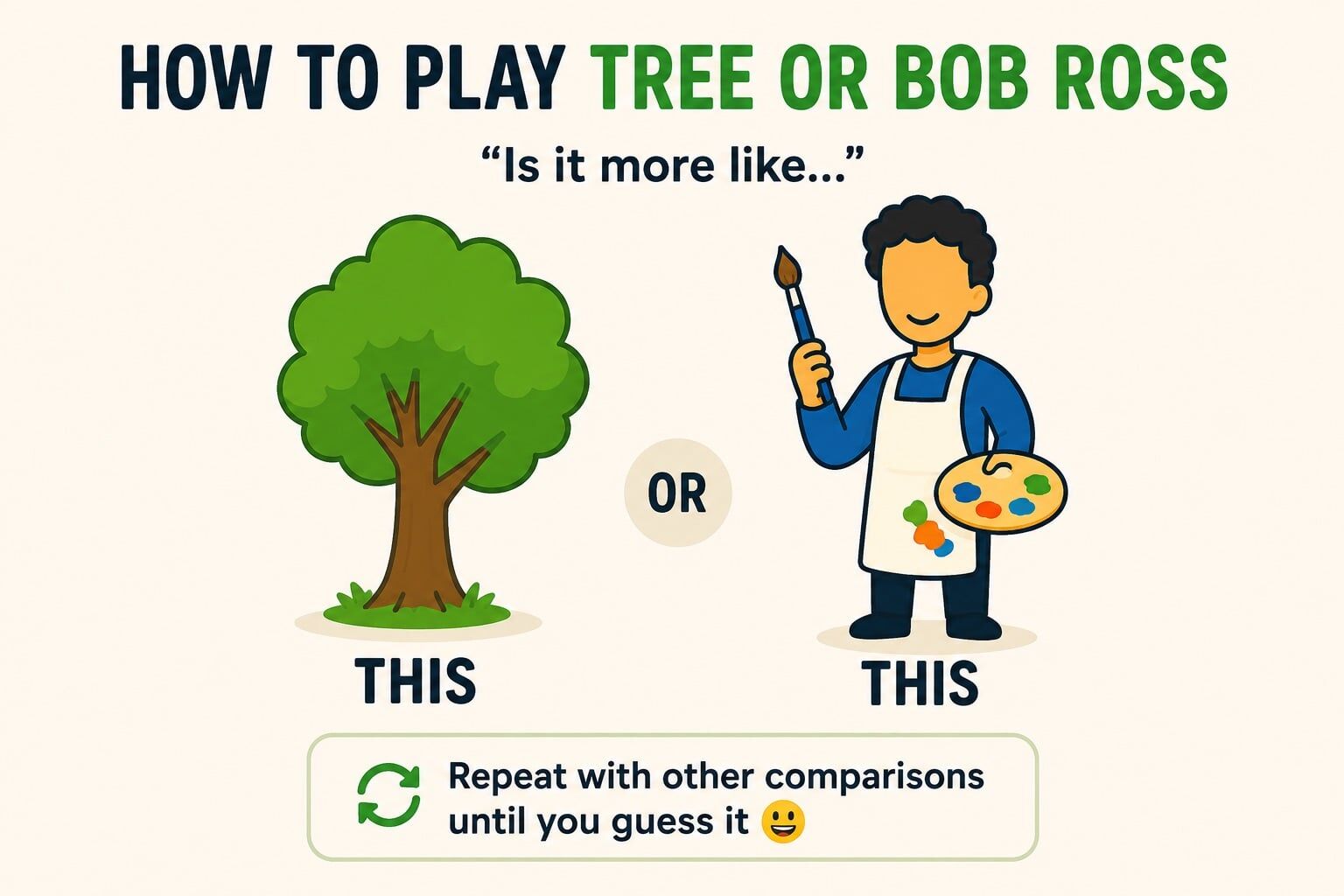
The player must choose one. If the secret answer is "sunflower," they might choose tree. The group then introduces a new comparison: "Is it more like a tree or a pineapple?" The answer to that question becomes one side of the next comparison, and the group gradually triangulates toward the secret identity.
Best for: 4 to 20 people
Time: 10 to 20 minutes
Cost: Free
What we've learned: Don't worry about whether every comparison is objectively correct. There is no official answer to whether Pinocchio is more like Bob Ross or a tree. Having to choose and then defend an imperfect comparison is exactly what makes the game interesting.
The Out-of-Order Challenge tests communication, delegation, and attention to detail using the tools already built into your video meeting.
Before the event, create six to ten instructions that must be completed in a specific sequence, then present them to the team out of order. For example, the instructions might require participants to type a phrase in chat, solve a word scramble, change a virtual background, send a reaction, mute and perform an action, and finish with a coordinated countdown.
The team first has to determine the correct sequence and then execute it. Only one person can perform each step. If the team completes a step out of order, restart the challenge.
Best for: 5 to 20 people per team
Time: 15 to 30 minutes
Cost: Free
What we've learned: The activity becomes chaotic if everybody starts acting immediately. Strong teams usually pause, solve the sequence, assign responsibilities, and then execute. That makes the game a surprisingly good demonstration of the difference between moving quickly and coordinating well.
Who da Baby? is exactly what it sounds like: participants try to identify their coworkers from childhood photos.
Before the event, ask everyone to send you a photo of themselves at around two or three years old. Put the photos into a numbered slideshow or shared document without names attached.
During the event, participants privately write down who they think each child grew up to become. Reveal the answers one by one, award one point for every correct guess, and give people a chance to react to particularly surprising photos.
Best for: 8 to 50+ people
Time: 15 to 30 minutes
Cost: Free
What we've learned: Toddler photos work much better than newborn photos because recognizable features have started to develop. The game also gets more challenging as the group gets larger, so it is one of the rare guessing activities that can actually improve with scale.
Best Thing on My Desk takes advantage of one of the peculiar advantages of remote work: everyone is joining from a different physical environment.
Ask each participant to find one object on their desk or nearby that they like, find interesting, or that has a good story behind it. It might be a ridiculous coffee mug, an old photograph, a tiny bonsai tree, a souvenir from a trip, or a mysterious object nobody else can identify.
Participants hold the object up to the camera and briefly explain why they chose it. Let other teammates ask questions when something interesting comes up.
Best for: 4 to 20 people
Time: 10 to 30 minutes
Cost: Free
What we've learned: Avoid turning this into a formal show-and-tell where every participant gives a five-minute speech. Keep the initial explanations short, then spend your time following the stories that naturally generate curiosity.
What Would You Do? gives teams unusual situations and asks them to agree on what happens next.
Split participants into small groups and give each group a hypothetical scenario. These can be practical:
Or completely ridiculous:
Give teams several minutes to discuss the options and reach a consensus, then compare answers.
Best for: 5 to 50 people
Time: 15 to 30 minutes
Cost: Free
What we've learned: Good scenarios have no obvious correct answer. The point is not to solve the hypothetical; it is to hear how teammates think, negotiate, disagree, and eventually make a decision together.
Virtual Debate Club asks coworkers to passionately defend positions that do not matter at all.
Divide participants into two sides and give them a low-stakes debate topic. Give each team a few minutes to prepare an argument, then alternate between opening statements, rebuttals, and closing arguments.
Topics might include:
Have neutral participants vote for the winning argument rather than the position they personally agree with.
Best for: 6 to 30 people
Time: 20 to 45 minutes
Cost: Free
What we've learned: Inconsequential topics are usually better than serious ones. People can argue with ridiculous conviction without bringing politics, workplace disagreements, or other baggage into the room. The best debates reward persuasion and creativity rather than being "right."
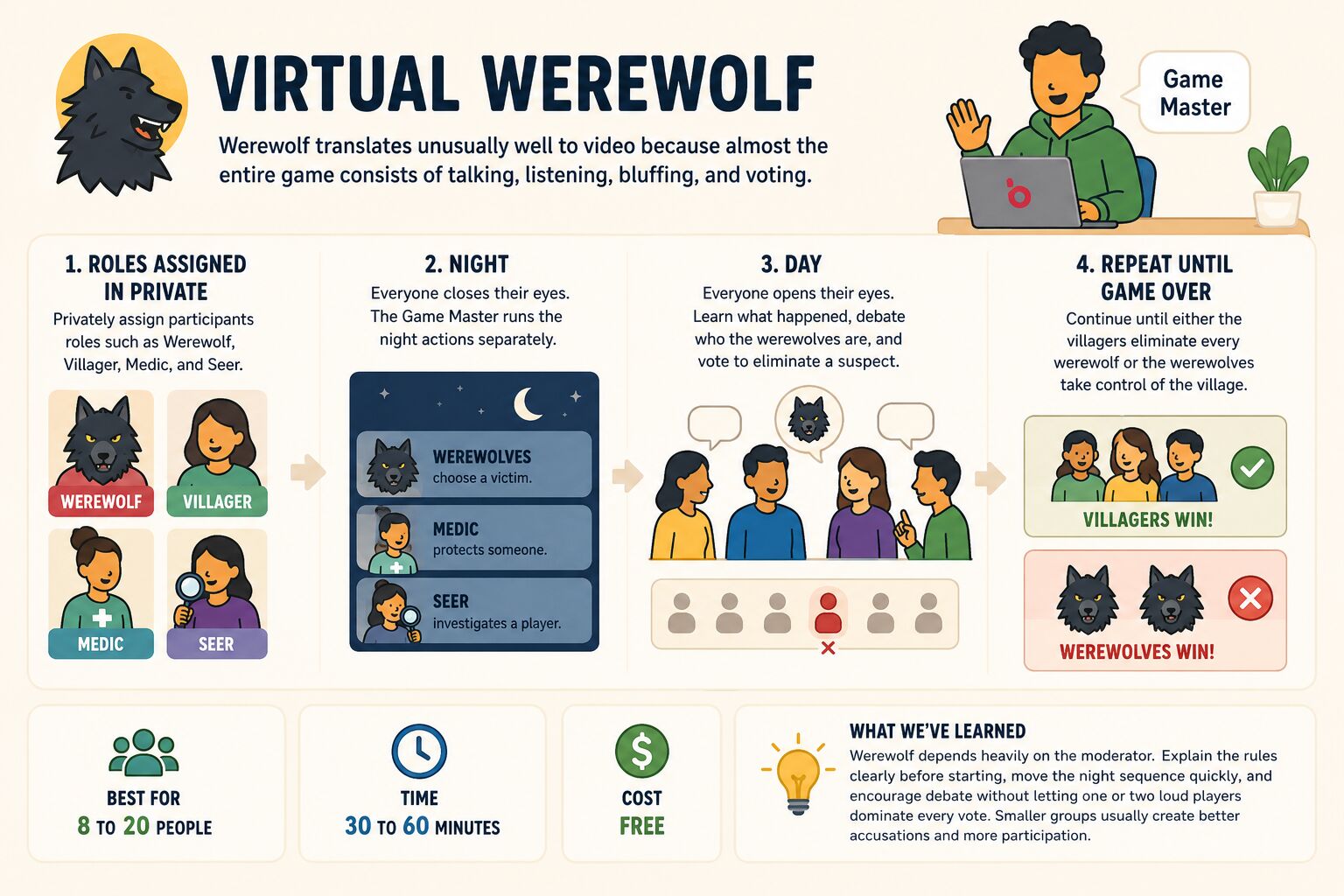
Werewolf translates unusually well to video because almost the entire game consists of talking, listening, bluffing, and voting.
Privately assign participants roles such as Werewolf, Villager, Medic, and Seer. During each "night," everyone closes their eyes while the game master separately lets the werewolves choose a victim, the Medic protect someone, and the Seer investigate a player.
During the "day," everyone opens their eyes, learns what happened overnight, debates who they believe the werewolves are, and votes to eliminate a suspect. Continue until either the villagers eliminate every werewolf or the werewolves take control of the village.
Best for: 8 to 20 people
Time: 30 to 60 minutes
Cost: Free
What we've learned: Werewolf depends heavily on the moderator. Explain the rules clearly before starting, move the night sequence quickly, and encourage debate without letting one or two loud players dominate every vote. Smaller groups usually create better accusations and more participation.
Virtual Team Building Bingo takes a familiar game and turns it into an excuse for teammates to discover things about each other.
Create Bingo cards containing statements instead of numbers. Examples might include "has lived in another country," "plays a musical instrument," "has run a marathon," "speaks more than one language," or "has an unusual pet."
Send participants into small breakout rooms and have them talk to teammates to find people who match each square. Participants write the appropriate teammate's name in the square. The first person to complete a row, X, or entire card wins.
Best for: 10 to 100+ people
Time: 15 to 30 minutes
Cost: Free
What we've learned: Bingo itself is not the interesting part. The prompts are. Avoid squares where everybody already knows the answer and write prompts likely to uncover stories. Breakout rooms also work better than asking fifty people to compete for airtime in one Zoom room.
If you have 60 to 90 minutes, one of the strongest DIY formats is not a single activity at all. Combine several short games into a mini tournament.
Divide participants into permanent teams, keep a running score, and rotate through four or five different challenges. For example:
Award points after every activity and finish by announcing the overall winning team. You can create a simple leaderboard in Google Sheets or keep score on a shared slide. For an easy extra round, try our longest word generator:
Best for: 10 to 100+ people
Time: 60 to 90 minutes
Cost: Free
What we've learned: Variety is one of the biggest advantages of this format. A trivia expert might dominate one round, a great communicator another, and the person with the strangest collection of household objects might win the scavenger hunt. Mixing thinking, talking, creativity, and movement gives more personalities a chance to contribute — and helps prevent a long virtual event from feeling repetitive.
Virtual team building has a reputation problem, and honestly, some of it is earned — most people's reference point is an awkward Zoom happy hour where two extroverts talked and everyone else watched the clock. That's not what we do. Since 2021, teams have spent more than 30,000 hours in our live virtual events — the equivalent of hosting back-to-back events nonstop for more than three years — and left 80,000+ reviews averaging 4.96 out of 5 (as of August 2026). Our post-event surveys also ask outcome questions beyond the star rating — not every reviewer answers them, but of the nearly 18,000 virtual participants who have, 98% said the event made them happier and 91% said they felt more connected to their teammates.
Happier is not just a feel-good metric. In a six-month study of nearly 1,800 British Telecom call-center workers published in Management Science, researchers found each one-point rise in weekly happiness came with a 12% increase in productivity. We measure happiness because it is the outcome that pays for everything else.
Still, we've found a few things true of the best virtual team experiences:
Participants tend to love events that are 60 to 90 minutes long. 88% of the virtual events we run fall in this window, and that's no accident. Occasionally a client will ask for a shorter timeline, and nine times out of ten they come back and say they wished they had booked the full event. Under an hour, the session ends right as your quieter teammates are warming up. Past 90 minutes, screen fatigue starts winning no matter how good the activity is.
You need clear structure. In-person events can absorb a little chaos — people fill the gaps by chatting. On a video call, a gap is just silence, and silence kills momentum fast. The best virtual events run on rails: a host who sets the rules in the first two minutes, rounds with visible time limits, and no point where anyone wonders what they're supposed to be doing. This is also why the host matters so much — roughly one in five of our virtual event reviews mentions the host by name. Nobody remembers the software; everybody remembers who ran the show.
Friendly competition does the heavy lifting. When we mine our reviews for what participants actually loved, competition comes up again and again — points, buzzers, leaderboards, team names. It works because it gives people a reason to lean in without asking anyone to perform. The stakes are deliberately low. As one participant put it after a virtual game show: "to have so much competition and smiles for no prize except bragging rights was very commendable to see." Another wrote, "It's hard to make virtual events feel engaging, and they both kept people laughing and bought into the competition." That's the trick: the competition is the engagement mechanism, and the laughing is the point.
The format scales further than people think. The median virtual event is a team of 16, but we've hosted 448 virtual events with 100 or more participants — the largest with over 1,000 attendees. Big groups just need the mechanics adjusted: breakout teams, co-hosts, and scoring that keeps every room in the same game. The intimacy people worry about losing at that size gets replaced by something else that's fun in its own right: the energy of an entire company competing at once.
And if you're wondering whether any of this actually sticks: as of August 2026, 928 companies have come back to run virtual events with us in three or more separate years — 160 of them in five or more. Teams don't turn something into an annual tradition unless it works.
The data above tells you what works; the people below are why it works. Our hosts have led virtual events for tens of thousands of remote teams — here is their best advice for engaging your employees, in their own words.
Cameras on, mics on.
“Have that camera on and, if you can, mic on too! It's one thing to be in the meeting, but it's another to be INVOLVED in the meeting. Smiles and words of praise suggested!”— Sonya Stewart, teambuilding.com Event Host
Prepare so thoroughly that nothing breaks your momentum.
“Be 100% prepared for whatever activity you're planning to do -- don't leave things to figure them out in the moment. The biggest challenge with a virtual meeting is keeping folks engaged and excited while they're sitting at home alone on a screen, so having to rearrange something in the middle of the game will kill the momentum.Practice any copy/pasting or screenshares you need to do so you're comfy with them (and no asking if everyone can see your screen! trust that they do cause you tested it beforehand!), get on the meeting early and make sure you know where you're clicking and you've got everything set up, have your browser tabs and notes or script ready, and come in with confidence and energy -- the team will follow your vibe and have a much better time!”
— Andrew Orsie, teambuilding.com Event Host
Mix up the teams.
“Mix your teams up, engage participants with people that they maybe don't see all the time. This gets people more easily and actively on-camera and off-mute, and puts everyone on a level playing field with answering questions and having an opportunity to participate/engage.”— Andrea Arvanigian, teambuilding.com Event Host
Make room for casual connection.
“My top tip is to integrate fun and casual connections like virtual coffee breaks or quick icebreakers. These moments allow team members to bond over non-work-related topics. A little personal connection goes a long way in creating an inclusive team.”— Michelle Carra, teambuilding.com Event Host
Listen like your participants are running the show.
“Listen to your participants as if they're running the show! You can get a lot of free info that'll clue you in to little adjustments and/or interactions you can create to make it feel like a more personal experience for them in the moment.”— Leighton Schlanger, teambuilding.com Event Host
Have fun yourself — it's contagious.
“My top virtual team building tip is to have fun! Which might be an obvious answer but I think that when facilitating a team building event, the focus can be on just leading participants through it. But the best events are when even the host is focused on having a good time themselves because the attendees will have a good time if you are.”— Paisley Carswell, teambuilding.com Event Host
We also asked our host team to explain the differences between remote team building for small and large groups. The dividing line in practice is around 15 people — the median event on our platform is a team of 16 — and the mechanics change on either side of it.
| Small groups (~15 or fewer) | Large groups (15+) | |
|---|---|---|
| Feels like | Personal and intimate | Broad, structured, high-energy |
| Best for | Building relationships within a team or department | Company-wide engagement and a morale boost |
| Hosting style | High-touch and interactive — everyone gets airtime | Structured hosting with a clear script |
| Tech you need | A simple video call (Zoom is plenty) | Breakout rooms, polls, and gamification |
| Great activities | Escape rooms and deep discussion games | Trivia, virtual retreats, and large-scale workshops |
| How people participate | One at a time, out loud — the host can call on specific teammates | Everyone at once via polls, chat, and raised hands; breakout rooms for discussion, then a few volunteers share back |
| Round length | Many short rounds to hold attention | Fewer, longer rounds so every teammate gets a chance to participate |
Way back when we wrote the first article on virtual team building we included stuff like "virtual karaoke" and "truth or dare: virtual teams edition." These were ideas we came up with quickly, for the sake of getting content online, and unfortunately were later copied by writers on hundreds of other sites and ingested into training AI models. Whoops.
There are a lot of team building ideas that just don't work for virtual teams. Maybe they don't fit the limitations of a Zoom room, or audio quality is a barrier, or some other reason. Anyway, the following activities are cringe and you should probably skip them.
| Activity | Why skip it | Verdict |
|---|---|---|
| Virtual dance parties | Most people are not comfortable dancing alone on camera, so participation tends to be low and the experience can feel awkward. | Skip it |
| Virtual karaoke | Video-call latency makes singing together nearly impossible, while solo karaoke puts a lot of pressure on individual participants. | Skip it |
| Truth or Dare | The interesting dares can cross professional boundaries, while workplace-safe versions tend to be so watered down that they are not much fun. Exception: Blackout Truth or Dare works well for groups and is SFW. | Skip it |
| Never Have I Ever | The game is built around personal disclosures and is traditionally associated with drinking, making it a poor fit for most workplace teams. | Skip it |
| Unstructured virtual happy hours | Without a game, host, or clear structure, these often turn into another Zoom meeting where everyone happens to have a drink. Here are virtual happy hour ideas that add the missing structure. | Add structure |
| Two Truths and a Lie | It can work as a quick icebreaker for a small group, but it is overused and becomes slow when every participant has to take a turn. | Usually skip |
| Virtual movie nights | Watching a movie together is mostly a passive experience, so teammates can spend two hours together without actually interacting very much. | Not team building |
| Virtual charades | Charades loses energy on video because body language is constrained by the camera frame and only one person is actively participating at a time. | Better in person |
| Virtual coffee breaks | Simply putting coworkers on a video call and telling them to chat rarely creates meaningful engagement, especially when teammates do not already know each other well. | Add structure |
| Forced talent shows | Putting employees on the spot to perform can create anxiety and embarrassment, particularly when participation does not feel genuinely optional. | Skip it |
Virtual team building has changed a lot since we first started writing about it in 2017, but the fundamentals haven't: people want to have fun, connect with their coworkers, and feel like their time was well spent.
Whether you book a professionally hosted event or run one of the free activities above, keep it structured, participatory, and relatively short. You don't need fancy technology or complicated games — you just need an experience people actually want to be part of.
We've learned that lesson over nearly a decade and tens of thousands of events. Hopefully this guide helps you skip a few of our mistakes and create something your team genuinely enjoys.
And if you'd rather have a professional host handle everything, browse all bookable virtual events in our marketplace — including every event in the Top 20 above.
Next, check out our virtual game night ideas, virtual games to play on Zoom with coworkers, and Zoom team building games.
Answers based on 80,000+ reviews and post-event surveys from our virtual events.
Virtual team building is group games, challenges and exercises run over video platforms like Zoom, Microsoft Teams and Google Meet. The purpose is to build relationships, improve communication, and boost employee morale on remote and hybrid teams. Activities range from free five-minute icebreakers to professionally hosted events like game shows, trivia and virtual campfires.
60 to 90 minutes is the sweet spot. 88% of the virtual events we run fall in this window: under an hour, the session ends right as quieter teammates warm up, and past 90 minutes screen fatigue sets in. When clients book shorter sessions, nine times out of ten they tell us afterward they wished they had booked the full event.
Professionally hosted virtual events typically cost $20 to $45 per person on teambuilding.com, and many DIY activities are completely free to run yourself. Events that include shipped kits for each participant typically run $80 to $110 per person or more. Across the industry, expect roughly $20 to $50 per person for hosted experiences, with some providers quoting per event instead of per person.
Yes, when events are structured and hosted well. In our post-event surveys of nearly 18,000 virtual event participants, 98% said the event made them happier and 91% said they felt more connected to their teammates, with an average likelihood to recommend of 9.4 out of 10. 928 companies have booked virtual events with us in three or more separate years.
The best virtual activities are structured, hosted, and lightly competitive — game shows, trivia, and themed experiences consistently top our rankings of 90+ virtual events by post-event survey results. For free DIY options, crowd favorites include Lightning Scavenger Hunts, Bet on the Crowd, and Virtual Team Building Bingo.
Just a video platform your team already uses — Zoom, Microsoft Teams, or Google Meet — plus cameras on and a clear plan. Larger groups benefit from breakout rooms, polls, and a co-host. No special software is required for most activities.
very interesting read . As a girl guide leader i am always looking for ways to entertain them. this has helped thank you
Thank you for sharing the ideas! In this current situation, we need human connection and kindness more than ever right now. Loved the ice breaking sessions!
Appreciate having a site like this. Gave me some good ideas. First time running virtual programming due to covid-19 and I am working with 13 and 14 year olds.
Sizzlin' n Gigglin'
A grocery list can be sent to each participant for a recipe that the group all agrees on. A partnership with Instacart could be made to have the groceries delivered to each person's residence.
A cooking teacher can lead the group through the step-by-step process of preparing the dish from start to finish and give cooking tips and answer questions along the way. In the end, each participant can reveal how their dish turned out after following along. Some will be gram-worthy and some will get... participation trophies. But, everyone will learn something and have a great time!
Having worked from home for the past 6 years, getting in enough movement was sometimes challenging. I think a fun team-building exercise would be to hold a virtual walking challenge. Have teammates use their movement tracking devices to see how long it takes to virtually walk to each of your teammates locations and back again. It'd be a great way to increase steps and movement over a long period of time, but it would also help new team members learn where in the world their new co-workers are located.