30 Virtual Happy Hour Ideas, Games & Themes (Plus a 60-Minute Agenda)
Thirty virtual happy hour ideas that hold up on a real video call, sorted into games, trivia, activities for work, themes, and alcohol-free options, with the 60-minute agenda we would actually use to host one.
Published
·
Updated
A virtual happy hour lives or dies on structure. Put twelve coworkers on a video call with a drink and no plan, and two people talk while ten watch the clock. Give the same group a 60-minute agenda, two quick games, and a theme, and they will ask for the next one. We have been running hosted virtual events for work teams since 2020, and this guide is the practical version of what we learned: 30 virtual happy hour ideas, games, trivia formats, and themes, plus the agenda we would actually use.
What is a virtual happy hour?
A virtual happy hour is a social event held over a video call, usually on Zoom, Microsoft Teams, or Google Meet, where coworkers bring their own drinks and the host runs a short agenda of icebreakers, games, and conversation. The drink is optional; the structure is not. These events are also called "online happy hours," "remote happy hours," "Zoom happy hours," "virtual team happy hours," "virtual cocktail hours," and "virtual social hours."
The point of a happy hour is the laughing, not the drinking. In a study of 54 videotaped real team meetings, Lehmann-Willenbrock and Allen found that patterns of humor and laughter, meaning humor sequences rather than isolated jokes, were positively related to team performance both immediately and roughly two years later. A virtual happy hour is the cheapest way to manufacture those sequences on purpose, and every idea below is chosen because it reliably gets a group laughing together within a few minutes.
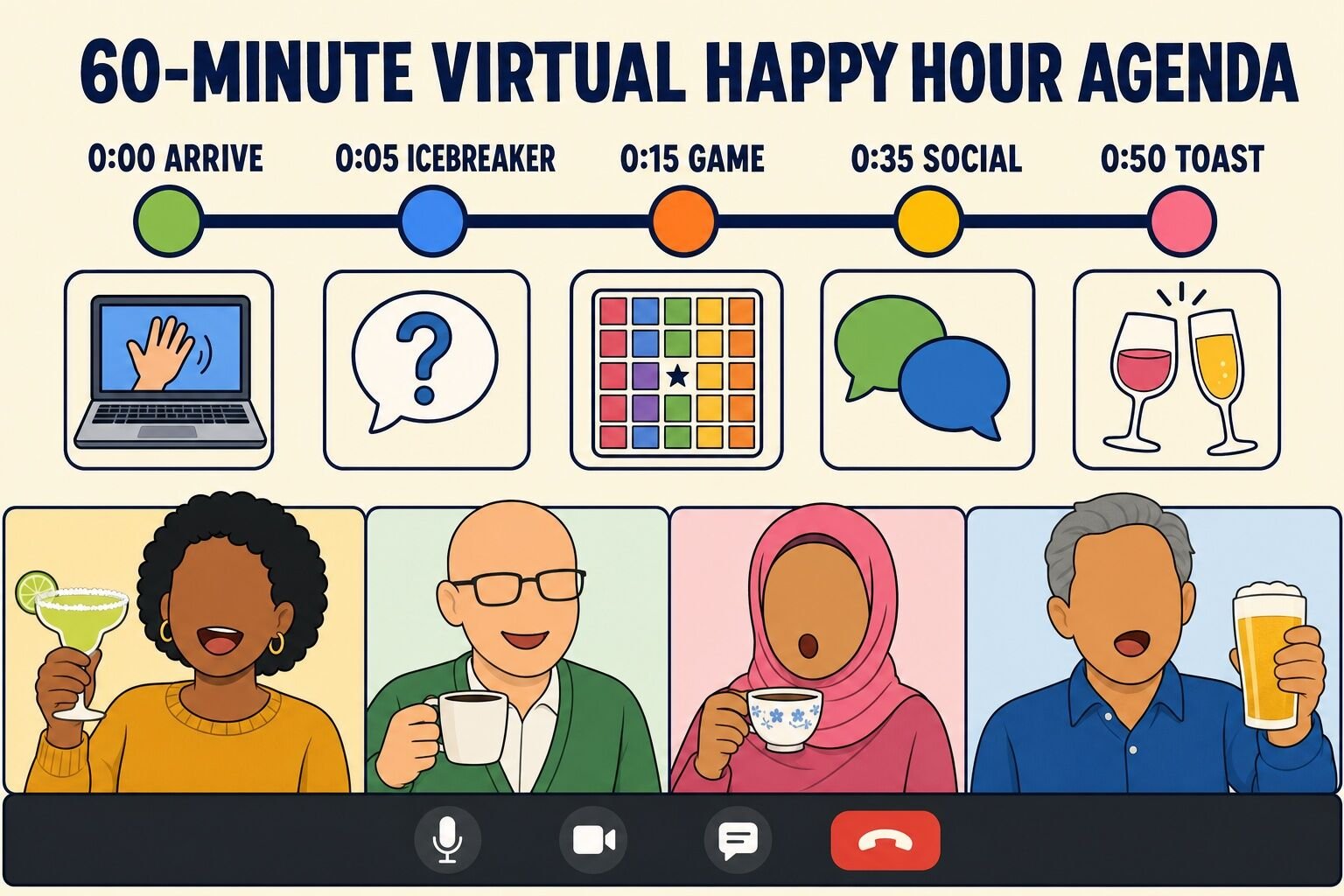
How to host a virtual happy hour: the 60-minute agenda
Before the list, here is the plan. Nearly every good virtual happy hour we have seen follows the same shape: a soft start, one quick icebreaker, one real game, unstructured time, and a deliberate ending. Sixty minutes is the right length for most teams. Since 2021 on teambuilding.com, 88% of virtual team building events have run 60 to 90 minutes, which is by far the most common format length, and for a social event the shorter end of that window is the safer pick.
Time
Block
What happens
0:00–0:05
Arrive and pour
Music on, cameras optional, host greets people by name as they join. Nobody waits in silence.
0:05–0:15
Icebreaker
One question, every person answers in one sentence, fixed order. See Happy Hour Icebreakers.
Breakout rooms of four or five with one prompt on screen, or an open conversation for groups under eight.
0:50–0:60
Toast and close
Announce the winner, one round of shout-outs, a toast, and a hard stop on time.
A few hosting decisions matter more than the games you pick:
Put it on the clock. We recommend making team socials paid and on work time. A happy hour at 4 p.m. on a Thursday gets far better attendance than one at 6 p.m., and it signals that connection is part of the job rather than an extra.
Pick the platform people already use. Roughly 85% of the hosted virtual events planned through teambuilding.com advisors run on Zoom, with the rest split across Microsoft Teams, Google Meet, and Webex. Whichever you choose, test breakout rooms and screen share before the call.
Send a real invitation. A calendar hold titled "Happy hour?" gets ignored. Send the agenda, the theme, what to bring, and a one-line promise that it ends on time. A working template: "Thursday 4:00–5:00 p.m. Virtual happy hour, 80s theme. Bring a drink (any kind) and one 80s song request. Two quick games, then hangout time. Hard stop at 5."
Budget for food if you can. For virtual team events with food, we recommend $25 to $35 per employee. A snack box or a drink kit shipped ahead of time turns "another call" into an occasion.
Run it like a good meeting, not a loose one.Mroz, Allen, Verhoeven, and Shuffler's meeting-science review recommends circulating an agenda in advance, starting on time, and actively encouraging participation from all attendees. The same rules make a happy hour work, because the failure mode of a social call is the same as a bad meeting: three people talking and everyone else muted.
Virtual happy hour games
These games take five to twenty minutes each, need nothing but the video call, and work whether the drinks are cocktails, coffee, or water. Pick one or two per session; more than that and the call turns into a game show.
1. Sneak It In
In the movie Super Troopers, a police officer works the word "meow" into a routine traffic stop as many times as he can without the driver noticing. Sneak It In borrows the premise, and it is our favorite background game for a happy hour because it runs underneath the conversation instead of replacing it.
Before the call, privately message each guest a secret word such as "kumquat," "railroad," or "jet ski."
Players work their word into normal conversation as many times as they can. Each unnoticed mention is a point.
Anyone can call out a suspected word at any time. A correct call steals the points; a wrong call costs the accuser one.
Reveal all the words at the end and count the points, then replay the best sneaks.
Best for: groups of 5–15 who talk a lot Time: runs in the background for the whole call Materials (cost): a list of secret words (free)
What we've learned: give teams of three the same word instead of one word per person. Teammates cover for each other, they plan in a breakout room first, and the reveal is funnier when a whole table has been saying "kumquat" for an hour.
2. Something in Common
Something in Common is the fastest way to turn strangers into a table. Small groups race to find the most unusual things they all share, and "we all have ears" does not count.
Split the call into breakout rooms of four or five.
Give each room three minutes to find the three most unusual things everyone in the room has in common.
Bring everyone back and have each room read its list. The group votes on the strangest one.
Reshuffle the rooms and play a second round with new mixes.
Best for: new or cross-team groups Time: 10–15 minutes Materials (cost): breakout rooms (free)
What we've learned: the word "unusual" does all the work. Say it twice in the instructions. Rooms that hear "things in common" produce "we all work here"; rooms that hear "unusual things in common" produce "we all cooked corn on the cob this week," and that is the answer people remember. More formats like this are in our guide to virtual icebreakers.
3. Virtual Happy Hour Bingo
Bingo gives every guest something to do for the whole call without anyone having to perform. Instead of numbers, the squares are things that happen at a virtual happy hour: "someone is on mute," "a pet appears," "a drink gets spilled," "someone says 'can you see my screen?'"
Send everyone the same card, or use the interactive card below so each player gets a shuffled board.
Play in the background of the whole happy hour. Players mark squares as the events happen.
Add a few confession squares ("has cried at a work meeting," "owns more than five mugs") that people have to admit to on camera before marking.
Award five-in-a-row, then four corners, then blackout, so more than one person gets a win.
Best for: any group, especially large ones Time: the length of the call Materials (cost): bingo cards (free)
What we've learned: the confession squares are the game. Reading one aloud and asking "who has done this?" turns bingo into an icebreaker with a scoreboard. More card templates are in our guide to online team building bingo.
4. I'll Drink to That
This is the happy hour version of a drinking game, and it works just as well with sparkling water or tea. The group agrees on a trigger phrase, and every time anyone says it, everybody drinks.
Pick a phrase that is common but slightly unusual on a call: "can everyone hear me?", "oh my goodness," "what do you think?"
Whenever someone says it, the first person to notice shouts "I'll drink to that!" and everyone takes a sip.
Add a second phrase halfway through the call, once people have started avoiding the first one.
Track who triggers the phrase most often and crown them at the end.
Best for: relaxed groups of 5–20 Time: runs in the background Materials (cost): a drink of any kind (free)
What we've learned: say "a sip, not a gulp" in the rules and mean it. The game is a running joke, not a pace-setter, and the alcohol-free players should be able to keep up with the same drink for the whole hour. The online drinking games guide linked above has more formats built for video calls.
5. The Question Game
Have you played The Question Game? Would you know if you had? How long can it go? The answer to that last one is "as long as the group can keep it up," and the record on one of our calls is about four minutes.
One player asks another player a question.
That player must reply with a question aimed at a third player, without answering.
Anyone who answers, repeats a question, or pauses for more than three seconds is out.
Play until one person is left, then start again with the eliminated players allowed back in.
Best for: quick-witted groups of 4–12 Time: 5–10 minutes Materials (cost): none (free)
What we've learned: tile order is your friend. Tell players to pass to the person on their right in the grid instead of choosing freely, so nobody gets skipped or targeted. More formats are in our guide to question games.
6. Most Likely To
Most Likely To is the easiest poll game to run on a video call, because the platform does the counting for you. The host reads a prompt, everyone votes for a teammate, and the group argues about the result.
Prepare a poll template with every attendee's name as an answer option.
Read a prompt such as "most likely to run away and join the circus," "most likely to end up on the news," or "most likely to lead the team in a zombie apocalypse."
Launch the poll, give 30 seconds, then share the results.
The winner takes a sip (or does five jumping jacks) and explains why the group is wrong.
Best for: teams who know each other a little Time: 10–15 minutes Materials (cost): the meeting platform's poll feature (free)
What we've learned: ask the runner-up why they voted the way they did. The vote is a laugh; the reasoning is where the stories come out. We keep a long list of most likely to questions for work if you need prompts.
7. Noisy Charades
Regular charades struggles on video because a webcam frame hides half the body. Noisy Charades flips the rules: players can only use words, never actions, and they cannot say the word itself.
Prepare prompts that are normally acted out: the Macarena, making pizza dough, throwing a football, walking a tightrope.
Privately send one prompt to the player whose turn it is.
They describe it in words only, with the prompt word and one or two obvious neighbors banned ("pizza" also bans "tomato" and "mozzarella").
First correct guess in the chat wins the point, then the guesser takes the next turn.
Best for: groups of 6–20 Time: 10–20 minutes Materials (cost): a prompt list (free)
What we've learned: describing a physical action without your hands is much harder than it sounds, which is the fun. If you would rather play the classic version, our charades generator produces prompts on demand.
8. Blackout Truth or Dare
Classic truth or dare does not belong on a work call, but this camera-based version does. It is one of the most requested games in our own hosted events because each player chooses their own level of exposure every round.
Everyone starts with cameras on.
The host reads a prompt: a truth ("worst job you have ever had?") or a dare ("show us the most embarrassing thing within arm's reach").
Anyone willing to answer keeps their camera on. Anyone who would rather sit it out turns their camera off, which is the blackout.
The host picks one lit tile to answer, then that player reads the next prompt.
Best for: mixed or new groups Time: 15–20 minutes Materials (cost): a prompt list (free)
What we've learned: keep the dares physical and quick ("hold up your drink," "show us your view") rather than performative. Singing and dancing dares are the fastest way to get a screen full of dark tiles.
9. Lightning Scavenger Hunt
A traditional scavenger hunt is too long and too collaborative for a happy hour. The lightning version is 60-second bursts: the host names an item, everyone runs, and the first tile back on camera holding it wins the round.
Prepare 8–10 prompts with a happy hour twist: "your favorite mug," "the weirdest glass in your kitchen," "something you would bring to a real bar," "a snack you are slightly embarrassed by."
Announce the prompt and start a 60-second timer.
Give a point to the first person back and a bonus point for the best story behind the item.
Run five or six rounds, then let the winner choose the next game.
Best for: re-energizing any size of group Time: 10–15 minutes Materials (cost): a prompt list (free)
What we've learned: personal prompts beat generic ones. "Something you have owned for more than ten years" produces a better conversation than "something blue." Full prompt lists are in our guide to lightning scavenger hunts.
10. Virtual Werewolf
Werewolf is a social deduction game: a few players are secretly wolves, the rest are villagers, and the village votes someone out each round while the wolves pick someone off at night. It needs no equipment beyond the call, and a talkative group can lose 45 minutes to it without noticing.
The host (the moderator) privately assigns roles: one wolf per four or five players, plus villagers.
"Night": everyone turns cameras off; the wolves message the moderator with a victim.
"Day": cameras back on, the moderator announces who was taken, and the village debates and votes someone out.
Repeat until the wolves are gone or outnumber the villagers.
Best for: groups of 8–16 with at least 30 minutes to spare Time: 30–45 minutes Materials (cost): none (free)
What we've learned: Werewolf is the main event, not the opener. Run one quick icebreaker first, then give the whole game block to it. Full rules are in our guide to Werewolf game rules.
Virtual happy hour trivia
Trivia is the most requested happy hour format for a reason: everyone understands the rules in ten seconds, teams give shy people cover, and a scoreboard gives the call a shape. Here are three trivia formats that fit inside a 20-minute game block.
11. DIY Happy Hour Trivia
You need three things for a good trivia round: a host, a question set, and a format. Everything else, including buzzer apps and slide decks, is optional. The host does not have to be the manager; ask for a volunteer and give them paid time to prepare.
Write or generate three rounds of five questions, each round on a different theme (pop culture, geography, "guess the year," food and drink).
Split the call into teams of three to five. Send each team to a breakout room with a shared answer sheet, or keep everyone together and have teams whisper in the chat.
Read each round, give teams 90 seconds to confer, then bring everyone back and score.
Finish with a wager round where teams bet points on the final question.
Best for: mixed groups of 6–40 Time: 15–25 minutes Materials (cost): question set and a scoring sheet (free)
What we've learned: the fastest way to write good happy hour trivia is to search "weird facts about [something the team cares about]" and turn the list into multiple-choice questions. Multiple choice keeps the pace up and lets people guess without embarrassment. Our virtual trivia guide has more formats and question banks.
12. Name That Tune
Music trivia gets more reactions than any other category, and it needs zero writing. The host plays the first five seconds of a song, and the first correct guess in the chat wins.
Build a playlist of 15 songs with obvious intros: a mix of decades, one or two theme songs, and a couple of guilty pleasures.
Share computer audio (not your microphone) and play five seconds of each track.
Award one point for the title and a bonus for the artist. The chat timestamp settles ties.
For the final round, play the songs guests requested in the invitation and have people guess who picked each one.
Best for: any group; especially good for a themed happy hour Time: 10–15 minutes Materials (cost): a playlist and screen share with audio (free)
What we've learned: test the audio share before the call. Nothing kills a music round like thirty seconds of "can anyone hear it?" while the host toggles settings.
13. How Well Do You Know the Team?
This round is trivia about the people on the call, and it is the one guests talk about afterward. The answers come from a two-minute survey sent with the invitation.
In the invite, ask three quick questions: "a country you have lived in," "a job you had before this one," "a food you refuse to eat."
Turn the answers into questions: "Which teammate spent a summer as a mascot?" with four names as options.
Run it as a poll so everyone votes at once, then reveal the answer and let the teammate tell the story.
Keep ten questions ready and stop at the eight-minute mark, even if the group wants more. Save the rest for next time.
Best for: teams of 8–30 who want to know each other better Time: 10–15 minutes Materials (cost): a survey form and polls (free)
What we've learned: the "tell the story" step is the whole point. The reveal takes five seconds; the story about the mascot job takes two minutes and is what people remember about the happy hour.
Virtual happy hour activities for work
Most games are activities, but not every activity is a game. These seven give a work happy hour something to do besides play: a class, a tasting, a story, or a five-minute ritual that becomes a team tradition.
14. Margarita Making Class
Margarita Making Class is our fully hosted virtual happy hour. A bartending host teaches the team to make margaritas from a kit shipped to each guest, mocktail versions included, and runs games between the drinks. It is the option for teams that want a real event rather than a call with a plan, and the host handles the pacing, the icebreakers, and the reveal of who salted their rim best.
Book a date at least a few weeks out so kits arrive in time; every guest needs a shipping address.
Guests receive cocktail or mocktail ingredients and a shaker set ahead of the event.
On the day, the host runs 60 to 90 minutes of mixing instruction, drink-themed trivia, and social games.
Finish with a toast and a group photo of everyone's glasses on screen.
Best for: teams of 10–100 who want a hosted event with something in hand Time: 60–90 minutes Materials (cost): hosted event with shipped kits (priced per person on the event page)
What we've learned: as of September 2026, Margarita Making Class holds a 4.99 out of 5 rating across 255 reviews, and the comment that comes up most is that the mocktail guests had just as much fun as the cocktail guests, because the game is the mixing and the shaking, not the tequila. If you would rather assemble your own kit, our guide to virtual happy hour kits covers what to ship.
15. Happy Hour Icebreakers
Five minutes of icebreakers at the top of a happy hour changes the whole call. One question, every person answers in one sentence, fixed order, no follow-ups until everyone has gone.
Spin the generator below or pick one question: "Which song can you listen to on repeat?", "Pancakes or waffles?", "On a scale of one to five, how good is your guacamole?"
The host answers first to set the length and the tone.
Each person names who goes next before they answer. Video calls lack the visual cue of a circle, so be deliberate about the order.
Cap answers at 20 seconds and save reactions for the chat.
Best for: the first five minutes of any happy hour Time: 5–10 minutes Materials (cost): one question (free)
What we've learned: this-or-that questions with a close split are the best openers for a social call. "Pancakes or waffles?" gets a 50/50 room arguing; "what is your favorite weather?" gets a polite silence.
16. Compliment Train
Nothing beats hearing praise about yourself, except maybe piling it onto a coworker. The Compliment Train is peer recognition disguised as a game, and it makes a good closing ritual before the toast.
The host compliments one person, specifically: a thing they did, not "you're great."
That person compliments someone who has not yet received one.
Continue until every tile has been named. The last person compliments the host.
Screenshot the chat if people add written kudos, and post it in the team channel afterward.
Best for: teams of 5–20 Time: 5–10 minutes Materials (cost): none (free)
What we've learned: announce the rule "you cannot pick someone who has already been picked" up front. Without it the same three popular people get complimented twice and the quiet ones never come up.
17. Ocean's Five or So
Ocean's Eleven is a heist movie with George Clooney and a lot of planning. Ocean's Five or So is the happy hour version: breakout rooms plan a wildly ambitious heist, then pitch it to the group.
Split the call into breakout rooms of about five.
Give each room ten minutes to plan a heist of a high-profile target: the office coffee machine, the Mona Lisa, the CEO's parking spot. Every member needs a role.
Bring everyone back and have each room pitch its plan in two minutes.
Vote in a poll on the heist most likely to succeed, and give the winners bragging rights.
Best for: creative teams of 10–30 Time: 20–25 minutes Materials (cost): breakout rooms (free)
What we've learned: the "everyone has a role" rule is what makes this work in a breakout room. It forces the group to talk about each other's strengths, which is the real activity hiding inside the silly one.
18. Truth Is Stranger Than Fiction
Everyone has one story that is too strange to tell without an opening. This activity is the opening. Guests tell a true story that sounds made up, and the group guesses whether it is.
Send a prompt in advance: "What story do you always want to tell but rarely get the chance?" or "What is the strangest coincidence that ever happened to you?"
Each volunteer tells their story in two minutes or less.
Before the reveal, the group votes: true, or embellished?
Award a point to every storyteller who fools the majority.
Best for: groups of 6–15 Time: 15–20 minutes Materials (cost): none (free)
What we've learned: ask for volunteers in the invitation, not on the call. People need a day to remember their story, and three prepared storytellers beat ten people put on the spot.
19. Teammate Bartender
One coworker teaches the group their signature drink, alcoholic or not. It costs nothing, it puts a different person at the front of the room each month, and it is the easiest recurring happy hour format we know.
Pick a volunteer bartender a week ahead and have them send a short ingredient list (three or four items, all available at a grocery store) with the invitation.
On the call, the bartender demonstrates one step at a time while everyone follows along.
Everyone raises their finished drink for a screenshot, then the bartender shares the story behind it.
Rotate the role each month, and keep a running "team cocktail menu" in a shared document.
Best for: recurring team happy hours Time: 15–20 minutes Materials (cost): three or four ingredients per person ($5–$15, or covered by the company)
What we've learned: a mocktail version of the recipe is not optional. Have the bartender name the swap in the ingredient list ("or ginger beer instead of the rum") so nobody has to ask. Teams that want a professional behind the bar can browse virtual mixology classes instead.
20. Virtual Tasting Flight
A tasting gives a happy hour an expert and a structure: three or four small pours, a few facts about each, and a group vote at the end. Wine, beer, whiskey, coffee, and chocolate all work, and the samples ship in advance.
Choose a category and ship three or four samples to each guest, or send a shopping list of three specific bottles and let people buy their own.
The host (a teammate who knows the subject, or a booked expert) introduces each sample for two or three minutes.
After each pour, everyone rates it in a poll and shares one word in the chat.
Reveal the group favorite and the most divisive sample at the end.
Best for: teams of 8–40 with a food-and-drink streak Time: 30–45 minutes Materials (cost): samples ($15–$40 per person, plus shipping)
What we've learned: ship at least a week ahead and confirm addresses in the invitation, not two days out. The tasting can survive one guest without samples; it cannot survive five. Our guide to virtual alcohol tasting compares hosted options for wine, beer, and spirits.
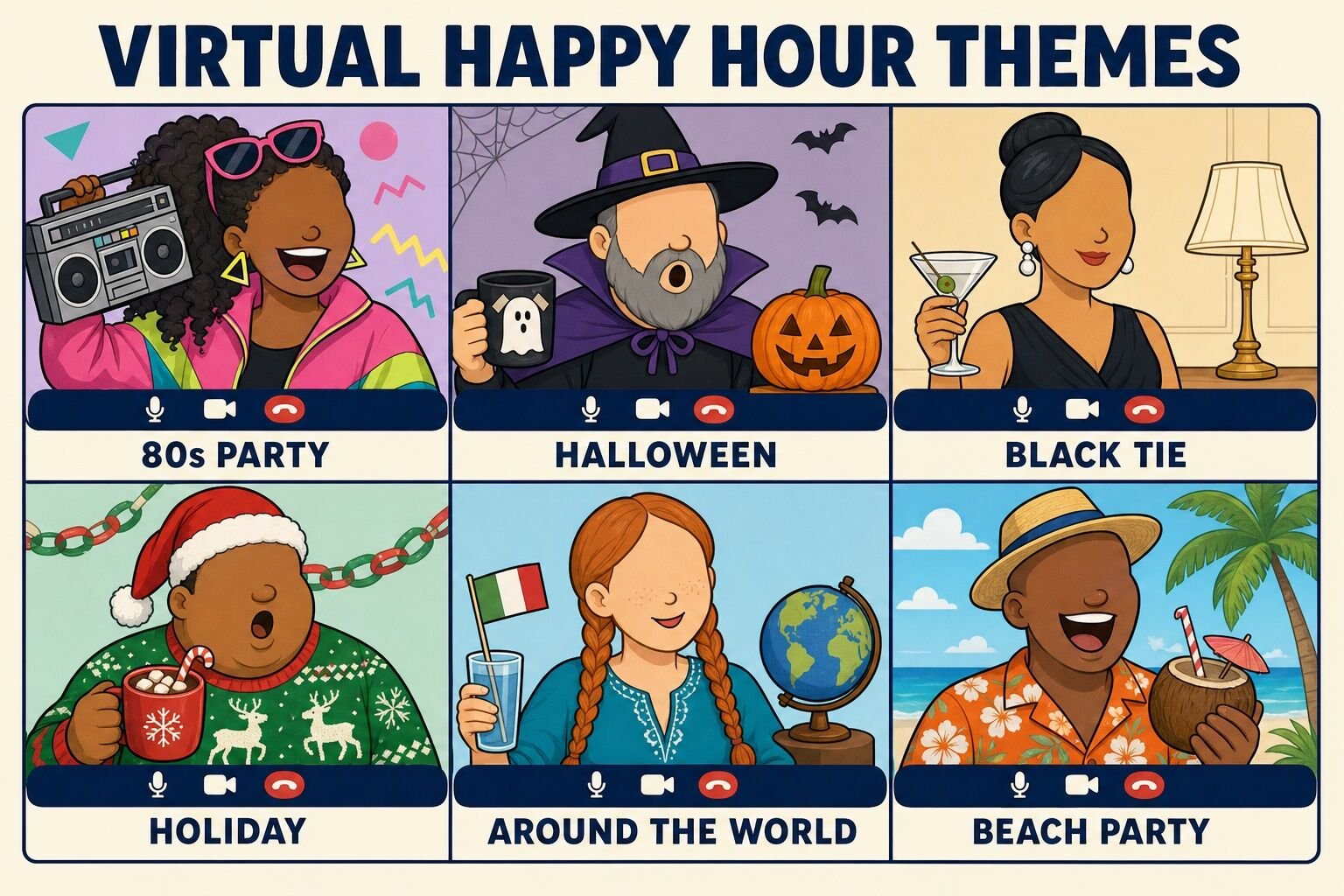
Virtual happy hour themes
A theme is the cheapest upgrade a happy hour can get. It gives people something to wear, a playlist to argue about, and a reason to make a drink they would not normally make. Announce the theme in the invitation and give at least a week's notice.
21. 80s Party
The 80s theme works because everyone already knows the costume, the music, and the hair. Any decade can do the same job; the 80s just has the most neon.
Send a playlist request with the invitation: one 80s song per guest.
Dress code: bright colors, big shoulders, sweatbands, optional mullet.
Run Name That Tune with the guests' requests as the final round.
Close with a group photo in the most 80s virtual background you can find.
Best for: teams who like to dress up Time: a full 60-minute happy hour Materials (cost): costumes from the back of the closet (free)
What we've learned: the playlist request is the secret. Guests who picked a song show up, because they want to hear it played.
22. Halloween Happy Hour
Online, Halloween can happen any month you want it to. Costumes, spooky virtual backgrounds, and a round of ghost stories give a regular happy hour a completely different feel.
Ask for costumes, or "one spooky item in frame" for people who will not dress up.
Hold a 60-second costume parade: each tile stands, spins, and gets a chat reaction score.
Run one game with a twist, such as Most Likely To with prompts like "most likely to survive a horror movie."
Finish with two-minute ghost stories from volunteers, lights off.
Best for: October, or any month the team needs a change Time: a full 60-minute happy hour Materials (cost): costumes and a spooky background (free)
What we've learned: the "one spooky item in frame" fallback doubles participation. A carved pumpkin or a plastic spider counts, and nobody feels underdressed. More ideas are in our guide to virtual Halloween party ideas.
23. Black Tie Event
Nobody actually has to wear a black tie. The joke is dressing up for a video call, and the payoff is a screen full of blazers, gowns, and one person in a tuxedo t-shirt.
Dress code: formal from the waist up, whatever you want below the frame.
Drinks: something in a stemmed glass, alcoholic or not. Sparkling cider in a flute counts.
Run a mock awards ceremony: "Best Virtual Background," "Most Likely to Be on Mute," "Rookie of the Year."
Close with a formal toast from the most junior person on the call.
Best for: end-of-quarter and milestone celebrations Time: a full 60-minute happy hour Materials (cost): whatever formal wear people own (free)
What we've learned: the awards are the heart of this theme, so write them in advance and make every award a genuine, specific compliment wearing a silly name.
24. Holiday Happy Hour
A holiday theme is the easiest happy hour of the year to get people excited about, and it does not have to happen in December. Ugly sweaters, a holiday playlist, and a gift-guessing game carry the call.
Send a holiday card or a small treat in advance if budget allows.
Dress code: the ugliest sweater available, with a chat-vote contest at the halfway point.
Icebreaker: "What is your earliest memory of the holidays?"
Game: holiday trivia or Name That Tune with only holiday songs.
Best for: December, or a mid-year "holiday in July" Time: a full 60-minute happy hour Materials (cost): sweaters and a playlist (free); optional treats ($10–$25 per person)
What we've learned: a happy hour is the right size for a small team's holiday party, but a company-wide one needs more structure. Our guides to virtual holiday party ideas and ugly sweater parties cover the bigger version.
25. Around the World
Sharing a drink with coworkers is a pastime in every culture, and a distributed team is already international. This theme puts that on the agenda.
Each guest picks a country (their own, one they have visited, or one they want to visit) and brings a drink or snack from it.
Open with "cheers" in every language on the call.
Each person gives a 60-second tour of their pick: what it is, why they chose it.
Finish with a geography trivia round or a "guess whose vacation photo" slideshow.
Best for: distributed and multinational teams Time: a full 60-minute happy hour Materials (cost): one drink or snack per guest (self-supplied)
What we've learned: the 60-second tour is where the connection happens. Teammates who have worked together for two years find out one of them grew up in Lagos and another in Lima.
26. Beach Party
The beach theme is a midwinter special. Tropical backgrounds, a summer playlist, and a drink with a paper umbrella get a team out of its February slump for an hour.
Dress code: Hawaiian shirts, sunglasses, sun hats.
Everyone sets a beach virtual background and makes a drink with a paper umbrella (mocktails encouraged).
Run a Lightning Scavenger Hunt with beach prompts: sunscreen, a seashell, a towel, something with a palm tree on it.
Close with a "best summer memory" round.
Best for: teams in cold climates during winter Time: a full 60-minute happy hour Materials (cost): a paper umbrella and a virtual background (free)
What we've learned: the beach hunt reveals who still has a bottle of sunscreen from 2019 within arm's reach, and that person always has a story.
27. Game Show Night
Turn the host into a game show host and the happy hour into a set. Buzzer sounds, a scoreboard on screen, and an over-the-top introduction for each "contestant" make three ordinary games feel like an event.
The host dresses the part (blazer, oversized microphone) and opens with a theme song.
Run three short rounds: a trivia round, a Most Likely To round, and a lightning round of this-or-that questions.
Keep a scoreboard visible on screen share the whole time.
Award a prize to the winning team: bragging rights, a ridiculous trophy in the mail, or first pick of the next theme.
Best for: competitive teams of 8–40 Time: a full 60-minute happy hour Materials (cost): a scoreboard slide and sound effects (free)
What we've learned: the visible scoreboard matters more than the prize. People will fight over a point that is worth nothing as long as everyone can see it. If you want a professional to run the format, see our guide to virtual game shows.
Alcohol-free virtual happy hour ideas
Every idea on this list works without alcohol, and some teams prefer to make that explicit: for people who do not drink, for teams with members in different time zones for whom it is 10 a.m., and for companies that simply do not want alcohol on the work calendar. These three formats put the drink in the background on purpose.
28. Coffee and Pastry Hour
Move the happy hour to the morning and swap the cocktails for coffee. The format is identical, the energy is better, and international teammates can join at a reasonable hour.
Schedule for a time that lands mid-morning for most of the team.
Ship a small pastry box or a bag of coffee beans in advance if budget allows.
Open with a "show us your mug" icebreaker and a quick vote for the best one.
Run one game, then leave 15 minutes for open conversation.
Best for: teams spread across time zones Time: 30–45 minutes Materials (cost): coffee (free); optional pastry box ($10–$20 per person)
What we've learned: a 30-minute coffee hour on a recurring calendar slot outlasts a one-off evening happy hour almost every time. Our guide to virtual coffee breaks covers the recurring version.
29. Mocktail Making Hour
A mocktail class has all the theater of a cocktail class, which is the point: the shaking, the garnish, and the reveal are the activity, and the ingredients are all available at any grocery store.
Send three recipes with the invitation, each with four ingredients or fewer: a citrus spritz, a ginger mule, and a fruit-and-herb muddle.
Have one teammate lead the demo, one recipe at a time, while everyone follows along.
Hold a garnish contest judged by chat reaction.
Vote on the team's official mocktail and add it to the next in-person event.
Best for: any team; ideal for onboarding cohorts and mixed-age groups Time: 30–45 minutes Materials (cost): ingredients ($8–$15 per person)
What we've learned: the garnish contest generates more laughs than the drink itself. Encourage absurd garnishes (a whole celery stalk, a cookie on the rim) and let the chat vote.
30. Snack Box Showdown
Ship every guest the same box of five or six snacks and taste them together, one at a time, with a running scoreboard. It is a tasting flight with no alcohol and a much higher chance of someone spitting something out on camera.
Order identical snack boxes (international snacks work best) and ship them a week ahead.
Unbox together on the call, then taste one item at a time in the same order.
After each snack, everyone rates it in a poll and gives a one-word review in the chat.
Crown the team favorite and the most controversial snack, and post the rankings in the team channel.
Best for: teams of 8–50 Time: 30–45 minutes Materials (cost): snack boxes ($25–$35 per person, which is the food budget we recommend for virtual team events)
What we've learned: include one snack that is genuinely strange. The reaction to the salted licorice or the durian candy is the moment everyone brings up at the next meeting.
Virtual happy hour ideas for large teams
A happy hour for eight people can be a conversation. A happy hour for 80 cannot, and the most common mistake we see is running the big one like the small one: an open floor, a turn-based icebreaker, and a host trying to call on everyone. Scale is not the limit. The median virtual event on teambuilding.com is a team of 16, but we have hosted 448 virtual events with 100 or more participants, the largest with over 1,000 attendees, and the same principles carry from 30 people to 300.
Everyone acts at once. Bingo, Lightning Scavenger Hunts, Most Likely To polls, and Name That Tune all work at any size because nobody waits for a turn. Retire anything with a turn order (The Question Game, Truth Is Stranger Than Fiction) once the call passes about 20 people.
Breakout rooms of four or five, twice. The social block becomes two rounds of small rooms with one prompt on screen. Reshuffle between rounds so people meet a second set of faces.
Give the host a co-host. One person runs the games; the other watches the chat, reads the best lines aloud, and manages breakout assignments. A single host at 60+ people spends the whole hour on logistics.
Use the chat as the main channel. Guesses, votes, and one-word reviews in the chat let the quiet two-thirds of a large call participate without unmuting.
Cap it at 60 minutes. Large calls tire people faster. Run the agenda tight, end on time, and let the breakout rooms be the part that runs long if anything does.
Free virtual happy hour games and ideas: summary table
Twenty-six of the 30 ideas above cost nothing beyond the video call and whatever guests already have in the fridge. The table lists every idea with the group size and time it fits best.
What we've learned from hosting virtual happy hours
We started running virtual events for work teams in 2020, and as of September 2026, teams have spent more than 30,000 hours in live virtual events on our platform since 2021. A large share of those events were, in spirit, happy hours: a team, a drink, and an hour to spend together. A few lessons hold up across all of them.
The host matters more than the drinks. Roughly one in five published reviews of our virtual events mention the host by name. Participants remember who ran the show, not which platform it was on or what was in the glass. For a DIY happy hour, that means picking a host who is comfortable talking to a grid of tiles, giving them paid prep time, and letting them run the agenda without a manager overriding it.
Structure is what makes it feel casual. The calls that feel relaxed are the ones with a plan: a five-minute icebreaker, one game, then open time. The calls with no plan are the ones where people leave after 20 minutes. Run the agenda and the ease follows.
Make the alcohol-free version the default, not the exception. Every game and theme above works with coffee, tea, or sparkling water. Say so in the invitation, put "any drink" in the dress code, and the teammates who do not drink stop wondering whether the event is for them.
The small talk is not filler. A three-week daily study of employed adults published in the Academy of Management Journal found that workplace small talk enhanced employees' positive social emotions, boosting citizenship behaviors and end-of-day well-being, even though it could briefly disrupt cognitive engagement with work. The 15 minutes of open conversation at the end of the agenda is doing real work; protect it.
End early and it comes back. A 45-minute happy hour that ends with people wanting more gets a repeat slot on the calendar. A 90-minute one that runs long does not. Build the hard stop into the invitation and honor it.
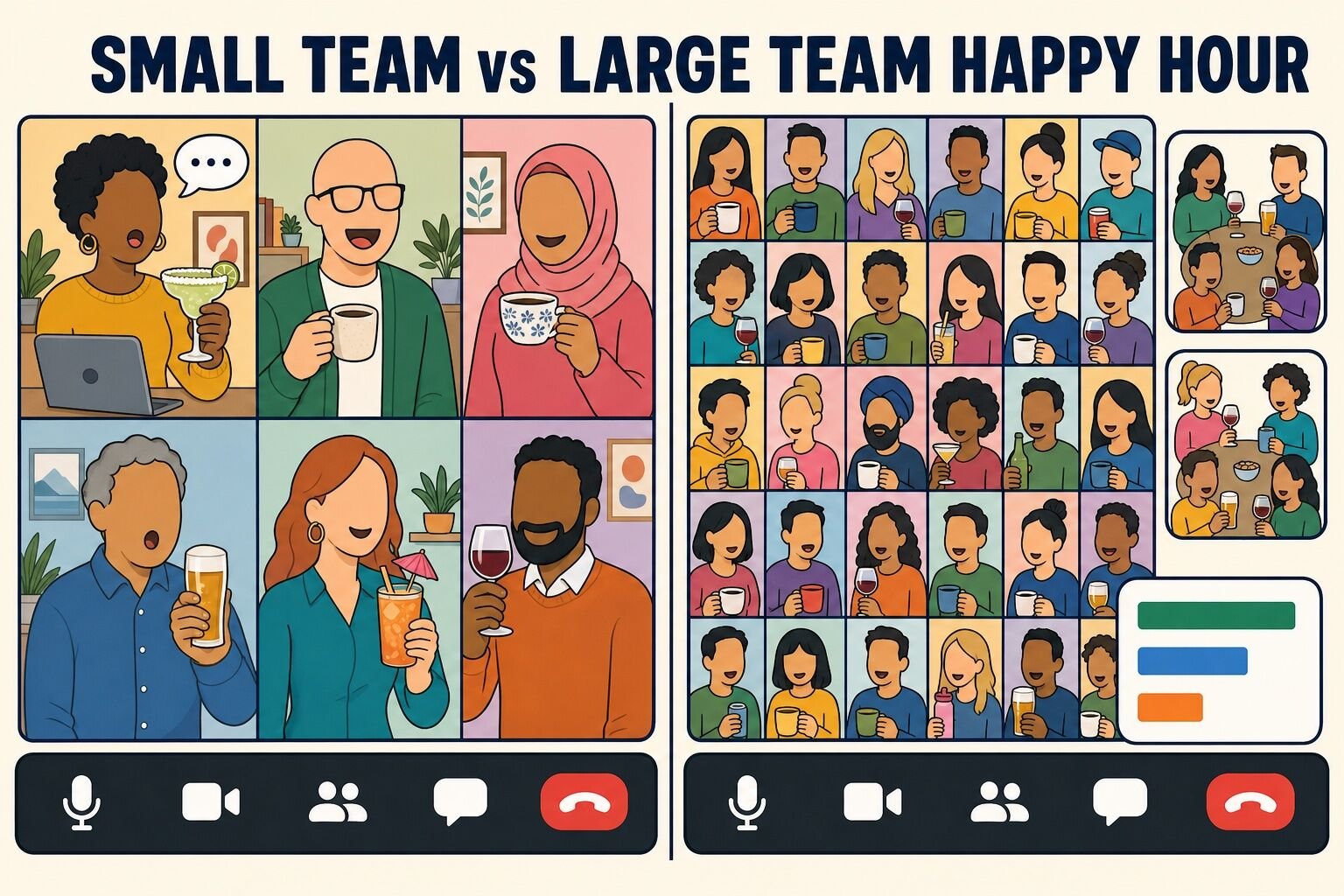
Group size changes the format, not the goal. The graphic below is the shorthand we use when planning: small teams get conversation, large teams get mechanics.
Small teams (roughly 4–12)
Large teams (25+)
What works
Conversation formats where everyone speaks each round: The Question Game, Truth Is Stranger Than Fiction, Teammate Bartender
Simultaneous-action formats: Bingo, Most Likely To polls, Lightning Scavenger Hunts, Name That Tune, breakout rounds
Host's job
Ask follow-ups and keep turns moving
Run the mechanics: polls, timers, breakout assignments, reading the chat aloud, with a co-host
Where it fails
Too much structure; a game that needs 20 people
Anything with a turn order; an open floor with no prompt
Ideal length
45–60 minutes
60 minutes with a hard stop
Tools
A question list and a timer
Polls, chat, breakout rooms, a shared scoreboard
If you would rather have a professional host run the whole thing, our hosted virtual events are built around exactly these principles.
Virtual happy hour ideas we don't recommend
Several formats that show up on every list of virtual happy hour ideas consistently fail on a video call. Some break on latency, some put one person under camera pressure while everyone else watches, and some are too passive to build any connection at all. Here is our Lame List, with what to run instead.
Activity
Why skip it
Verdict
Virtual karaoke
Breaks on latency: the singer and the backing track drift apart, and everyone else mutes. Run Name That Tune instead.
Skip
Dance party or dance tag
Puts each person under camera pressure one at a time. Half the tiles go dark by the second song. Use a Lightning Scavenger Hunt for movement.
Skip
Useless talent show
Same problem: individuals performing for a silent grid. Fun for the three extroverts, awkward for everyone else. Truth Is Stranger Than Fiction gets the same stories without the performance.
Skip
Staring contest
Ends in ten seconds, works for two people, and reads as nothing on a laggy call.
Skip
Watch party
Too passive. Thirty people watching a movie in silence is not a happy hour; it is a screen share with witnesses.
Skip
Open floor with no plan
"Just hang out and chat" is the number one reason people stop attending. Two people talk, the rest wait for a polite moment to leave.
Skip
Drinking games with real pace
Anything that sets a drinking pace excludes the teammates who are not drinking and creates an HR problem for the ones who are. Keep triggers to "a sip" and make the alcohol-free version explicit.
Know your group
Fridge and home tours
Filming the inside of your kitchen is fun for the person doing it and uncomfortable for the coworker who does not want their home on screen. Show us your mug instead.
Know your group
90-minute happy hours
The first hour is great and the second half-hour is people finding reasons to leave. Book 60 and end on time.
Shorten it
Final thoughts
The best virtual happy hour is a 60-minute call with a plan: one icebreaker, one game, a theme if you want one, and time to talk. Most of the ideas above are free, all of them work without alcohol, and none of them need more than a week's notice. Pick two for the next call, rotate the host, and the happy hour will outlast the novelty.
Quick answers about planning and hosting a virtual happy hour for a work team.
What is a virtual happy hour?
A virtual happy hour is a social event held over a video call, usually on Zoom, Microsoft Teams, or Google Meet, where coworkers bring their own drinks and a host runs a short agenda of icebreakers, games, and conversation. The drink is optional and can be coffee, tea, or sparkling water. These events are also called online happy hours, remote happy hours, Zoom happy hours, and virtual social hours.
What are good virtual happy hour games?
The best virtual happy hour games let everyone play at the same time and take five to twenty minutes: Virtual Happy Hour Bingo, Most Likely To (run as a poll), Lightning Scavenger Hunts, Name That Tune, and a short trivia round. Sneak It In, where each guest works a secret word into conversation, runs in the background of the whole call. Formats with a turn order, such as The Question Game, work best for groups under about a dozen.
How do you host a virtual happy hour?
Pick a 60-minute slot during work hours (late afternoon on a Thursday works well), send an invitation with the agenda, the theme, and what to bring, and run a simple plan: five minutes to arrive, a ten-minute icebreaker, one 20-minute game, 15 minutes of breakout-room social time, and a toast with a hard stop. Test breakout rooms and audio sharing before the call, and give the host paid time to prepare.
How long should a virtual happy hour be?
Sixty minutes. Since 2021 on teambuilding.com, 88% of virtual team building events have run 60 to 90 minutes, and for a social event the shorter end of that window is the safer choice. A 45-minute happy hour that ends with people wanting more gets a repeat slot on the calendar; a 90-minute one that runs long does not.
What are some virtual happy hour themes?
Popular virtual happy hour themes include an 80s party, Halloween (any month), a black tie event with a mock awards ceremony, a holiday happy hour with ugly sweaters, an around-the-world night where each guest brings a drink or snack from a country, a beach party for midwinter, and a game show night with a scoreboard and buzzer sounds. Announce the theme in the invitation and give at least a week's notice.
Can you have a virtual happy hour without alcohol?
Yes, and we recommend making the alcohol-free version the default. Every game and theme works with coffee, tea, or sparkling water. Dedicated alcohol-free formats include a morning coffee and pastry hour for teams across time zones, a mocktail making hour with three grocery-store recipes, and a snack box showdown where everyone tastes and rates the same shipped snacks. For virtual team events with food, we recommend budgeting $25 to $35 per employee.
Comments (232)
Mike
Kris Kross was active in 1991 so woudln't be fitting for a 80's theme. Overall some great ideas here.
Marly
There are a BUNCH of great ideas out there, and it's great to see how creative everyone is. Personally I love the idea of "Newlyweds" style games, where you see how much team members already know about each other, and when they don't... you get hilarious fails! If it hasn't been suggested, team meditation is always a strong way to start off a call and allow everyone to feel more relaxed and less self-conscious before heading into the crazy. I'm also a huge fan of trivia type activities, or creative/critical thinking activities (I'm envisioning deserted island conversations, survival or camping scenarios, etc). Personally, I'm a reader. Anything that involves books instantly has my attention. One activity could be a book mash-up, where you take titles and mix them around and have team members give you the new, completely mashed-up plot in their own words. This is something I've done with students and team members alike! Let me tell you, things get interesting when you get books like "The Lord of Gatsby".
Candace
I just love it! And there are so many comments with great ideas to make our virtual happy hours and meetings so much lighter and fun especially despite everything we're all going through during these times! I love the costume challenge idea and especially the Show & Tell- Pet Edition. I know my dog would just love to join in and show off! TikTok has been a trending subject and I think it'd be awesome if everyone could learn an existing dance or create our own! The Masked Singer is a also such a great concept and it's so fun. It'd just be hilarious to all show up to the call with masks on and we'd have to figure out who is who!!!
CESAR IPARREA
Have you ever played LOTERIA?, Mexican family game, like BINGO, but instead of numbers we use "Mexican symbols" like sombrero, tequila, animals and different icons of Mexican Culture.
Jessica Dell'Era
I've been thinking about how we could play "Who's the Leader?" in a videoconference setting. I think it would be a fun and physical activity for a virtual happy hour! One volunteer gets put into a breakout room by themself while the rest of the team chooses a leader. The leader starts some sort of physical gesture (like tapping on their nose, turning their head side to side, raising and lowering their shoulders, etc.) that everyone else can copy on camera. The volunteer returns to the main group and watches everybody. The leader changes the gesture every 10-15 seconds while the volunteer tries to guess who's in charge! It's sure to get people laughing and moving.


Kris Kross was active in 1991 so woudln't be fitting for a 80's theme. Overall some great ideas here.
There are a BUNCH of great ideas out there, and it's great to see how creative everyone is. Personally I love the idea of "Newlyweds" style games, where you see how much team members already know about each other, and when they don't... you get hilarious fails! If it hasn't been suggested, team meditation is always a strong way to start off a call and allow everyone to feel more relaxed and less self-conscious before heading into the crazy. I'm also a huge fan of trivia type activities, or creative/critical thinking activities (I'm envisioning deserted island conversations, survival or camping scenarios, etc). Personally, I'm a reader. Anything that involves books instantly has my attention. One activity could be a book mash-up, where you take titles and mix them around and have team members give you the new, completely mashed-up plot in their own words. This is something I've done with students and team members alike! Let me tell you, things get interesting when you get books like "The Lord of Gatsby".
I just love it! And there are so many comments with great ideas to make our virtual happy hours and meetings so much lighter and fun especially despite everything we're all going through during these times! I love the costume challenge idea and especially the Show & Tell- Pet Edition. I know my dog would just love to join in and show off! TikTok has been a trending subject and I think it'd be awesome if everyone could learn an existing dance or create our own! The Masked Singer is a also such a great concept and it's so fun. It'd just be hilarious to all show up to the call with masks on and we'd have to figure out who is who!!!
Have you ever played LOTERIA?, Mexican family game, like BINGO, but instead of numbers we use "Mexican symbols" like sombrero, tequila, animals and different icons of Mexican Culture.
I've been thinking about how we could play "Who's the Leader?" in a videoconference setting. I think it would be a fun and physical activity for a virtual happy hour! One volunteer gets put into a breakout room by themself while the rest of the team chooses a leader. The leader starts some sort of physical gesture (like tapping on their nose, turning their head side to side, raising and lowering their shoulders, etc.) that everyone else can copy on camera. The volunteer returns to the main group and watches everybody. The leader changes the gesture every 10-15 seconds while the volunteer tries to guess who's in charge! It's sure to get people laughing and moving.