Virtual Corporate Events People Look Forward To: 27 Ideas for Companies
27 virtual corporate event ideas for companies, from free in-house formats like a virtual campfire to workshops, entertainment, holiday parties, and client events, plus how to plan one and where to book a hosted anchor event.
Published
·
Updated
Virtual corporate events are how distributed companies do the things offices used to do by accident: celebrate wins, welcome new people, thank clients, and give coworkers a reason to talk about something other than the sprint. Done well, they are the best hour of someone's week. Done badly, they are a webinar with a party hat on.
We have run virtual events since 2020, when our in-person museum tours moved online overnight, and as of August 2026 more than 40,000 teams have booked virtual events with teambuilding.com. This guide collects the 27 ideas that hold up at company scale, plus how to plan one and where to book.
What are virtual corporate events?
Virtual corporate events are company-organized gatherings held online, usually on Zoom or Microsoft Teams, for employees, clients, or both. They range from a 20-minute coffee roulette pairing to a 90-minute hosted game show for 500 people. They are also called virtual company events, online corporate events, virtual events for companies, or remote corporate events.
Virtual corporate events are the online branch of corporate events and the company-level branch of virtual events. Their closest relatives are virtual team building activities and virtual team celebrations. The difference is scale: a corporate event has a company budget and a guest list that crosses departments, while those are planned by one team lead for one team. The category stretches from company-wide game shows and virtual conference sessions down to a department virtual happy hour.
Why bother? Remote work removed most of the unplanned moments where coworkers get to know each other, and nothing replaces them unless someone puts it on the calendar. More than morale is at stake. The U.S. Surgeon General's 2023 advisory on loneliness states that lacking social connection can raise the risk of premature death as much as smoking up to 15 cigarettes a day, and it explicitly recommends that employers make social connection a strategic priority. Virtual events are not the whole answer, but they are the part a company can schedule.
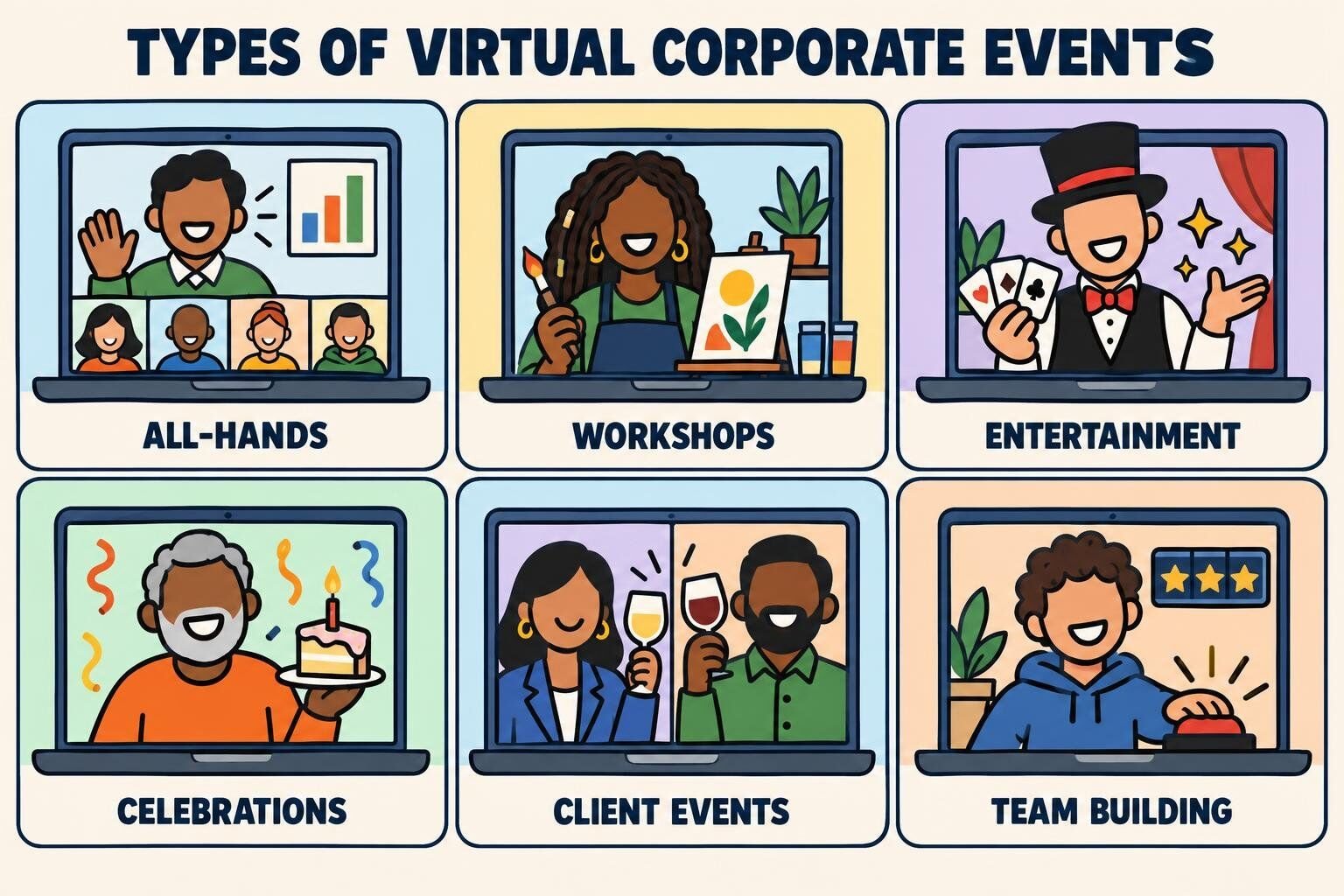
Most virtual company events fall into six types. Knowing which one you are planning settles the length, the budget, and who should host it.
Type
Purpose
Typical length
Typical group
Examples
All-hands and town halls
Share news, align everyone
30 to 60 minutes
Whole company
Quarterly kickoff with a game break
Team building events
Build connection across teams
60 to 90 minutes
10 to 100+
Hosted game show, escape room, trivia
Workshops and classes
Learn a skill together
60 to 120 minutes
8 to 50
Cooking class, storytelling workshop
Entertainment
Give people a show
30 to 60 minutes
Any size
Magician, comedian, live music
Parties and celebrations
Mark a moment
60 to 90 minutes
Team to company
Holiday party, awards ceremony
Client and customer events
Build relationships outside the company
45 to 90 minutes
10 to 200
Tasting, open house, company tour
A good virtual events calendar mixes types: one anchor event per quarter, usually hosted, plus smaller in-house formats in between.
Virtual corporate event ideas you can run in-house
These virtual corporate event ideas cost little or nothing and need no outside vendor, just an organizer and a calendar invite.
1. Virtual Campfire
A virtual campfire is a cozy, story-driven session where coworkers trade short prompts around a shared "fire," usually an animated fire background or a lit candle on everyone's desk. It is the format that kept our own company alive in 2020: as Inverse reported, we rebuilt the business almost overnight by running tiny virtual campfires for newly remote teams. Our virtual campfire guide has the full DIY version.
To run it:
Ask everyone to dim the lights and bring a hot drink or s'mores-style snack.
Open with a light prompt such as "the best meal you have ever eaten on a trip."
Move to one deeper prompt, like "a small moment that changed your career."
Give each person 60 to 90 seconds, and let the organizer go first to set the tone.
Close with a round of one-word reactions.
Best for: teams of 6 to 25 who want real conversation Time: 45 to 60 minutes Materials (cost): a fire background, optional snack kits (free to $)
To hand it off, tiny campfire is our hosted version: a professional host runs the session, s'mores kits are mailed to every participant, and the group splits into small teams for games.
What we've learned: the second prompt matters more than the first. Light prompts warm people up, but the stories people remember a month later come from a prompt with a little stake in it.
2. Show-and-Tell Presentation Party
Everyone prepares a five-minute presentation on anything except work: how to make the perfect omelet, a ranking of airport food, the history of their hometown. Slides are optional and silliness is encouraged. It works because people get to show a side of themselves the org chart never sees. Pair it with our presentation games if you want structure.
To run it:
Send a sign-up sheet two weeks ahead with eight to ten slots.
Cap each talk at five minutes and use a visible timer.
Follow each talk with one question from the audience.
Award joke categories at the end: Most Useful, Most Unexpected, Best Visual.
Best for: curious teams of 10 to 40 Time: 60 minutes Materials (cost): none (free)
3. Virtual Lunch and Learn
A lunch and learn is a short teaching session over lunch, led by an employee or a guest. Virtually, it becomes one of the easiest recurring company events to keep alive, because people are eating anyway. Rotate presenters across departments so engineering teaches sales something and finance teaches everyone something.
To run it:
Pick a monthly slot at midday in your main time zone.
Ask presenters for 20 minutes of content and 10 minutes of questions.
Send a meal stipend or delivery credit if the budget allows.
Record it for the time zones that cannot attend live.
Best for: any company, any size Time: 30 to 45 minutes Materials (cost): optional meal credits (free to $$)
4. Cross-Team Coffee Roulette
Coffee roulette pairs random coworkers for a 20-minute video chat each week or month. It is the closest virtual stand-in for bumping into someone in the kitchen, and it scales to thousands of employees because the organizer only manages the pairing. Our virtual coffee break guide has conversation starters.
To run it:
Create an opt-in list or channel.
Pair people randomly across departments, using a pairing app or a spreadsheet shuffle.
Send each pair two optional prompts.
Let pairs schedule their own time within the week.
Best for: companies of 30 to 5,000 Time: 20 minutes per pair Materials (cost): a pairing tool (free to $)
What we've learned: opt-in beats mandatory. A smaller pool of people who want to be there produces better conversations and better word of mouth than a forced pairing.
5. Remote Pet Parade
A virtual version of Bring Your Dog to Work Day, open to every species. Employees introduce their pets on camera, and coworkers vote in silly categories. It is short and low-pressure, and it suits people who hate being the center of attention, because the pet is the one on show.
To run it:
Ask people to submit a pet photo in advance for a slideshow, so camera-shy pets still compete.
Give each pet owner 30 seconds on camera.
Vote in categories like Best Nap, Most Dramatic, and Best Supporting Houseplant for the pet-free.
Post the winners in your company channel.
Best for: any team, especially new remote teams Time: 30 minutes Materials (cost): none (free)
6. Virtual Volunteer Hour
Give a company-wide hour to remote volunteering: writing letters to isolated seniors, transcribing historical documents for the Smithsonian or the Library of Congress (both run free public transcription projects), or a skills-based session for a nonprofit. Our charity team building guide covers more formats.
To run it:
Pick one cause, or let employees vote between three.
Prepare instructions and materials so nobody spends the hour setting up.
Work in small breakout rooms of four to six people.
Share the total output at the end: letters written, pages transcribed, hours given.
Best for: purpose-driven companies of 10 to 500 Time: 60 to 90 minutes Materials (cost): varies by project (free to $)
7. Mini Virtual Retreat
A half-day virtual retreat gives a team the reflection and planning time of an offsite without the travel. The trick is to keep it shorter than an in-person retreat and to break up strategy blocks with something social.
To run it:
Cap it at three to four hours with a 15-minute break every hour.
Open with a social activity, not a slide deck.
Run one or two strategy blocks in small breakout rooms.
End with a fun anchor event, hosted or DIY.
Best for: leadership teams and departments of 8 to 40 Time: 3 to 4 hours Materials (cost): optional snack box or hosted closer ($ to $$)
Fun virtual events for companies
These fun virtual events for companies take a game that works for one team and run it across departments. Mix the teams and the game does the introductions for you.
8. Cross-Department Trivia Tournament
Run a bracket-style virtual trivia tournament where departments compete over several weeks. Mixed rounds (general knowledge, company history, pop culture) give everyone a category to shine in.
To run it:
Form teams of four to six, mixing departments or pitting them against each other.
Run one 30-minute match a week, two teams per match, and post the bracket where everyone can see it.
Read questions aloud and give teams 20 seconds to answer in the chat, which is too short to search for the answer.
Include one company-history round per match.
Crown a champion at an all-hands with a trophy that travels by mail.
Best for: competitive companies of 20 to 300 Time: 30 minutes per match over 4 to 6 weeks Materials (cost): question sets, a trophy (free to $)
9. Company-Wide Office Olympics
Virtual Office Olympics turn quick at-home challenges into a medal table: fastest to find five red objects, longest paper-airplane flight on camera, tallest coin stack in 30 seconds. Teams earn points across events, and a running leaderboard keeps the energy up.
To run it:
Pick five or six events that need only household items.
Split into teams with a captain and a team name.
Run events back to back with a scorekeeper sharing a leaderboard.
Hold a closing ceremony with digital medals.
Best for: energetic teams of 10 to 60 Time: 60 minutes Materials (cost): household items (free)
10. Company-Wide Escape Room
A virtual escape room drops teams into a shared puzzle story where they decode clues against the clock. Run several rooms at once in breakout rooms, and the fastest teams get bragging rights at the next all-hands.
To run it:
Choose a hosted escape game or a DIY puzzle kit, and give every team the same puzzle so times are comparable.
Split into teams of five to eight in breakout rooms.
Set the hint rule before the clock starts, such as two free hints per team, so no room sits stuck for 20 minutes.
Reconvene to compare times and share the best "aha" moment.
Best for: problem-solving teams of 10 to 200 Time: 60 to 90 minutes Materials (cost): hosted game or puzzle kit ($ to $$)
11. Murder Mystery Night
Everyone plays a detective in a story-driven virtual murder mystery, interviewing suspects and comparing notes until a team names the culprit. It suits companies that like a theme, and costumes are optional but encouraged.
To run it:
Pick a hosted mystery or a printable DIY kit.
Send the theme a week ahead so people can dress up.
Investigate in teams of four to six.
Reveal the culprit and award Best Detective and Best Costume.
Best for: teams of 10 to 150 who like a story Time: 90 minutes Materials (cost): mystery kit or hosted event ($ to $$)
Virtual corporate workshops and classes
Virtual corporate workshops give people something to take away: a recipe, a skill, a calmer afternoon. Classes with shipped kits need more lead time, so plan these at least three weeks out.
12. Virtual Cooking Class
A chef teaches the group to make a dish live while everyone cooks along in their own kitchen. A shared ingredient list or shipped kits put everyone on equal footing, and the end of class doubles as a team meal. Our guide to online cooking classes compares providers.
To run it:
Choose a dish that takes under an hour and uses common equipment.
Send the ingredient list, or kits, two weeks ahead.
Ask people to prop the laptop where the chef can see their cutting board, so mistakes get caught before they become dinner.
Eat together for the last 10 minutes.
Best for: teams of 8 to 40 Time: 60 to 90 minutes Materials (cost): ingredients or kits ($$)
13. Guided Tasting Session
A guided tasting of four to six items, such as coffees, chocolates, hot sauces, teas, or wines, with a host explaining what to notice. It is easy to make inclusive with non-alcoholic flights, and it works for clients as well as employees. See our guides to virtual wine tasting and virtual chocolate tasting for kit vendors.
To run it:
Ship identical tasting kits at least two weeks ahead.
Number every item so the group tastes in sync.
Ask everyone to rate each item and guess a "mystery" one.
Reveal the group favorite at the end.
Best for: teams and client groups of 10 to 100 Time: 60 minutes Materials (cost): tasting kits ($$)
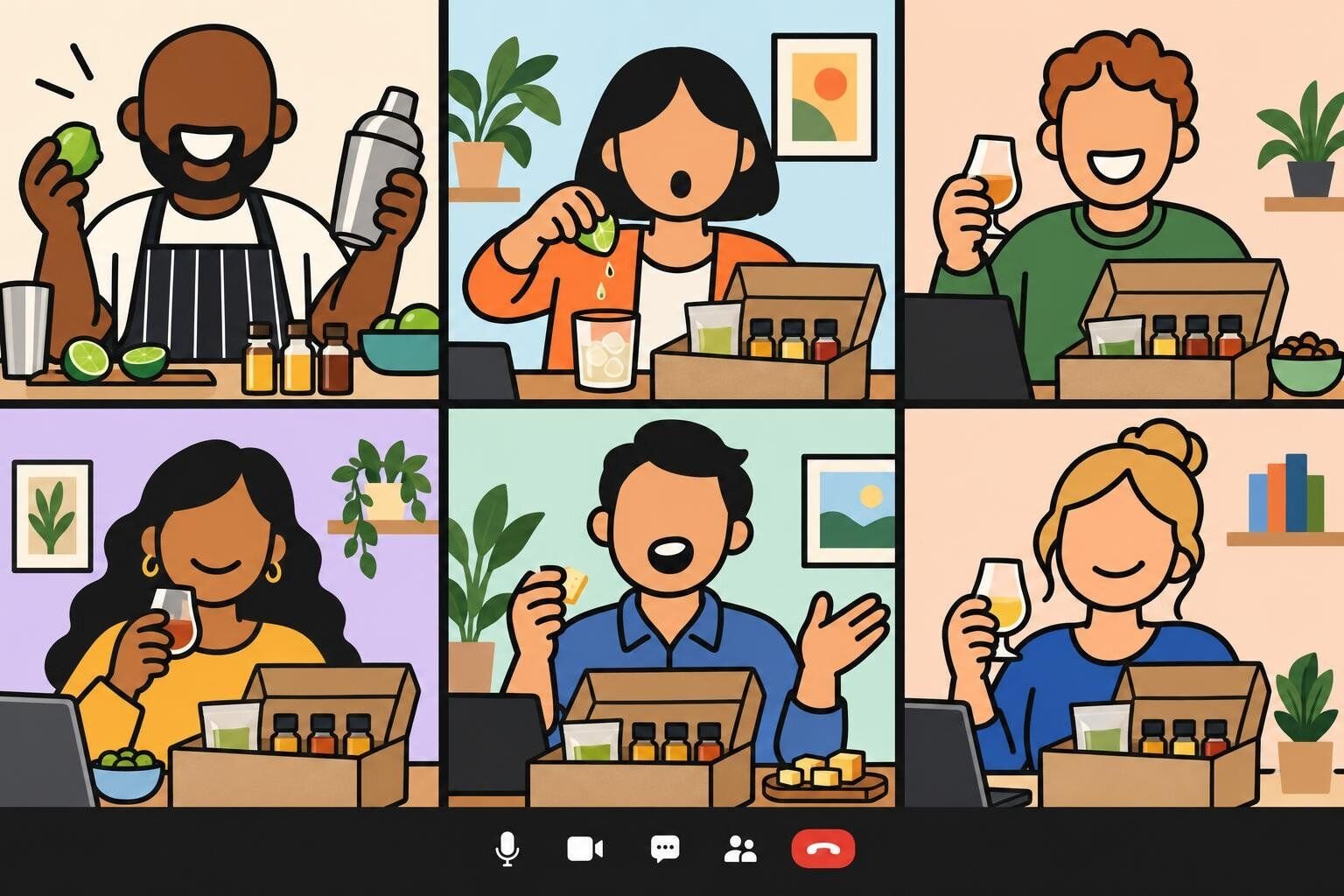
For a hosted version, the Margarita Making Class has the whole team make drinks together and customize them to taste, with shipped kits available:
A storytelling workshop teaches employees how to structure a story, then has them practice on each other in small groups. It is a skill people use in pitches, interviews, and all-hands updates, and it builds connection because everyone shares something personal. Our Virtual Art of Storytelling Workshop is the hosted version.
To run it:
Teach a simple structure: situation, turning point, what changed.
Give a prompt like "a time something went wrong at work and turned out fine."
Practice in breakout rooms of three, with each person telling a two-minute story.
Invite volunteers to share with the full group.
Best for: client-facing and leadership teams of 8 to 40 Time: 90 to 120 minutes Materials (cost): none, or a hosted workshop (free to $$)
15. Paint and Vision Board Workshop
Part art class, part goal-setting session. An instructor leads a simple painting or collage, and each person builds a small vision board for the year ahead. It works well in January or at a fiscal-year kickoff.
To run it:
Ship or list simple supplies: a small canvas or poster board, paints or magazines, glue.
Spend the first half on the art technique.
Spend the second half on the vision board, with one personal and one work goal.
Invite volunteers to show their boards on camera.
Best for: teams of 6 to 30 Time: 75 minutes Materials (cost): art supplies ($)
16. Mindfulness Session
A guided meditation or breathing session led by a trained instructor. It is the rare virtual event that works with cameras off, which makes it a good fit for busy seasons and end-of-quarter crunches.
To run it:
Book a qualified instructor and keep it to 30 minutes.
Make cameras optional and say so in the invite.
Run it at the same time each week or month so it becomes a habit.
Best for: any team, especially in high-stress periods Time: 20 to 30 minutes Materials (cost): instructor fee ($)
Virtual corporate entertainment
Virtual corporate entertainment asks the least of attendees, which makes it a good fit for big audiences and end-of-year gatherings. See our guide to event entertainment for in-person options too.
17. Virtual Magician or Mentalist
Close-up magic translates surprisingly well to video, because the camera puts everyone in the front row. The best virtual magicians build the show around audience participation, using objects people have at their desks.
To run it:
Book a performer with a proven virtual act, and ask for a recording of a virtual show rather than a stage reel.
Send any prep (a deck of cards, a pen and paper) a few days ahead.
Spotlight the performer's video so everyone sees the same view.
Best for: groups of 20 to 500 Time: 30 to 45 minutes Materials (cost): performer fee ($$ to $$$)
18. Virtual Comedy Show
A stand-up comedian or improv troupe performs live, often with a set tailored to your industry. Ask for a clean set and share a few safe company in-jokes in advance, so the show feels made for you.
To run it:
Book a comedian who performs regularly for corporate audiences.
Agree on content guidelines and share a short company briefing.
Ask attendees to keep cameras on, since comedians feed off visible laughter.
Best for: groups of 20 to 1,000 Time: 30 to 45 minutes Materials (cost): performer fee ($$ to $$$)
19. Live Music Request Hour
A musician plays a live set and takes requests from the chat, turning a passive concert into something the audience shapes. Themed sets, like a decade or a "your team's walk-up songs" playlist, add a game to it.
To run it:
Book a musician whose home audio is as good as their voice, and ask for a sample recorded over a video call.
Collect requests in advance and in the chat.
Add a "name that tune" round between songs.
Best for: groups of 15 to 300 Time: 45 minutes Materials (cost): performer fee ($$)
20. Company Game Show
A live host runs a virtual game show with teams, buzzers, and a scoreboard. It works for almost any group size and needs nothing from participants except a laptop.
To run it:
Book a hosted show, or build your own with a slide deck and a scorekeeper.
Split into teams of five to eight.
Include one custom round about your company.
Give the winning team a prize they will brag about.
Best for: groups of 10 to 1,000+ Time: 60 to 90 minutes Materials (cost): hosted show or DIY deck (free to $$)
What we've learned: put the company round in the middle, not at the end. It is the round new hires score worst on, and a team that drops points there needs a round or two to come back.
21. Virtual Keynote Speaker
A virtual keynote speaker anchors a kickoff, conference day, or all-hands with an expert talk. The best ones keep it interactive with polls and live Q&A rather than reading slides.
To run it:
Choose a speaker whose topic matches the year's theme.
Brief them on your company and ask for two or three interactive moments.
Collect questions in advance, and keep 15 minutes for Q&A.
Best for: company kickoffs and conferences, 50+ people Time: 30 to 60 minutes Materials (cost): speaker fee ($$$)
Virtual company parties and celebrations
Virtual company parties mark the end of the year, a big win, a milestone, or a goodbye. For smaller team-level celebrations, our virtual party games fill out the agenda.
22. Company Holiday Party
The virtual holiday party is the biggest virtual corporate event of the year. December is our busiest month for virtual events, with 33% of annual volume. The parties that work combine a hosted game, a short awards or thank-you moment, and an optional gift or snack box.
To run it:
Book in October or early November; December dates fill first.
Keep it to 90 minutes, with leadership's thank-you at the start.
Choose a holiday-themed game everyone can play, regardless of what they celebrate.
Ship snack or gift boxes early enough to arrive before the party.
Best for: any company, 10 to 1,000+ Time: 90 minutes Materials (cost): hosted event, optional boxes ($$)
What we've learned: collect shipping addresses in the same message as the save-the-date. The booking is rarely what runs late; the last 20 addresses are.
23. Virtual Awards Ceremony
An awards show that celebrates real accomplishments, with a few playful categories mixed in. Done virtually, it can include employees from every office and lets families watch from the couch.
To run it:
Collect peer nominations two to three weeks ahead.
Mix serious awards (Customer Hero, Rookie of the Year) with fun ones (Best Zoom Background, Most Likely to Reply at 6 a.m.).
Ask each presenter for a 30-second story about the winner.
Mail physical trophies or certificates so the award outlives the call.
Best for: companies of 20 to 500 Time: 45 to 60 minutes Materials (cost): trophies or certificates ($)
24. Milestone and Send-Off Celebrations
Work anniversaries, birthdays, retirements, and farewells deserve their own moment, even when nobody can bring a cake to a desk. Our guides to virtual work anniversaries, virtual birthday parties, virtual retirement parties, and virtual farewell parties cover each in depth. At company level, what matters is consistency: every milestone gets the same recognition, including the quiet person in accounts who would never ask for it.
To run it:
Keep a shared calendar of anniversaries and birthdays.
Hold a short monthly celebration rather than ad hoc ones.
Ask the honoree's manager to share one specific story.
For retirements and farewells, collect video messages in advance.
Best for: teams of any size Time: 15 to 45 minutes Materials (cost): optional gift or card (free to $)
Virtual events for clients and customers
These formats build client relationships without anyone booking a flight.
25. Virtual Open House
Invite clients, partners, and prospects behind the scenes: short talks from your team, a live product demo, and time in small breakout rooms to meet the people they usually only email.
To run it:
Keep the agenda under an hour, with no single talk over 10 minutes.
Put a team member in every breakout room as host.
Send a follow-up with recordings and a direct contact.
Best for: B2B companies Time: 45 to 60 minutes Materials (cost): none (free)
26. Customer Appreciation Tasting
Ship your best customers a tasting kit and host them for a guided session as a thank-you. It is a natural centerpiece for Customer Appreciation Day, and it gives your account team an hour of goodwill that no sales call can match.
To run it:
Pick a tasting with broad appeal, like chocolate, coffee, or a non-alcoholic flight.
Confirm shipping addresses three weeks ahead.
Keep the business talk to a two-minute thank-you.
Best for: client groups of 10 to 100 Time: 60 minutes Materials (cost): kits and shipping ($$)
27. Virtual Company Tour
Walk clients or new hires through your office, warehouse, kitchen, or lab on a live camera, with the people who work there narrating. It makes a company feel real to people who have only seen its website. For inspiration, see our list of virtual tours.
To run it:
Plan a route with four or five stops and a guide at each.
Test the connection on the route beforehand.
Take questions in the chat and answer them at each stop.
Best for: clients, partners, and new hires Time: 30 to 45 minutes Materials (cost): a phone on a gimbal (free to $)
Virtual events for large companies
Most virtual events are team-sized: the median one we host has 16 participants. A company event is a different animal. We have hosted 448 virtual events with 100 or more people, the largest with over 1,000, and at that scale three things change:
Breakout rooms become the event. Nobody bonds in a 300-person gallery view. Put people in teams of six to eight for the interactive parts and bring everyone together for scores and awards.
You need more hosts. Plan one facilitator for every few breakout rooms, plus a producer handling the tech.
Time zones decide the date. Run two sessions rather than forcing one time on everyone.
This is the sequence we use for every virtual event we host, from a 10-person team to a 1,000-person company party:
Pick one goal. Celebrate, connect, learn, or thank. One goal per event keeps the agenda tight.
Choose the format and length. 88% of the virtual events we run are 60 to 90 minutes long. Longer sessions start to lose attention, so build breaks into anything bigger.
Set the date and time. Thursday is the most popular day for team events, and most start between 2 p.m. and 4 p.m. local time. For global teams, schedule two sessions.
Confirm the platform. Zoom, Microsoft Teams, Google Meet, and Webex all work. Check that breakout rooms and screen sharing are switched on for your account, because some corporate IT settings disable them. Our comparison of virtual meeting platforms covers the differences.
Budget per person. The hosted events ranked below cost about $30 to $109 per person. If you add food, budget another $25 to $35 per employee. Our team building budgets guide has full benchmarks.
Order kits early. Anything shipped needs addresses collected and a buffer for delays, so set the date with the vendor's shipping cutoff in mind.
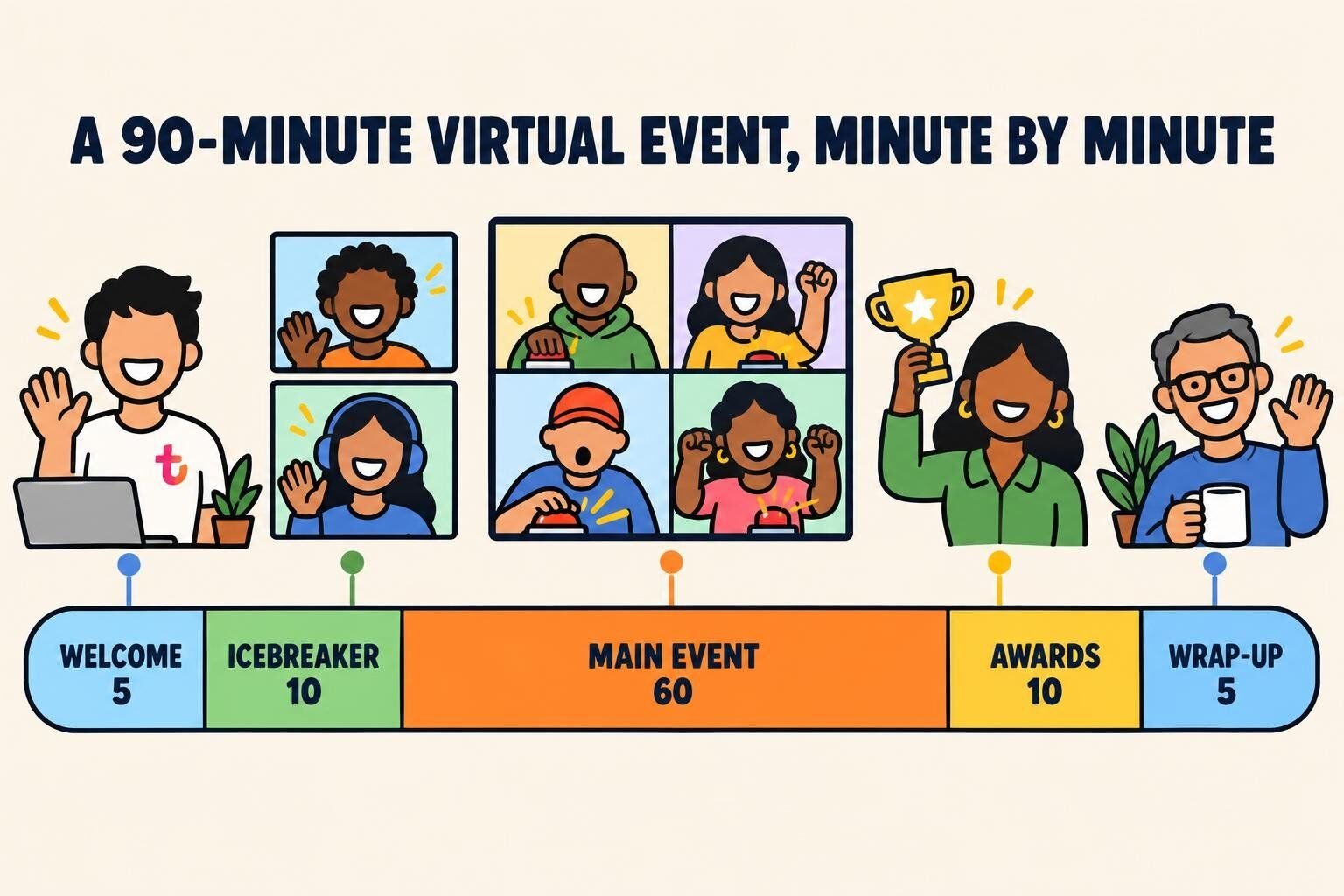
Write a run of show. Welcome, icebreaker, main event, awards, wrap-up. Assign an owner to each block.
Follow up. Send photos, winners, and a two-question survey the same day.
Best virtual corporate events, ranked by Team Building Score
For a company-wide anchor event, a professional host makes the difference: every employee, including the organizer, gets to play. We rank our hosted virtual events with the Team Building Score, points each event earns through confirmed bookings, verified reviews and ratings. The survey columns come from participants' post-event responses, and an event needs at least 30 per question to appear. The current ranking:
Ranked by our Team Building Score — a running points total earned through confirmed bookings, verified reviews, ratings, and listing quality, recalculated nightly. Every event shown also has at least 30 post-event survey responses per question; the happier, connected, and NPS columns are computed from the 5,189+ survey responses collected for the 10 events listed here — a subset of all post-event surveys across our catalog. Updated November 2026.
Hundreds of companies sell virtual events, and quality varies wildly: some send a professional host, others send a slide deck and a stranger. We run one of these companies, so read our row with that in mind. These are the providers we would shortlist:
About $30 to $109 per person for the events ranked above
Hosted virtual games, parties, and classes, with published rankings and survey results
Biased, obviously. What we can point to: events are run by a pool of 75+ professional hosts with performance backgrounds, and we publish our rankings and the survey outcomes behind them.
Live online classes on Zoom from a well-known cooking school. Classes run on a public schedule, so it suits a small team more than a company-wide event.
For large conferences and multi-session virtual events, you may need a production partner rather than an activity provider. Our list of virtual event management companies covers those. Whoever you book, ask two questions: "Who exactly will host our event?" and "What happens if our headcount changes?"
What we've learned from 40,000+ virtual team bookings
A few patterns hold across those bookings:
Virtual events become traditions. When an event works, companies put it on the calendar permanently: 160 have booked with us in five or more separate years.
The host matters more than the theme. A great host rescues an average game, and a flat host sinks a great one. Before you book anyone, ask to watch the person who would run your event.
Plan December in October. Holiday demand compresses into a few weeks, and the Thursday afternoon slots go first.
Some formats look great in a list and fall flat on a video call. This is our Lame List:
Idea
Why it fails
Try instead
Virtual karaoke
Video-call lag means nobody can sing along in time, so one person performs to a silent grid
Live music request hour
Online dance party
Asks people to dance alone in a spare room while coworkers watch
Company game show
Virtual talent show
Three people perform, everyone else watches, and the nervous never sign up
Show-and-tell presentation party
Online movie night
Ninety minutes of the same screen with nobody talking; see our team building movies for a discussion-based alternative
Virtual campfire
Virtual charades
The game needs a whole body and a room, and a webcam crops both
Trivia tournament
Mandatory after-hours events
Competes with family time, and the resentment shows up as cameras off
Hold events on the clock, mid-afternoon
A webinar called a party
One person talks, everyone else is muted, and the chat is the only fun
Breakout teams with a host
Final thoughts
The best virtual corporate events give people a reason to show up and something to do once they are there. Start with one free in-house format this month, book a hosted anchor event for the quarter, and build from there. For more ideas, try our virtual icebreakers, online team building games, and hybrid team building ideas for teams that are part in-office, part remote.
FAQ for Virtual Corporate Events
Short answers from a team that has hosted virtual events for companies since 2020.
What are virtual corporate events?
Virtual corporate events are company-organized gatherings held online, usually on Zoom or Microsoft Teams, for employees, clients, or both. They include all-hands meetings, hosted team building events, workshops and classes, entertainment, holiday parties and other celebrations, and client events like tastings and open houses.
What are some good virtual corporate event ideas?
Free in-house ideas include a virtual campfire, a show-and-tell presentation party, coffee roulette, and a remote pet parade. For bigger moments, companies book hosted game shows, virtual escape rooms, murder mysteries, cooking or tasting classes, and virtual holiday parties. Client-facing ideas include virtual open houses and customer appreciation tastings.
How long should a virtual corporate event be?
Most should run 60 to 90 minutes. 88% of the virtual team building events we run fall in that window. Short formats like coffee roulette or a pet parade can run 20 to 30 minutes, and a virtual retreat can run a half day if you build in a break every hour.
How do you plan a virtual corporate event?
Pick one goal, choose a 60 to 90 minute format, and schedule it mid-afternoon on the clock; Thursday is the most popular day for team events. Confirm the platform supports breakout rooms, order any kits early, write a simple run of show (welcome, icebreaker, main event, awards, wrap-up), and send photos and a short survey the same day.
How much do virtual corporate events cost?
In-house formats like a virtual campfire or coffee roulette are free. The hosted virtual events ranked in this article cost about $30 to $109 per person on teambuilding.com, with kit-based classes at the higher end. If you add food, budget about $25 to $35 per employee on top of the activity.
What virtual events work for large companies?
Hosted game shows with breakout teams, live entertainment, awards ceremonies, and company-wide trivia tournaments scale best. We have hosted 448 virtual events with 100 or more participants, the largest with over 1,000. At that size, put people in teams of six to eight for the interactive parts and add a facilitator for every few breakout rooms.











Comments (0)
Leave a Comment