Team huddle ideas, topics and formats for daily, weekly and virtual huddles, with a 15-minute agenda, five huddle games, the mistakes that quietly kill huddles, and the ideas we would skip.
Published
·
Updated
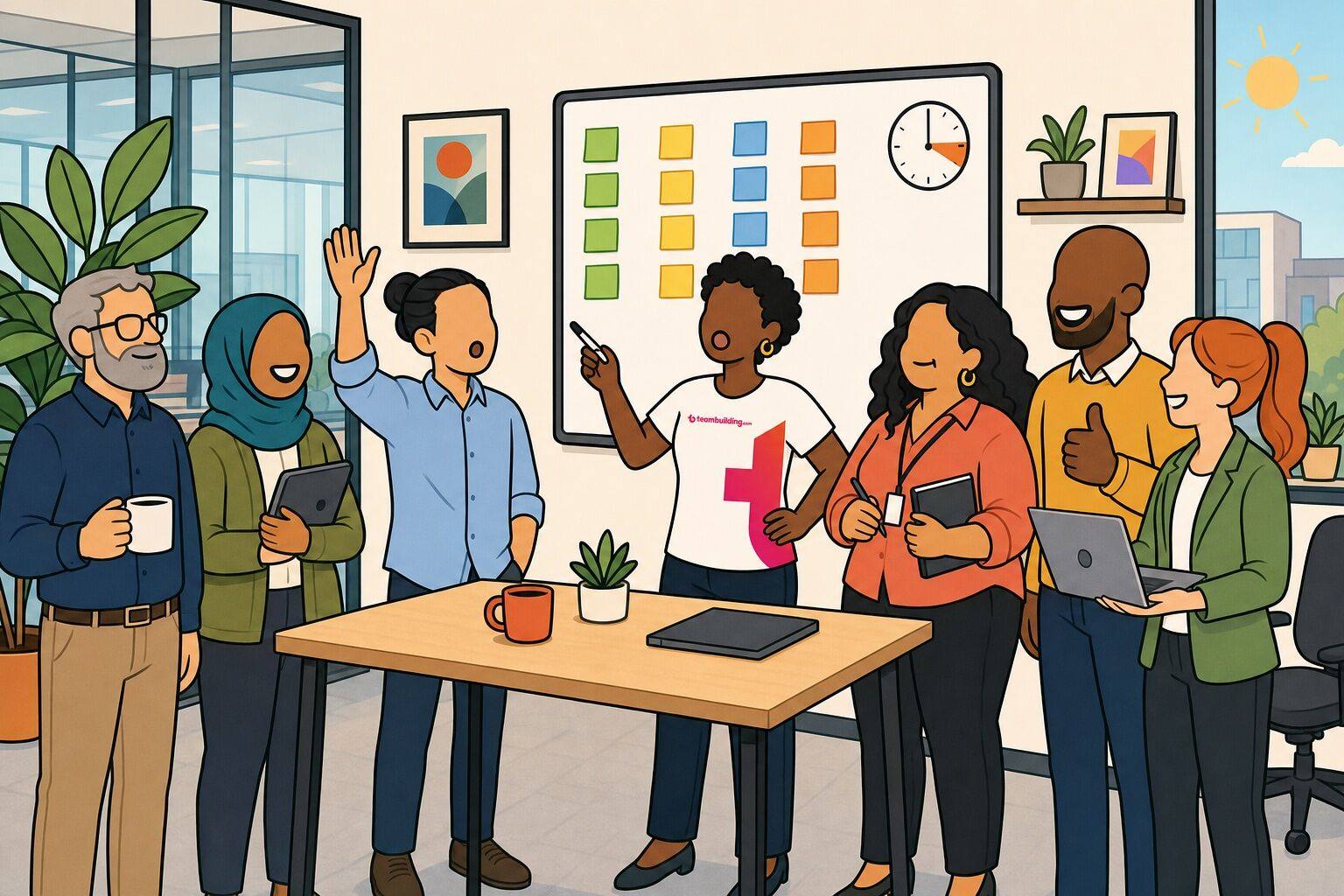
A team huddle is the shortest meeting on the calendar and, on most teams, the one that decides how the day goes. Ten to fifteen minutes, everyone standing or on camera, one round of the room, and then people get back to work with a clearer picture of what matters today and who needs help.
We have run team building for thousands of companies, and our own team works remotely, so our huddles happen on video calls and in Slack threads rather than around a whiteboard. This guide is what we have learned about making that short block worth showing up for: 25 team huddle ideas, topics and formats, grouped by when you would use them, plus a daily huddle agenda, the mistakes that quietly kill huddles, and the ideas we would skip.
Every idea below comes with step-by-step instructions, the group size it suits, how long it takes, and what it costs (almost always nothing).
A team huddle is a short, standing meeting, usually 10 to 15 minutes, where a team checks in on priorities, flags blockers and shares quick wins before getting back to work. The name comes from sports: the huddle is the quick circle a team forms to agree on the next play, not the film session where they analyze the whole game. Most huddles happen daily or weekly at the same time, follow the same simple agenda, and end on schedule whether or not every topic got covered. Team huddles are also called huddle meetings, daily huddles, morning huddles, stand-ups, group huddles, and quick huddles.
The reason huddles exist is that the alternative is worse. Organizational psychologist Steven Rogelberg, in The Surprising Science of Meetings (2019), puts the figure at an estimated 55 million meetings per day in the United States, and earlier work with colleagues noted that by some estimates senior managers attend nearly 23 hours of meetings every week. A huddle is the deliberate answer to that: one short, predictable slot that replaces the ad-hoc "got a minute?" interruptions and the hour-long status meeting nobody wanted.
What separates a huddle from a meeting that happens to be short:
Feature
Team huddle
Team meeting
Length
10 to 15 minutes, hard stop
30 to 60 minutes
Posture
Standing, or cameras on
Seated
Agenda
Same every time
Changes per meeting
Cadence
Daily or weekly, same time
As needed
Purpose
Align on today, surface blockers
Decide, plan, or review
Discussion
Parked for later ("take it offline")
The point of the meeting
Daily huddle format and 15-minute agenda
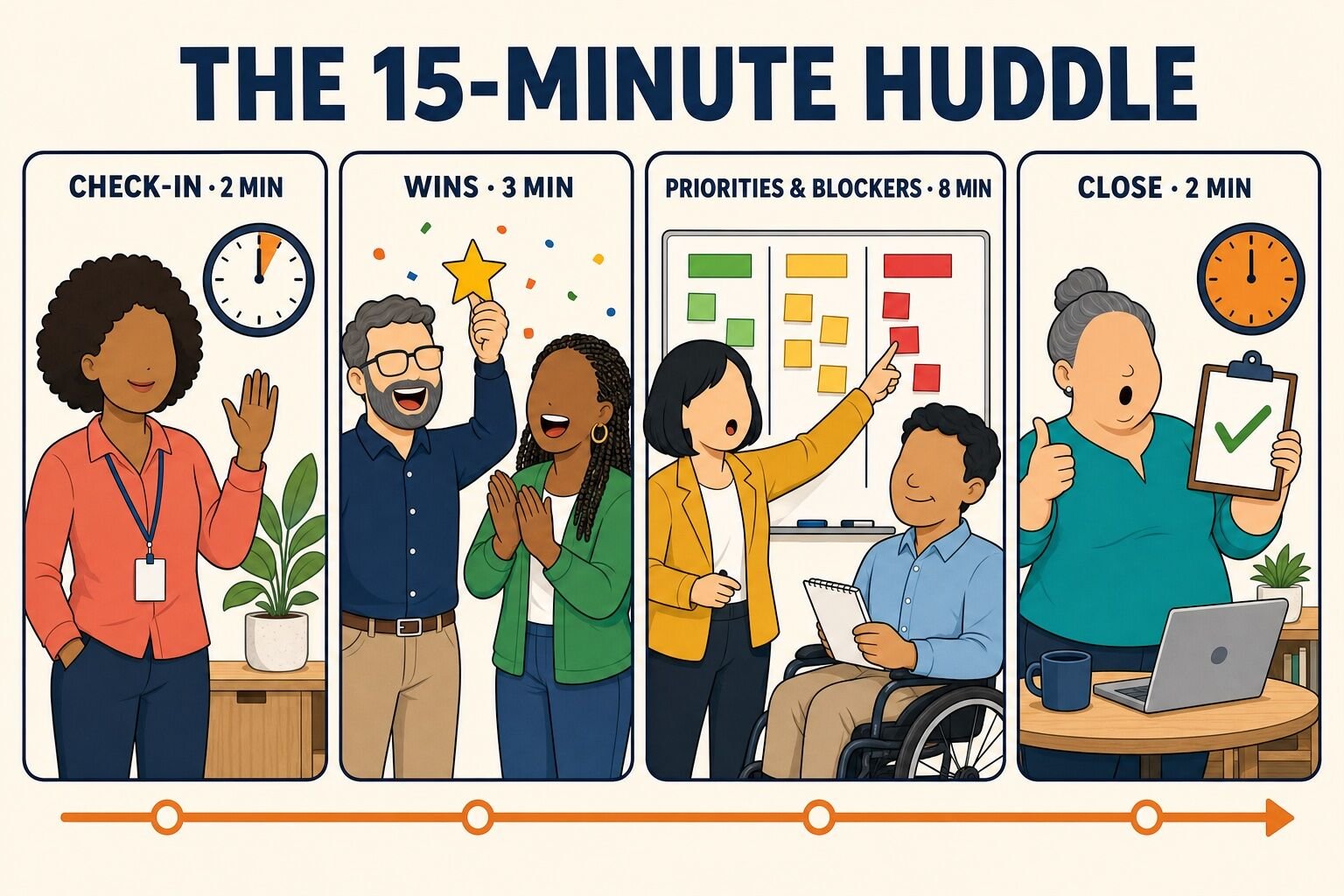
The daily huddle format that works for most teams has four blocks and never runs past 15 minutes. Once the team knows the shape, you can drop any of the ideas in this article into the first or last block without the huddle sprawling.
0:00 to 0:02, check-in. Start on time even if two people are missing. Use a one-word check-in, a color status, or one of the morning huddle ideas below. This is the block where huddle games and icebreakers live, and it is the block that makes people want to come back.
0:02 to 0:05, wins. Anyone with a win from yesterday shares it in one sentence. Recognition first, because it sets the tone for the harder part.
0:05 to 0:13, priorities and blockers. Each person names the one thing they are shipping today and anything in the way. The lead assigns follow-ups but does not solve problems in the huddle. Anything that needs more than 30 seconds gets parked and picked up by the two people who need to talk.
0:13 to 0:15, close. Recap the parked items and who owns them, name the one metric or deadline that matters this week, and end early if you can.
Three rules that keep this working. First, hold the huddle at the same time every day; the value is the rhythm, not any single session. Second, stand up, or keep cameras on, because sitting turns a huddle into a meeting within a week. Third, rotate who runs it. A huddle led by the same manager every day becomes a status report to the boss, while a huddle led by a different teammate each week stays a conversation among peers.
For a weekly huddle, stretch the same four blocks to 20 or 30 minutes and swap "today" for "this week" in the priorities block. The agenda otherwise stays identical.
25 team huddle ideas at a glance
Every idea in this guide, with the block of the agenda it belongs in and what it costs. Almost all of them are free.
Morning huddle ideas are the check-in formats that open the day. The goal of the first two minutes is not information; it is getting every voice into the room once, so that speaking up later in the huddle costs nothing. Each of these takes a minute or two and slots into the check-in block of the 15-minute agenda.
1. One Win Each
One Win Each replaces the generic "how is everyone?" with a prompt people can actually answer. Every teammate shares one win from the last 24 hours, work or otherwise, in a single sentence.
To run it:
Announce the rule the first time: one win, one sentence, no explanations needed.
Go first, and keep yours small on purpose. "I cleared my inbox" gives everyone permission to share ordinary wins.
Go around the circle or the video grid in a fixed order so nobody has to decide when to jump in.
Say "nice" or clap once per win and move on. Do not ask follow-up questions in this block; save them for after the huddle.
Best for: 3 to 15 people Time: 3 minutes Materials (cost): None. Free.
What we have learned: Wins first, problems second. Teams that open with blockers spend the rest of the huddle in a defensive crouch. If the group runs dry, seed the round with a positive morning message and ask people to react to it instead.
2. Top Priority Round
The Top Priority Round is the core of a daily huddle: each person names the single thing they intend to finish today. Not a list, not a status update, one deliverable.
To run it:
Ask each teammate to complete the sentence "By end of day I will have..." out loud.
Write the answers on the huddle board or in the meeting chat so they are visible all day.
If two priorities conflict or depend on each other, flag it and pair the two people up after the huddle. Do not resolve it in the round.
The next morning, start by glancing at yesterday's list. Finished items get a checkmark, unfinished ones get a one-word reason.
Best for: 3 to 12 people Time: 4 minutes Materials (cost): Whiteboard or shared doc. Free.
What we have learned: The check-back the next morning is what makes this work. Without it, priorities are wishes. With it, people pick priorities they can actually hit, which is the point.
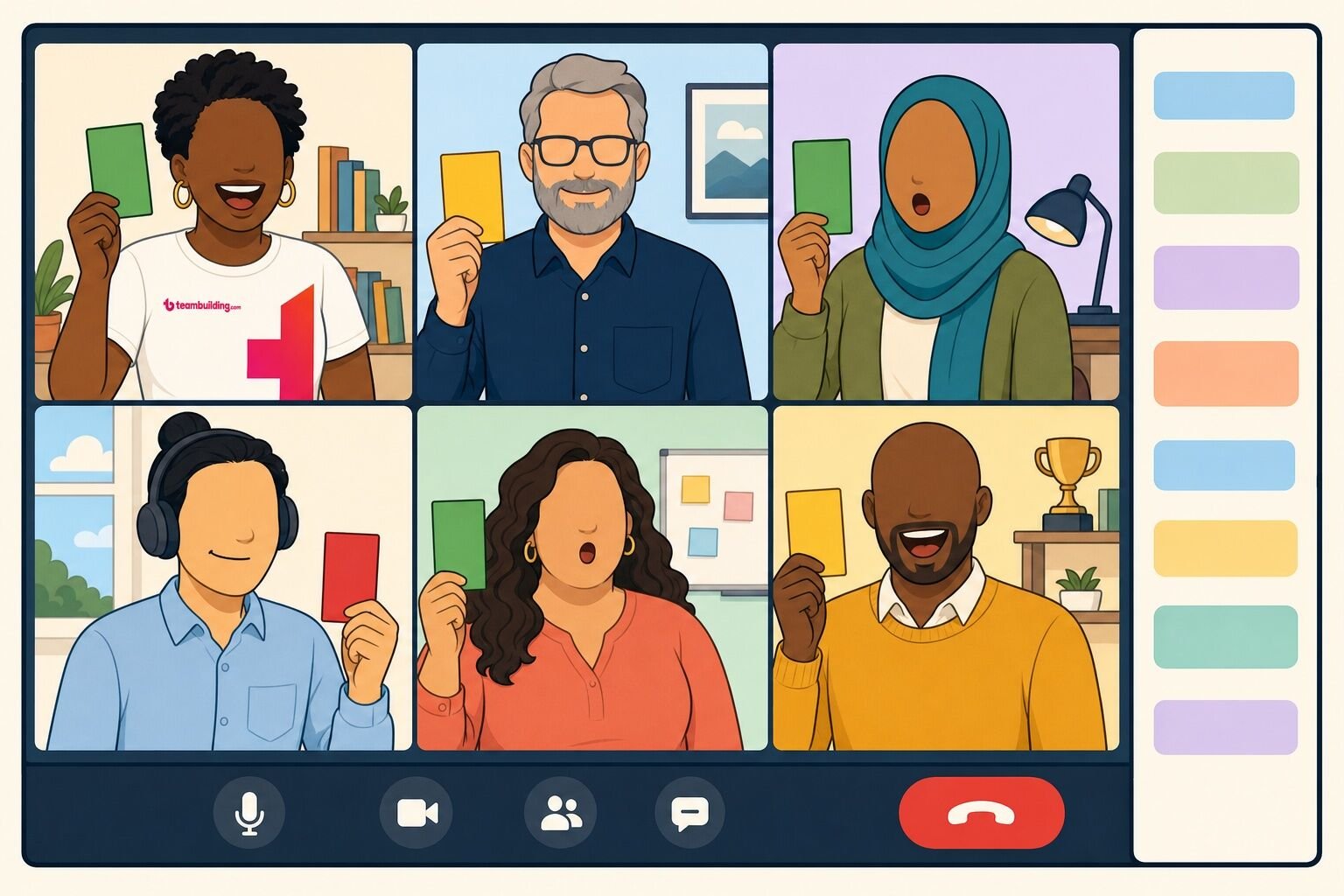
3. Red, Yellow, Green Check-In
The color check-in is the quickest way to find out who needs help without asking anyone to explain themselves in front of the group. Green means on track, yellow means at risk, red means blocked.
To run it:
Each person says their color and, if they want, one phrase of context. "Yellow, waiting on legal" is plenty.
On video calls, people can hold up a colored card or sticky note, or type the color into chat so everyone answers at once.
The lead only follows up on reds, and only to assign who will help, not to fix the problem live.
Track colors over a week. Three yellows in a row from one person is a conversation worth having outside the huddle.
Best for: 3 to 30 people Time: 2 minutes Materials (cost): Optional colored cards. Free.
What we have learned: Let people be red without a story. The moment red requires a justification, everyone is green.
4. One-Word Check-In
The One-Word Check-In is the format we use most on our own calls. Everyone answers a single question with a single word, which gives a fast read on the room's mood and gets quiet people talking before the work part starts.
To run it:
Pick one question. "One word for how you are arriving today" is the default; a fresh prompt from the generator below keeps it from going stale.
Give people ten seconds to think, then go around quickly. No explanations unless someone volunteers one.
Notice the outliers. If most people say "focused" and one person says "underwater," check in with them afterwards.
Best for: 3 to 30 people Time: 2 minutes Materials (cost): None. Free.
What we have learned: Vary the question weekly, not daily. A question that lasts a week lets the team notice how answers shift, which is more interesting than novelty.
5. Two-Minute Reset
A Two-Minute Reset is a short physical break built into the huddle: a stretch, a breathing round, or a walk to the window. It sounds trivial, and it is the idea that tired teams thank you for most.
To run it:
Pick one move for the day: shoulder rolls, a standing forward fold, wrist and finger stretches, or four slow breaths.
Have someone other than the lead call it, and rotate who picks.
Keep it to two minutes on a visible timer. It is a reset, not a class.
On sunny days, move the whole huddle outside or to a window and skip the stretch.
Best for: Any size Time: 2 minutes Materials (cost): None. Free.
What we have learned: Put the reset at the end of the huddle, not the start. As an opener it feels like a delay; as a closer it sends people back to their desks with more energy than they arrived with. More options are in our list of desk exercises.
6. Number of the Day
Number of the Day gives the huddle one shared metric to rally around, which is why it is the backbone of sales huddles, bank branch huddles, and service team huddles. One number, said out loud, every day.
To run it:
Choose a number the whole team can move today: calls booked, tickets closed, accounts opened, orders shipped. Not revenue for the quarter.
Post yesterday's number and today's target where everyone can see them.
Ask one person to say what they will do differently today to move it. Rotate who answers.
Celebrate when the number is hit with a quick round of applause or a small ritual, like ringing a bell.
Best for: 3 to 20 people Time: 3 minutes Materials (cost): Whiteboard or dashboard. Free.
What we have learned: Swap the number every quarter. The same metric for a year stops being a rallying point and becomes wallpaper.
Huddle topics for work
Huddle topics for work are the middle-of-the-agenda formats: project updates, blockers, recognition, and the operational topics that specific teams need every day. A good huddle rotates through two or three of these across the week rather than covering all of them daily.
7. Project Update Round
The Project Update Round keeps everyone informed about progress without turning the huddle into a status meeting. The trick is a strict format: each person gives a headline, not a report.
To run it:
Set the format up front: "Done since yesterday, doing today, anything in the way." Three phrases, thirty seconds.
Go in a fixed order so nobody is choosing when to speak.
Park anything that needs discussion. Say "let's take that after" and write it on the board so the person knows it will be picked up.
Close with the parked list and who owns each item.
Best for: 3 to 10 people Time: 5 to 8 minutes Materials (cost): Whiteboard or shared doc. Free.
What we have learned: Above ten people, this format collapses; by the time the eighth person speaks nobody remembers the first update. Split into two huddles, or switch to the written async huddle thread and use the live time for the other ideas on this list.
8. Blockers and Asks
Blockers and Asks is the problem-solving block, and the rule that makes it work is that the huddle identifies problems but does not solve them. Anyone can raise a blocker or make an ask; the group's only job is to match the ask with a person.
To run it:
Ask "Who is stuck, and what would unstick you?" Each answer is one sentence naming the blocker and one naming the help needed.
The lead asks "Who can take that?" and waits. Volunteers beat assignments.
Write the pair and the blocker on the board. The two of them talk right after the huddle.
If nobody has a blocker for three days running, ask a different question: "What is the riskiest thing on your plate this week?"
Best for: 3 to 12 people Time: 5 minutes Materials (cost): None. Free.
What we have learned: The huddle that solves one blocker live sets a precedent and runs 40 minutes the next day. For a team that wants to practice the skill itself, run one of these problem solving games in a proper meeting slot instead.
9. Shout-Out Round
The Shout-Out Round is peer recognition in its simplest form: teammates thank teammates, by name, for something specific from the last day or week.
To run it:
Open the floor with "Who has a shout-out?" rather than going around; forced praise reads as forced.
Ask for specifics. "Thanks to Priya for staying on the client call after I dropped" beats "Priya is great."
Let the person receiving it just say thanks. No deflecting, no "it was nothing."
Keep a running list somewhere visible; it becomes a nice record at review time.
Best for: 3 to 30 people Time: 3 minutes Materials (cost): None. Free.
What we have learned: Managers should give shout-outs last, not first, or the round becomes a performance for the boss. Teams that want to formalize this can look at employee recognition programs, but the two-minute version costs nothing and starts tomorrow.
10. Client Voice
Client Voice puts one real piece of customer feedback in front of the team every day, good or bad, so the people doing the work hear the people they are doing it for.
To run it:
Rotate who brings the feedback: a support ticket, a review, a survey comment, or a line from a sales call.
Read it verbatim. Do not summarize or soften it.
Ask one question: "What is one thing we could do this week because of this?" Take one or two answers.
If it is praise, name the teammates who earned it. If it is a complaint, assign one owner to follow up.
Best for: 3 to 20 people Time: 3 minutes Materials (cost): None. Free.
What we have learned: Every event we run ends with a participant survey, and reading real comments aloud at our own huddles changed how our hosts talk about their work far more than any dashboard did. Verbatim beats summarized, every time.
11. Safety Minute
The Safety Minute is a fixed 60 to 120 seconds at the top of the huddle for teams in warehouses, labs, clinics, kitchens, construction sites, and anywhere else where one distracted afternoon can hurt someone.
To run it:
Cover one topic per day: a recent near miss, a seasonal hazard, a piece of equipment, or a single rule worth repeating.
Rotate the presenter so every team member leads a safety minute over the course of a month.
End by asking "Anything anyone saw this week that worried them?" and thank whoever speaks up, even if it was minor.
Once a month, replace the talk with a short activity from our list of workplace safety games.
Best for: Any size Time: 2 minutes Materials (cost): None. Free.
12. Two-Minute Teach
Two-Minute Teach is a skill swap compressed to huddle length. One teammate teaches one small thing: a keyboard shortcut, a template, a phrase that works with difficult customers, a faster way to do a task the whole team does.
To run it:
Schedule it once or twice a week and post the rota so people can prepare.
Cap the teach at two minutes and one takeaway. If it needs slides, it is not a huddle topic.
Ask the teacher to demo rather than describe, on a shared screen or the whiteboard.
Keep a running "things we learned" doc so the tips outlive the huddle.
Best for: 3 to 20 people Time: 3 minutes Materials (cost): None. Free.
What we have learned: The best teaches come from the newest people, who still notice the things veterans do on autopilot. Put new hires on the rota in their second week.
13. Show and Tell Demo
The Show and Tell Demo gives one person the floor for five minutes to show something they are working on, finished or not. It is the huddle version of the walk past someone's desk that remote teams lost.
To run it:
Schedule one demo per huddle, no more than twice a week, and book the presenter a day ahead.
Work in progress is the point. Ask for the messy version, not the polished one.
Allow two questions from the group, then move on. Longer feedback goes to the presenter afterwards.
Rotate deliberately so the quiet people demo as often as the loud ones.
Best for: 3 to 20 people Time: 5 minutes Materials (cost): Screen share or laptop. Free.
What we have learned: A demo changes the energy of a huddle more than any other topic on this list, because it is the one block where someone shows rather than reports.
Huddle games and icebreakers
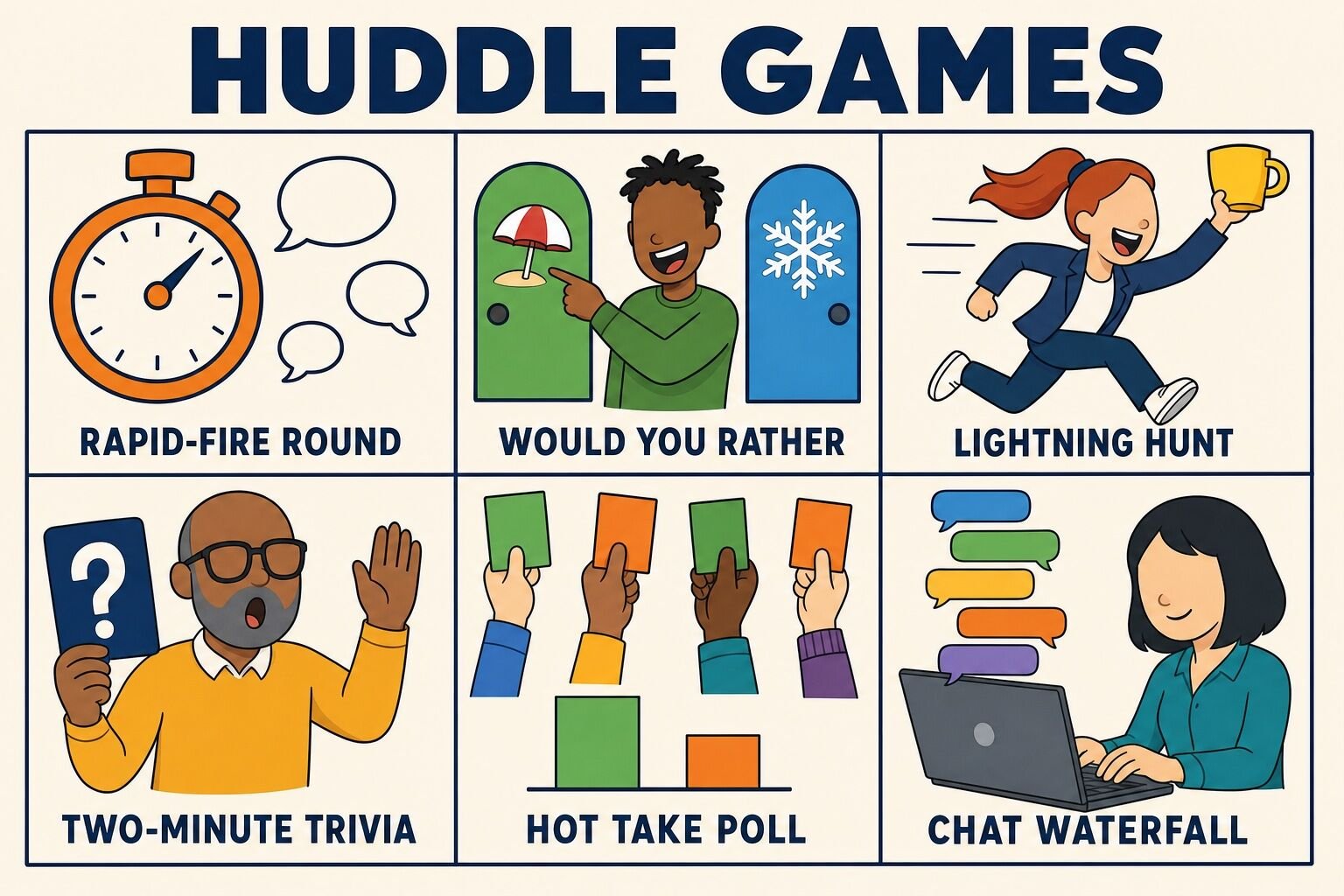
Huddle games and icebreakers are the two-to-five-minute formats that make a morning huddle something people show up for rather than dial into. The constraint is the clock: a huddle game has to be explained in one sentence, played by everyone at once, and finished before the priorities block. These five come from formats our hosts run in real events, trimmed to huddle length. For a longer bench, the morning meeting games guide linked in the definition above has dozens more.
14. Rapid-Fire Round
The Rapid-Fire Round is a one-question icebreaker on a timer. The lead asks a light question and every person answers in three seconds or less, so a team of twelve is done in under a minute.
To run it:
Pick a question with a one-word answer: "Coffee or tea?", "Best snack in the office?", "One app you could not work without?"
Set a visible order and say "go." Anyone who hesitates longer than three seconds gets a friendly "pass" and comes back at the end.
Run two questions on a good day, never more than three.
Let a different person pick tomorrow's question. Our list of rapid fire questions is a good bank.
Best for: 4 to 20 people Time: 3 minutes Materials (cost): None. Free.
What we have learned: Speed is the fun. The moment someone is allowed to explain their answer, it turns into a discussion and the huddle runs long.
15. Would You Rather Vote
Would You Rather Vote turns a classic party question into a huddle-length poll. One question, two options, everyone votes at once, and the minority has to defend itself in one sentence.
To run it:
Read the question: "Would you rather have a four-day week or work from anywhere?"
Everyone votes at the same time by raising a hand, stepping left or right, or reacting in the meeting chat.
Ask one person from the smaller side to make the case in a sentence. Applaud, and move on.
Keep it work-safe. Nothing about money, health or family. Our would you rather questions are sorted by setting.
Best for: 4 to 50 people Time: 3 minutes Materials (cost): None. Free.
What we have learned: The close votes are the good ones. If a question splits 12 to 1, swap it out; a 7 to 6 split gets people arguing happily for the rest of the morning.
16. Lightning Scavenger Hunt
The Lightning Scavenger Hunt is a format from our hosted events, cut to one round for huddles. The lead names an object, everyone races to find one within reach and hold it up, and the first back wins the round.
To run it:
Announce one item: "Something blue," "the oldest thing on your desk," "something you have had since school."
Count down from ten. Everyone hunts, in the office or at home, and holds the item up to the group or the camera.
Give the winner a two-second victory lap, then ask one or two people to explain their object if it is interesting.
One round is a huddle. Three rounds is a meeting; save that for a proper session using our lightning scavenger hunt prompts.
Best for: 4 to 100+ people Time: 3 to 5 minutes Materials (cost): Whatever is on people's desks. Free.
What we have learned: This is the one huddle game that scales to a hundred people without changing, because everyone hunts at once. It also gets remote teammates out of their chairs, which nothing else on a video call does.
17. Two-Minute Trivia
Two-Minute Trivia is a single trivia question, answered by the whole team, with a running scoreboard across the week. It adds a thread of friendly competition to a daily huddle without eating the agenda.
To run it:
Ask one question per day. Mix general knowledge with company trivia: "What year did we open the Denver office?"
Everyone writes an answer on a sticky note or in the chat before anyone says it aloud, so the fast talkers do not win by default.
Reveal the answer, award a point to everyone who got it, and keep the tally on the huddle board.
Crown a weekly champion on Friday. The prize is choosing next week's category. Pull questions from our trivia questions bank.
Best for: 4 to 50 people Time: 3 minutes Materials (cost): Sticky notes or chat. Free.
18. Hot Take Poll
The Hot Take Poll asks the team to vote on a deliberately low-stakes opinion, then hears from both sides. It is the fastest way we know to learn something surprising about a coworker.
To run it:
Post one opinion: "Pineapple belongs on pizza," "Mornings are better than evenings," "Reply-all should be banned."
Everyone votes agree or disagree at the same time, with hands or in chat.
One volunteer from each side gets thirty seconds. No rebuttals.
Keep the topics inconsequential; the point is hearing how people think, not settling anything. Our this or that questions make good polls.
Best for: 4 to 50 people Time: 3 minutes Materials (cost): None. Free.
What we have learned: Stay away from anything real. A hot take about the roadmap is a meeting in disguise, and a hot take about politics is a mistake.
Virtual team huddle ideas
Virtual team huddle ideas are formats built for the video call rather than adapted to it. Everything above works on a call, but these four use the tools that only exist online: the chat box, reactions, backgrounds and the option to not meet live at all. If your whole team is remote, the virtual team huddles guide linked in the definition above goes deeper on cadence and tools.
19. Chat Waterfall
Chat Waterfall is our go-to opener for big virtual calls, and it works just as well for a huddle of eight. Everyone types an answer to one question but nobody hits enter until the count of three, so the chat fills with every answer at once.
To run it:
Ask one question and say "type your answer, but do not send it yet."
Give ten seconds, then count down "three, two, one, send."
Read three or four answers aloud, picking the funny and the unexpected. Ask one person to say more if their answer deserves it.
Good questions: "What is on your desk right now that should not be?", "One word for this week so far," "Best thing you ate this weekend."
Best for: 5 to 200+ people Time: 2 minutes Materials (cost): Meeting chat. Free.
What we have learned: The waterfall works because nobody has to go first. On calls where a spoken round gets three volunteers, the waterfall gets everyone.
20. Emoji Weather Report
The Emoji Weather Report is the virtual version of the color check-in. Each person posts one emoji that describes their day like a forecast, from sunshine to thunderstorm, and the lead scans the chat for anyone who needs a follow-up.
To run it:
Set the scale once: sun for great, partly cloudy for fine, rain for rough, storm for "please check on me later."
Everyone posts at the same time in chat, or uses the reaction button on the lead's message.
Skip the spoken round entirely; the lead just says "a lot of sun today, two clouds, I will follow up" and moves on.
Once a week, ask people to add a second emoji for what they are looking forward to.
Best for: 3 to 50 people Time: 2 minutes Materials (cost): Meeting chat or Slack. Free.
21. Background Story
Background Story asks one teammate per huddle to set a virtual background that means something to them and spend sixty seconds explaining it. It is a small ritual that gets remote teams past small talk fast.
To run it:
Post a rota so people know when their turn is coming.
The presenter picks a photo: a hometown, a hobby, a place they want to visit, a pet, a first job.
Sixty seconds of explanation, then two quick questions from the group.
Keep a shared album of the backgrounds; new hires love scrolling it.
Best for: 3 to 15 people Time: 3 minutes Materials (cost): Video call with virtual backgrounds. Free.
What we have learned: Ask for a place or a thing rather than "something about you." Concrete prompts get better stories than open ones, and nobody freezes.
22. Async Huddle Thread
The Async Huddle Thread is a huddle without a call, for teams spread across time zones or days when a live meeting is not worth the interruption. Each person posts the same three lines in a Slack or Teams thread by an agreed time.
To run it:
Post the thread starter at the same time every day with the three prompts: "Yesterday, today, blockers." A bot can do this.
Everyone replies in the thread by a set time, in their own timezone. Three lines, no essays.
The lead reads the thread and replies only where a blocker needs a pairing.
Twice a week, add a fourth line for a bit of fun, or run one of these Slack games in the same thread.
Best for: Any size Time: 5 minutes per person Materials (cost): Slack or Teams. Free.
What we have learned: Do not make async the only huddle. Teams that never meet live lose the wins and the shout-outs, which is the part that makes the blockers bearable. Our own pattern is a written thread most days and a short live call twice a week.
Weekly, sales and leadership huddle ideas
Weekly huddle ideas run longer, usually 20 to 30 minutes, and they suit the topics a daily huddle is too short for: goals, culture and feedback. The same formats work for sales huddles, where the number of the day becomes the number of the week, and for leadership huddles, where the group is managers rather than one team.
23. Weekly Goal Setting
Weekly Goal Setting gives each person one measurable goal for the week, set in the Monday huddle and checked in the Friday one. It is the weekly version of the top priority round, and it is the block sales teams tend to build their whole huddle around.
To run it:
On Monday, each person states one goal that is specific, measurable and finishable by Friday. "Ship the pricing page" counts; "work on pricing" does not.
Write the goals on the huddle board with a name next to each.
On Friday, go down the list: hit, missed, or moved. One sentence each. Missed goals get a reason, not a lecture.
Once a month, replace the goals round with a longer session from our list of goal setting activities.
Best for: 3 to 12 people Time: 10 minutes Materials (cost): Whiteboard or shared doc. Free.
What we have learned: The public Friday check-back does more for follow-through than any tracking tool, because people set goals they are willing to be asked about.
24. Values Spotlight
The Values Spotlight takes one company value per week and makes it concrete: a story of someone living it, a discussion of where the team fell short, or a small challenge to practice it. It is the single best topic for a leadership huddle, because managers are the people who carry values into every other huddle in the company.
To run it:
Pick one value for the week and post it on Monday.
Ask for one story where a teammate demonstrated it. Name the person.
Ask one harder question: "Where did we not live this last week?" Take one honest answer and thank the person for it.
Set a small challenge for the week that puts the value into practice, and report back in the next huddle.
Best for: 3 to 30 people Time: 5 minutes Materials (cost): None. Free.
What we have learned: This works only if the values are real. If nobody can name a story for a value two weeks running, that is useful information about the value, not the team. Here is how to write company core values people can actually use.
25. Start, Stop, Continue
Start, Stop, Continue is a ten-minute retrospective that fits inside a weekly huddle. The team names one thing to start doing, one to stop, and one to keep, and commits to it for the following week.
To run it:
Give everyone two minutes to write one idea per column on sticky notes, or in a shared doc if remote.
Read the notes aloud by column. Cluster the duplicates; the clusters are your answer.
Pick exactly one item per column to commit to. More than one and nothing changes.
Post the three commitments where the daily huddle can see them, and review them at the next weekly huddle before running a new round.
Best for: 3 to 12 people Time: 10 minutes Materials (cost): Sticky notes or a shared doc. Free.
What we have learned: Start with "continue." Teams that open with "stop" spend the whole ten minutes complaining. For more ways to gather honest input, see our guide to employee feedback.
Team huddle mistakes to avoid
Most huddles do not fail because of the ideas in them. They fail because of a handful of structural mistakes that creep in over a few weeks. These are the ones we see most, and the fix for each.
Mistake
What happens
Fix
Solving problems in the huddle
One blocker eats twelve minutes while ten people watch two people talk
Match the blocker to a helper and take it offline, every time
Sitting down
A 15-minute huddle becomes a 40-minute meeting within a month
Stand, or cameras on and no screen share except for demos
Same leader every day
The huddle turns into a status report to the boss
Rotate the facilitator weekly
Waiting for stragglers
Starting late trains the team to arrive late
Start at the scheduled minute with whoever is there
Reading a dashboard aloud
People can read; they stop listening
Post numbers before the huddle and use the time on what to do about them
No fun block, ever
Attendance quietly drops and the huddle feels like a checkpoint
Two minutes of a huddle game, two or three days a week
A fun block that runs long
The huddle is now a party and the priorities block gets cut
Timer on screen, one round only
Huddling when there is nothing to say
The team learns the huddle is optional
Cancel proactively on light days, or switch to the async thread
What we have learned about team huddles
We run a remote company, we host team events for a living, and we have sat through a lot of other people's huddles as guests. Here is what holds up.
Recognition is the highest-leverage two minutes in the agenda. Teams tend to cut the wins and shout-out blocks first when time is short, and they are the blocks that make the rest of the huddle worth attending. The research backs this up in a striking way: in a field experiment published in the Journal of Personality and Social Psychology, Adam Grant and Francesca Gino (2010) found that university fundraisers who received an in-person thank-you from a director made about 50% more voluntary calls the following week (41.4 to 62.6 on average) while a control group stayed flat, an effect explained by feeling socially valued. A thank-you in front of the team costs nothing and takes ten seconds.
The check-in is not optional. Every huddle format that has survived on our own team opens with everyone saying something, even one word. The first sentence is the expensive one; once people have spoken, raising a blocker later costs nothing.
Rhythm beats content. A mediocre huddle at 9:15 every day beats a brilliant huddle whenever the manager remembers. The team plans around the slot, and the slot does most of the work.
Games belong in huddles, in small doses. The formats in the games section are all trimmed from activities our hosts run in longer events. The trim matters: one round, one question, one winner, then the agenda. A team that wants more play than that should book a proper slot for it, for example one of these 15-minute team building activities.
Big huddles are a different animal. Past about ten people, spoken rounds stop working and the huddle has to shift to parallel formats: chat waterfalls, cards, polls, and written threads. Here is how the same huddle changes as the team grows.
What changes
Small huddle (under 10)
Large huddle (10 to 30+)
Check-in
Spoken round, one word or one sentence each
Everyone at once: colors, emoji, or a chat waterfall
Updates
Every person gives a headline
Only exceptions speak; the rest goes in a written thread
Blockers
Raised and paired live
Raised in chat, paired by the lead afterwards
Recognition
Open floor for shout-outs
Two or three pre-collected shout-outs read by the lead
An earlier version of this page listed 18 ideas, and several are gone. Some were padding, and a few were actively bad advice for a 15-minute meeting. Here is what we cut and what we would tell you to skip.
The Lame List
Activity
Why skip it
Verdict
Product reviews
We had this on the old list. Reading software reviews as a group is not a huddle topic; it is a procurement task for one person.
Cut from our list
Human Knot, Desert Island and other "team challenges"
These need 20 to 30 minutes and a debrief to be worth doing. Crammed into a huddle they are a tangle of arms and a missed priorities block.
Book a real slot
Spontaneous dance break
Our old list suggested it. In practice one person dances, eleven people check their phones, and the video-call version is worse.
Cut from our list
Full creative brainstorm
Good brainstorming needs quiet thinking time and a facilitator. A five-minute huddle brainstorm produces the first idea from the loudest person.
Needs a workshop
Open feedback round
"Any feedback for each other?" in front of the whole team, unstructured, is either silent or a public performance review. Start, Stop, Continue gives feedback a safe shape.
Add structure
Surprise hot-seat questions
Putting one person on the spot with a personal question is the opposite of the low-stakes check-in a huddle needs. Everyone answers or nobody does.
A fine icebreaker for a new group once. As a recurring huddle game it is slow, because every person needs a turn and every turn needs a guess.
Usually skip
Motivational quote of the day, read by the manager
A quote nobody chose, read to people who did not ask for it, is the fastest way to make a huddle feel like a school assembly. If you use one, let the team react to it instead.
Rethink it
The 30-slide weekly huddle
If it has a deck, it is a meeting. Post the slides beforehand and use the huddle for questions.
Not a huddle
Final thoughts
A good team huddle is boring in the best way: same time, same shape, done in fifteen minutes, every day. The ideas on this list are there to keep the two minutes at the top interesting and the ten minutes in the middle honest, not to turn the huddle into an event. Pick one check-in format and one game, run them for a month before you change anything, and rotate who leads. The rhythm will do the rest.
Answers to the questions managers ask us most about running team huddles.
What is a team huddle?
A team huddle is a short, standing meeting, usually 10 to 15 minutes, where a team checks in on the day's priorities, flags blockers and shares quick wins before getting back to work. It runs at the same time every day or week, follows the same simple agenda, and ends on schedule. The name comes from the quick circle a sports team forms to agree on the next play. Team huddles are also called huddle meetings, daily huddles, morning huddles and stand-ups.
How long should a team huddle be?
Ten to fifteen minutes for a daily huddle, and 20 to 30 minutes for a weekly one. The length only holds if the huddle has a hard stop and a rule that problems get identified in the huddle but solved afterwards by the people involved. Standing up, or keeping cameras on with no screen share, is the simplest way to keep a huddle from drifting into a 40-minute meeting.
What should a daily huddle agenda include?
Four blocks: a two-minute check-in where everyone says something, three minutes of wins from the previous day, about eight minutes of priorities and blockers where each person names the one thing they will finish today and anything in the way, and a two-minute close that recaps parked items and who owns them. Keep the shape identical every day and rotate who runs it.
What are good team huddle topics?
Rotate through a small set across the week rather than covering everything daily: a project update round, blockers and asks, a peer shout-out round, one piece of verbatim client feedback, a safety minute for frontline teams, a two-minute teach, and a short show-and-tell demo of work in progress. Weekly huddles add goal setting, a values spotlight and a start-stop-continue retro.
How do you make a morning huddle fun?
Give the first two minutes a game and keep it to one round: a rapid-fire question everyone answers in three seconds, a would-you-rather vote, a single lightning scavenger hunt item, one trivia question with a weekly scoreboard, or a hot take poll on something inconsequential. Everyone plays at once, nobody is put on the spot, and the agenda starts on time.
How do you run a virtual team huddle?
Use the tools that only exist on a call. Open with a chat waterfall, where everyone types an answer and sends it on a count of three, or an emoji weather report in place of a spoken round. Keep cameras on, share a screen only for demos, and for teams across time zones replace some live huddles with a written thread where each person posts yesterday, today and blockers by an agreed time.

Comments (0)
Leave a Comment